Good morning everyone.
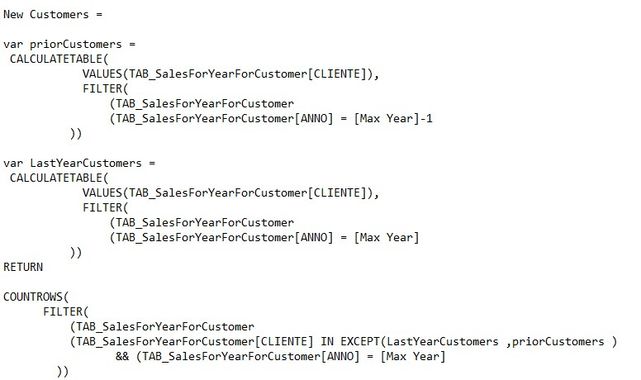
I would need to show both the number of new customers and their sales through two cards.
Given that the criterion by which it is determined that a customer is new is the following:
If in the previous year (e.g. 2021) he has not bought anything and instead in the current year (e.g. 2022) he bought something, then it is a new customer!
The calculation must also be sensitive to the chosen month (because I would like to be able to make an analysis, for example, limiting it to only until 31 August of this year and therefore the customers considered new will be those who in ALL 2021 had not bought anything, but who instead, on 31 August of the last year, 2022, instead bought something.
I would like to give the user the possibility to choose, through two filters, both the years and the months:
The minor year (e.g. 2021) will always be considered ALL for the measures of the calculation of the number of customers and their sales, while the higher one (eg: 2022), will be considered only up to the month chosen by the user.
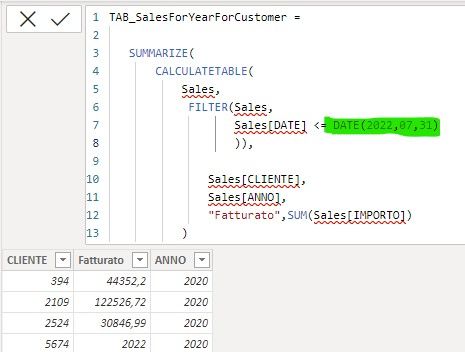
My idea was to create a calculated table, to be used later in my measures, where I already summarize the sales per year per customer. Within this summarize I then wanted to put a filter for the date (ex: min of 07/31/2022), but I do not accept the measures! so it works..but with the date written in a "hardcoded" way ..
See attached files for details
if i can't use a measure in the Calculatedtable, how can i pass the date chosen by the user through the filters dynamically?
Thanks in advance very much
ps: the errors in the code you see (underlining) are there because I renamed the tables in such a way that the names could be understood ...