Hi everyone,
I am working through an issue trying to create a running total based upon a String value in my dimension. I have a fact table with user records and a AgeSK value that links to a dimension table. The running total I am attempting to build would give me counts based upon the current period in the dimension, and any records in later periods. The basic data sets look as follows:
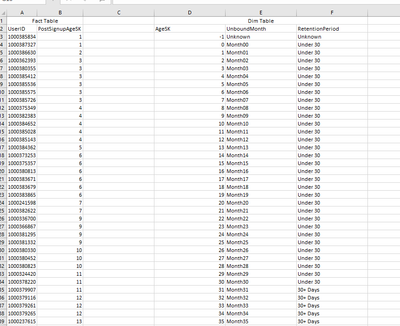
In a previous iteration of this, where I was predetermining the months, I was able to get away with a calculation that utilized the UnboundMonth string value because I created the values with a leading zero so that they would still order properly. The calculation essentially looked like this (note in that previous iteration the PostSignupAgeSK was stored as a month count, in the above its stored as a day count):
TotPostSignupAgeMthRollingQualifiedUsers:=
VAR CurrentMonthNum = SELECTEDVALUE(Dim Table[UnboundMonth])
RETURN
CALCULATE(
[TotQualifiedUsers],
Dim Table[UnboundMonth] >= CurrentMonthNum,
ALL(Dim Table[UnboundMonth])
)
This formula won't work for the RetentionPeriod because the string data will not order appropriately to roll the data up sequentially. What I essentially think needs to happen is I need to bring the AgeSK in to scope to order appropriately, but work from the RetentionPeriod value so that when I visualize the data, that is the label value present. I found several solutions for doing this when the data points are all in the fact table, I just am unable to properly implement them when using a dimension. Any and all help would be appreciated.
Thank you


