Join us at FabCon Atlanta from March 16 - 20, 2026, for the ultimate Fabric, Power BI, AI and SQL community-led event. Save $200 with code FABCOMM.
Register now!The Power BI Data Visualization World Championships is back! Get ahead of the game and start preparing now! Learn more
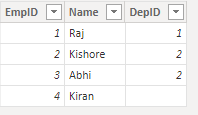
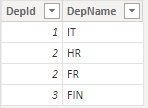
How to get the result as below.
EMP_table
Department_table
Result Table
| EmpId | Name | DepName |
| 1 | Raj | IT |
| 2 | Kishor | HR |
| 2 | Abhi | FR |
| 4 | Kiran | No Department |
May be I'm missing the result in this example.
Solved! Go to Solution.
Hi @DeoYadav,
I use selectedcolumns() to do this.
Result Table =
SELECTCOLUMNS (
'EMP_table',
"empid", [new EmpID],
"name", [Name],
"DepName",
IF (
ISBLANK ( RELATED ( Department_table[DepName] ) ),
"No Department",
RELATED ( Department_table[DepName] )
)
)
Result:
Pbix in the end you can refer.
Best Regards
Community Support Team _ chenwu zhu
If this post helps, then please consider Accept it as the solution to help the other members find it more quickly.
Hi @DeoYadav ,
Can you explain why the second and third rows are the same Empid 2?
If you want get the depName from Department_table, a relationship between these two tables on DepID is needed. Then create the new column in EMP_table via related(Department_table[DepName])
Best Regards
Community Support Team _ chenwu zhu
If this post helps, then please consider Accept it as the solution to help the other members find it more quickly.
Hi @v-chenwuz-msft , "Can you explain why the second and third rows are the same Empid 2?" - this is the result that I want in a calculated table.
Hi @DeoYadav,
I use selectedcolumns() to do this.
Result Table =
SELECTCOLUMNS (
'EMP_table',
"empid", [new EmpID],
"name", [Name],
"DepName",
IF (
ISBLANK ( RELATED ( Department_table[DepName] ) ),
"No Department",
RELATED ( Department_table[DepName] )
)
)
Result:
Pbix in the end you can refer.
Best Regards
Community Support Team _ chenwu zhu
If this post helps, then please consider Accept it as the solution to help the other members find it more quickly.
Hi,
Your department table had a duplicate id. I will ignore it in my example.
Here is one way to do this:
Proud to be a Super User!
Hi @ValtteriN tables can have multiple ids where we use M:M relationship in our model, correct? so what would be result in the case of M:M, can we get the result as shown in the result table?
The Power BI Data Visualization World Championships is back! Get ahead of the game and start preparing now!
| User | Count |
|---|---|
| 7 | |
| 5 | |
| 4 | |
| 3 | |
| 3 |
| User | Count |
|---|---|
| 19 | |
| 10 | |
| 8 | |
| 7 | |
| 7 |