cancel
Showing results for 
Search instead for 
Did you mean: 

The Power BI Data Visualization World Championships is back! Get ahead of the game and start preparing now! Learn more

Reply
Anonymous
Not applicable

Calculated Measures vs Calculated Columns

Hello Dazzling DAX users,


I have a conundrum. I can't make the following visuals using calculated measures. - Line Chart, Bar Chart, etc. I am limited to a table.


Here are my calculated measures.


Total Tutoring Hours = SUM(Separate[Tutoring Time (30 Minutes each session)])
 
Tutoring in HH:MM =
VAR _Min = [Total Tutoring Hours]*30
VAR HourNo = INT(_Min/60)
VAR minuteNo = MOD(_Min, 60)
Return FORMAT(HourNo, "#00") & ":" & FORMAT(minuteNo, "#00")
 
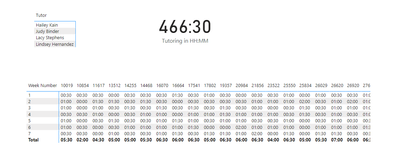
Work like a charm.
 
quipmaster_0-1678317337749.png


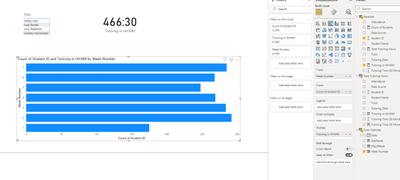
But I can't make the aforementioned visuals with a calculated measure. 


Can only place Tutoring in HH:MM into Tooltips. 

 
quipmaster_1-1678317433594.png


Should I use a calculated columns for Total Tutoring Hours and Tutoring in HH:MM?


My goal is to build visual that demonstrate total tutoring hours:minutes by student by day.


Any nudge is greatly appreciated.


2 REPLIES 2
Anonymous
Not applicable

Hi @FreemanZ - thank you for the nudge.


I thought that by pulling in Total Tutoring Hours that i summed.


But i have to sum in hour in the calculated measure of Tutoring Hours in HH:MM.


Am i understanding you correctly?


Total Tutoring Hours = SUM(Separate[Tutoring Time (30 Minutes each session)])
 
Tutoring in HH:MM =
VAR _Min = [Total Tutoring Hours]*30
VAR HourNo = INT(_Min/60)
VAR minuteNo = MOD(_Min60)
Return FORMAT(HourNo"#00") & ":" & FORMAT(minuteNo"#00")
FreemanZ
Super User
Super User

hi @Anonymous 

FORMAT returns text, instead of numeric values, so totaling text doesnt work. 


Try to sum in hour or minute and in the last step format to HHMMSS if needed for each measure.

Helpful resources

Announcements
Power BI DataViz World Championships

Power BI Dataviz World Championships

The Power BI Data Visualization World Championships is back! Get ahead of the game and start preparing now!

December 2025 Power BI Update Carousel

Power BI Monthly Update - December 2025

Check out the December 2025 Power BI Holiday Recap!

FabCon Atlanta 2026 carousel

FabCon Atlanta 2026

Join us at FabCon Atlanta, March 16-20, for the ultimate Fabric, Power BI, AI and SQL community-led event. Save $200 with code FABCOMM.