FabCon is coming to Atlanta
Join us at FabCon Atlanta from March 16 - 20, 2026, for the ultimate Fabric, Power BI, AI and SQL community-led event. Save $200 with code FABCOMM.
Register now!- Power BI forums
- Get Help with Power BI
- Desktop
- Service
- Report Server
- Power Query
- Mobile Apps
- Developer
- DAX Commands and Tips
- Custom Visuals Development Discussion
- Health and Life Sciences
- Power BI Spanish forums
- Translated Spanish Desktop
- Training and Consulting
- Instructor Led Training
- Dashboard in a Day for Women, by Women
- Galleries
- Data Stories Gallery
- Themes Gallery
- Contests Gallery
- QuickViz Gallery
- Quick Measures Gallery
- Visual Calculations Gallery
- Notebook Gallery
- Translytical Task Flow Gallery
- TMDL Gallery
- R Script Showcase
- Webinars and Video Gallery
- Ideas
- Custom Visuals Ideas (read-only)
- Issues
- Issues
- Events
- Upcoming Events
The Power BI Data Visualization World Championships is back! Get ahead of the game and start preparing now! Learn more
- Power BI forums
- Forums
- Get Help with Power BI
- DAX Commands and Tips
- Calculate running total for missing values, showin...
- Subscribe to RSS Feed
- Mark Topic as New
- Mark Topic as Read
- Float this Topic for Current User
- Bookmark
- Subscribe
- Printer Friendly Page

- Mark as New
- Bookmark
- Subscribe
- Mute
- Subscribe to RSS Feed
- Permalink
- Report Inappropriate Content
Calculate running total for missing values, showing blank
Hi there,
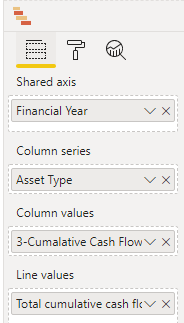
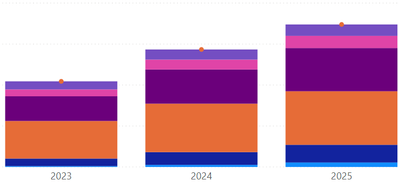
I am building a report to represent the cumulative of a column (the cashflow) over time (different years) based on some categories (i.e. different asset_types). The problem is that not all the years have an equivalent value and consequently these years are shown blank in my bar chart. I was wondering if someone let me know how to fix my DAX query.

- Mark as New
- Bookmark
- Subscribe
- Mute
- Subscribe to RSS Feed
- Permalink
- Report Inappropriate Content
Here's why you've got problems of this kind. You've only got one big table, Output_SSIS, and for some dates some types are not present in it. Therefore, when you start filtering, some values will be missing in the context. In your case it's VALUES(...) that is causing the problem (in fact, you're causing the problem, not the function). If you use a proper dimension for Asset Type, this problem will immediately be gone since choices made in dimensions stay put regardless of what's in the fact table. Please therefore structure your models correctly in the first place.
- Mark as New
- Bookmark
- Subscribe
- Mute
- Subscribe to RSS Feed
- Permalink
- Report Inappropriate Content
@Anonymous
Hi there, thanks for the link, I never thought these issues can be fixed with an appropriate data model. I was always seeing these concepts in the field of data model not DAX queries. The link looks very interesting, I will go through this (and the if clause) over the next few days and report back.
- Mark as New
- Bookmark
- Subscribe
- Mute
- Subscribe to RSS Feed
- Permalink
- Report Inappropriate Content
If you think about it deeply, it only makes sense that your graph looks the way it does. Think about the financial year where you don't see the values. You don't see them because in your formula you put VALUES(Output_SSIS[Asset type]). But for these years, when they are visible in the context, there are NO asset types, so your filter is empty in these years and this, of course, affects all the years that are filtered in your formula, hence your measure must return nothing. This all stems from the fact that you're taking all values from the fact table (one-table models should never be used in professional settings, only star schemas). If you had a dimension with your types, your selected type(s) (say, via a slicer, for instance) would be visible all the time regardless of other choices elsewhere. Hence, your formula would work OK without even putting VALUES(...) in the formula. Just stick to correct models and you'll be safe.
- Mark as New
- Bookmark
- Subscribe
- Mute
- Subscribe to RSS Feed
- Permalink
- Report Inappropriate Content
Hi @Anonymous ,
Thanks again for the explanation and also the link. It was very educational,.
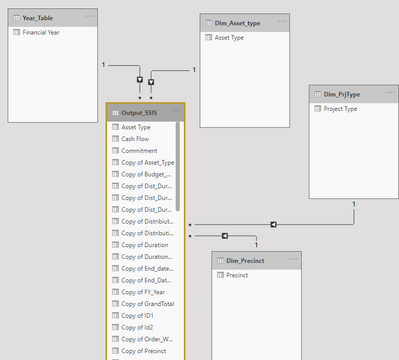
I have formed a star schema by breaking my big table into smaller ones by some DAX expressions such as
Dim_Asset_type = DISTINCT(Output_SSIS[Asset Type])
So the whole * schema is shown below:
I put some filtering options below my chart which are coming from these dimensions and I use them to filter the chart values.
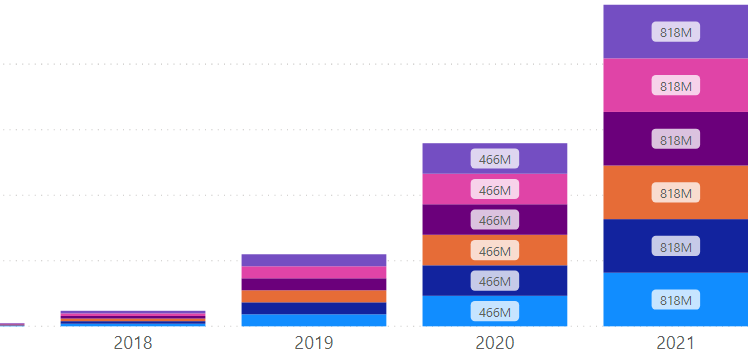
But still do not know how to modify my cumulative and total value (also a dax expression) to use these filters. The Y axis shows incorrect values, repetetive values, I guess it is because of the "allselected" function in the dax, please see below
Now my cumulative is :

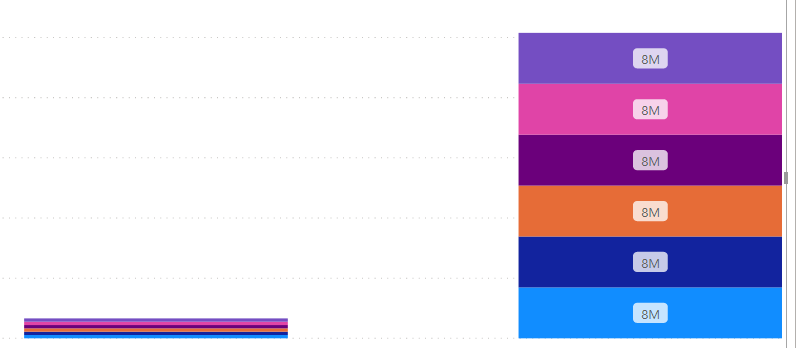
I think I have fixed that, finally !!, I had to put values at the end, so the code is :


- Mark as New
- Bookmark
- Subscribe
- Mute
- Subscribe to RSS Feed
- Permalink
- Report Inappropriate Content
@Anonymous ,
Try like
CALCULATE (sum (Output_SSIS [Cash Flow]),
filter(
ALLselected (Output_SSIS),
Output_SSIS [Financial Year] <= Max (Output_SSIS [Financial Year])
)
)
or
CALCULATE (sum (Output_SSIS [Cash Flow]),
filter(
ALLselected (Output_SSIS),
Output_SSIS [Financial Year] <= Max (Output_SSIS [Financial Year]) && Output_SSIS[Asset type] = max(Output_SSIS[Asset type])
)
)
- Mark as New
- Bookmark
- Subscribe
- Mute
- Subscribe to RSS Feed
- Permalink
- Report Inappropriate Content
Thanks Amit, but none of them works

and the second one

I think I need to modify the calculation somehow to force it to use Output_SSIS [Financial Year]-1 if isblanck(Output_SSIS [Financial Year]) with some if statements possibly with some variables, but not sure exactly how but working on it
Helpful resources

Power BI Monthly Update - November 2025
Check out the November 2025 Power BI update to learn about new features.

Fabric Data Days
Advance your Data & AI career with 50 days of live learning, contests, hands-on challenges, study groups & certifications and more!

FabCon Atlanta 2026
Join us at FabCon Atlanta, March 16-20, for the ultimate Fabric, Power BI, AI and SQL community-led event. Save $200 with code FABCOMM.

| User | Count |
|---|---|
| 21 | |
| 10 | |
| 9 | |
| 4 | |
| 4 |


| User | Count |
|---|---|
| 34 | |
| 31 | |
| 19 | |
| 13 | |
| 10 |


