cancel
Showing results for 
Search instead for 
Did you mean: 

The Power BI Data Visualization World Championships is back! Get ahead of the game and start preparing now! Learn more

Reply
Anonymous
Not applicable

Calculate percentage per category in 'survival curve'

Hello


I have some data on patients and how many days they stayed in a hospital.

If a patient has been in the hospital for 3 days (starting with day zero) like patient P110001121288 then I have three rows. One row (observation) for each day in the hospital - all starting with zero and incrementing by 1.

Data look like this:

PatientId DaysInHospital AgeGroups
P110001121288 0 0-29 years
P110001121288 1 0-29 years
P110001121288 2 0-29 years
P110006104217 0 60+ years
P110006104217 1 60+ years
P110006104217 2 60+ years
P110006104217 3 60+ years
P110006319740 0 30-59 years
P110006319740 1 30-59 years
P110006319740 2 30-59 years
P110006319740 3 30-59 years
P110006319740 4 30-59 years
P110006319740 5 30-59 years
P110006593041 0 30-59 years
P110006593041 1 30-59 years
P110006593041 2 30-59 years
P110006593041 3 30-59 years
P110006670979 0 30-59 years
P110006670979 1 30-59 years
P110006670979 2 30-59 years
P110006670979 3 30-59 years
P110006670979 4 30-59 years
P110008686937 0 0-29 years
P110008751176 0 0-29 years
P110008751176 1 0-29 years
P110008751176 2 0-29 years
P110008751176 3 0-29 years
P110008751176 4 0-29 years
P110008751176 5 0-29 years
P110008751176 6 0-29 years
P110008751176 7 0-29 years
P110008751176 8 0-29 years


My graph looks like this - however I want to show percentages per group instead of totals, so I need the graph to start with 100% for day zero for each agegroup. And then I need to calculate a measure for the percentages for the following days, which means I need to use the numbers from day zero as denominator. E.g 30-59 years denominator = 669 and the percentage for day 1 should be 444/669 = 66,4% and so forth for each group.

How to calculate the DAX measure for these percentages?

Thank you very much in advance!
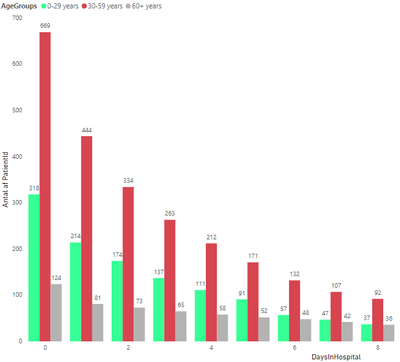
Number of patients on days in hospital by agegroups.png

1 ACCEPTED SOLUTION
mahoneypat
Microsoft Employee
Microsoft Employee

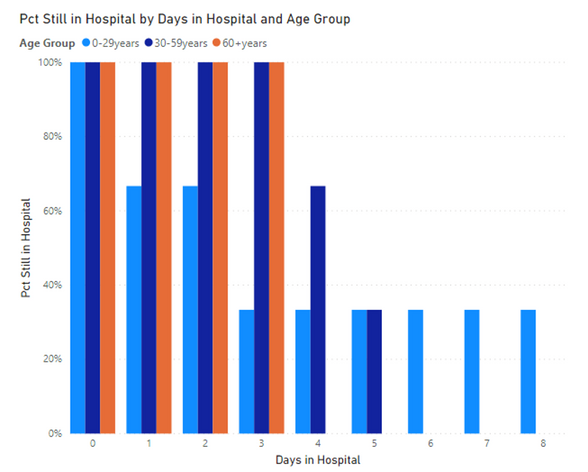
I believe this measure will do what you are looking for.


Pct Still in Hospital = var dayzerocount = CALCULATE(DISTINCTCOUNT(Data[PatientID]), Data[Days in Hospital] = 0)
var currentcontextcount = DISTINCTCOUNT(Data[PatientID])
return DIVIDE(currentcontextcount, dayzerocount)
 
patientsplot.png


Did I answer your question? Mark my post as a solution! Kudos are also appreciated!

To learn more about Power BI, follow me on Twitter or subscribe on YouTube.


@mahoneypa HoosierBI on YouTube


View solution in original post

1 REPLY 1
mahoneypat
Microsoft Employee
Microsoft Employee

I believe this measure will do what you are looking for.


Pct Still in Hospital = var dayzerocount = CALCULATE(DISTINCTCOUNT(Data[PatientID]), Data[Days in Hospital] = 0)
var currentcontextcount = DISTINCTCOUNT(Data[PatientID])
return DIVIDE(currentcontextcount, dayzerocount)
 
patientsplot.png


Did I answer your question? Mark my post as a solution! Kudos are also appreciated!

To learn more about Power BI, follow me on Twitter or subscribe on YouTube.


@mahoneypa HoosierBI on YouTube


Helpful resources

Announcements
Power BI DataViz World Championships

Power BI Dataviz World Championships

The Power BI Data Visualization World Championships is back! Get ahead of the game and start preparing now!

December 2025 Power BI Update Carousel

Power BI Monthly Update - December 2025

Check out the December 2025 Power BI Holiday Recap!

FabCon Atlanta 2026 carousel

FabCon Atlanta 2026

Join us at FabCon Atlanta, March 16-20, for the ultimate Fabric, Power BI, AI and SQL community-led event. Save $200 with code FABCOMM.