Join us at FabCon Atlanta from March 16 - 20, 2026, for the ultimate Fabric, Power BI, AI and SQL community-led event. Save $200 with code FABCOMM.
Register now!The Power BI Data Visualization World Championships is back! Get ahead of the game and start preparing now! Learn more
Hi dax experts,
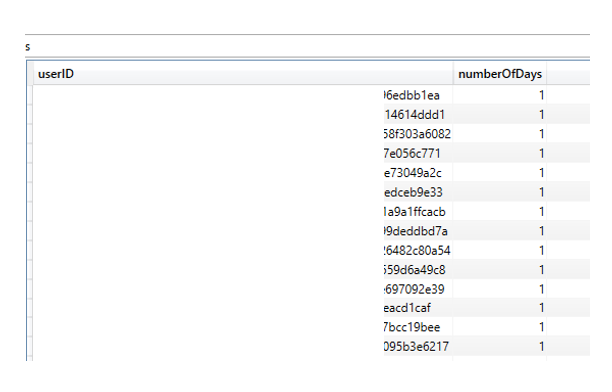
I have a table with user log data and want to calculate the numberOfDays for the filtered users inside a selectcolumns. The problem is, that calculate(DISTINCTCOUNT('∑ Tracking Data'[Date_Key]) is always 1 for every user. It seems that calculate always refers to only one row of a user. But it must refer to all rows of a user. How can I implement this?
EVALUATE
DISTINCT (
SELECTCOLUMNS (
FILTER (
'∑ Tracking Data',
'∑ Tracking Data'[Application] = "product_a"
&& '∑ Tracking Data'[Userrole] = "customer"
),
"userID", '∑ Tracking Data'[userId],
"numberOfDays", calculate(DISTINCTCOUNT('∑ Tracking Data'[Date_Key]))
))
Solved! Go to Solution.
Hi @power_roboter ,
Try ALL()
DISTINCT (
SELECTCOLUMNS (
FILTER (
'∑ Tracking Data',
'∑ Tracking Data'[Application] = "product_a"
&& '∑ Tracking Data'[Userrole] = "customer"
),
"userID", '∑ Tracking Data'[userId],
"numberOfDays", CALCULATE (
DISTINCTCOUNT ( '∑ Tracking Data'[Date_Key] ),
ALL ( '∑ Tracking Data' )
)
)
)
Regards,
Harsh Nathani
Appreciate with a Kudos!! (Click the Thumbs Up Button)
Did I answer your question? Mark my post as a solution!
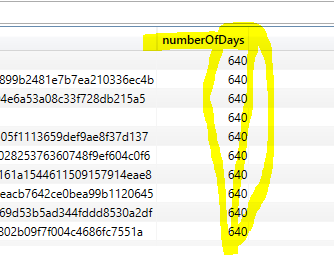
This is not working. The calculation then refers to all user data, but not to the data of a (one) user.
Works perfect! Thanks!
Check out the November 2025 Power BI update to learn about new features.
Advance your Data & AI career with 50 days of live learning, contests, hands-on challenges, study groups & certifications and more!
| User | Count |
|---|---|
| 21 | |
| 10 | |
| 9 | |
| 4 | |
| 4 |
| User | Count |
|---|---|
| 34 | |
| 31 | |
| 20 | |
| 13 | |
| 12 |