Join us at FabCon Atlanta from March 16 - 20, 2026, for the ultimate Fabric, Power BI, AI and SQL community-led event. Save $200 with code FABCOMM.
Register now!The Power BI Data Visualization World Championships is back! Get ahead of the game and start preparing now! Learn more
Hi Everyone,
Here is the type of table I have:
| Date | Name | Location |
| 15/Apr/22 09:38 | Bob | A Sector |
| 15/Apr/22 12:15 | Bob | A Sector |
| 15/Apr/2216:23 | Bob | A Sector |
| 16/Apr/22 13:14 | Bob | A Sector |
| 16/Mar/22 07:21 | Bob | A Sector |
| 17/Feb/22 20:08 | Bob | A Sector |
| 15/Apr/22 13:12 | Karen | A Sector |
| 15/Mar/22 19:45 | Karen | A Sector |
| 15/Mar/22 04:21 | Karen | A Sector |
| 16/Feb/22 02:12 | Karen | A Sector |
I also have a calendar table. The table is setup so that each time someone badges in, it creates a new row.
I want to know, each month, how many different people came in 1 day, 2 days, 3 days, 4 days, etc. So the output would be something like this:
| Month | # Days Logged | # People who logged these amount of days |
| Feb 22 | 1 | 45 |
| Feb 22 | 2 | 12 |
| Feb 22 | 3 | 67 |
| Feb 22 | 4 | 34 |
| Feb 22 | 5 | 98 |
| Feb 22 | 6 | 29 |
| Mar 22 | 1 | 12 |
| Mar 22 | 2 | 78 |
| Mar 22 | 3 | 12 |
and so on. I have the total distinct entries, and total distinct entries by month (or any other time period), but I can't seem to create the table above! Appreciate any help.
Solved! Go to Solution.
@Anonymous , oh, I think You need dynamic bucketing
Dynamic segmentation -Measure to Dimension conversion: https://youtu.be/gzY40NWJpWQ
or
Dynamic Segmentation Bucketing Binning
https://community.powerbi.com/t5/Quick-Measures-Gallery/Dynamic-Segmentation-Bucketing-Binning/m-p/1387187#M626
Dynamic Segmentation, Bucketing or Binning: https://youtu.be/CuczXPj0N-k
Hi @Anonymous ,
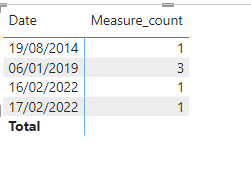
I have created a simple sample, please refer to my pbix file to see if it helps you.
Create a column first.
Column =
VAR _mintime =
CALCULATE (
MIN ( 'Table'[Date] ),
FILTER ( ( 'Table' ), 'Table'[Name] = EARLIER ( 'Table'[Name] ) )
)
RETURN
IF ( 'Table'[Date] = _mintime, 1, 0 )
Then create a measure.
Measure_count =
CALCULATE (
COUNT ( 'Table'[Column] ),
FILTER (
ALL ( 'Table' ),
'Table'[Column] <> 0
&& 'Table'[Date] = SELECTEDVALUE ( 'Table'[Date] )
)
)
If I have misunderstood your meaning, please provide your desired output with more details and your pbix file without privacy information.
Best Regards
Community Support Team _ Polly
If this post helps, then please consider Accept it as the solution to help the other members find it more quickly.
@amitchandak thanks for the response! I have that column with just a date and the distinct count, however the output just gives me the number of distinct entries per day/month/year etc. and not the different total sums for the time period.
What I'm looking for: How many people came in once during the period? Twice? Three times? Four times? etc.
@Anonymous , oh, I think You need dynamic bucketing
Dynamic segmentation -Measure to Dimension conversion: https://youtu.be/gzY40NWJpWQ
or
Dynamic Segmentation Bucketing Binning
https://community.powerbi.com/t5/Quick-Measures-Gallery/Dynamic-Segmentation-Bucketing-Binning/m-p/1387187#M626
Dynamic Segmentation, Bucketing or Binning: https://youtu.be/CuczXPj0N-k
The Power BI Data Visualization World Championships is back! Get ahead of the game and start preparing now!
| User | Count |
|---|---|
| 19 | |
| 13 | |
| 8 | |
| 4 | |
| 4 |
| User | Count |
|---|---|
| 29 | |
| 18 | |
| 17 | |
| 11 | |
| 10 |