cancel
Showing results for 
Search instead for 
Did you mean: 

Level up your Power BI skills this month - build one visual each week and tell better stories with data! Get started

Reply
leonardosoares
Regular Visitor

Calcular IPCA acumulado até o mês no PowerBI

Como calcular o valor do acumulado do IPCA no ano até o mês atual de forma que o acumulado do mês de janeiro é o proprio janeiro e os demais é definido pela seguinte formula no excel: =(1+IPCA_NO_MÊS/100)*IPCA_NO_MÊS_ANTERIOR)+IPCA_NO_MÊS


Tabela IPCA mês a mês - 2018
IPCAValor (%)Acumulado do ano (%)
jan/180,290,29
fev/180,320,61
mar/180,090,70
abr/180,220,92
mai/180,41,33
jun/181,262,60
jul/180,332,94
ago/18-0,092,85
set/180,483,34
out/180,453,81
nov/18-0,213,59
dez/180,153,75
5 REPLIES 5
camargos88
Community Champion
Community Champion

@leonardosoares ,


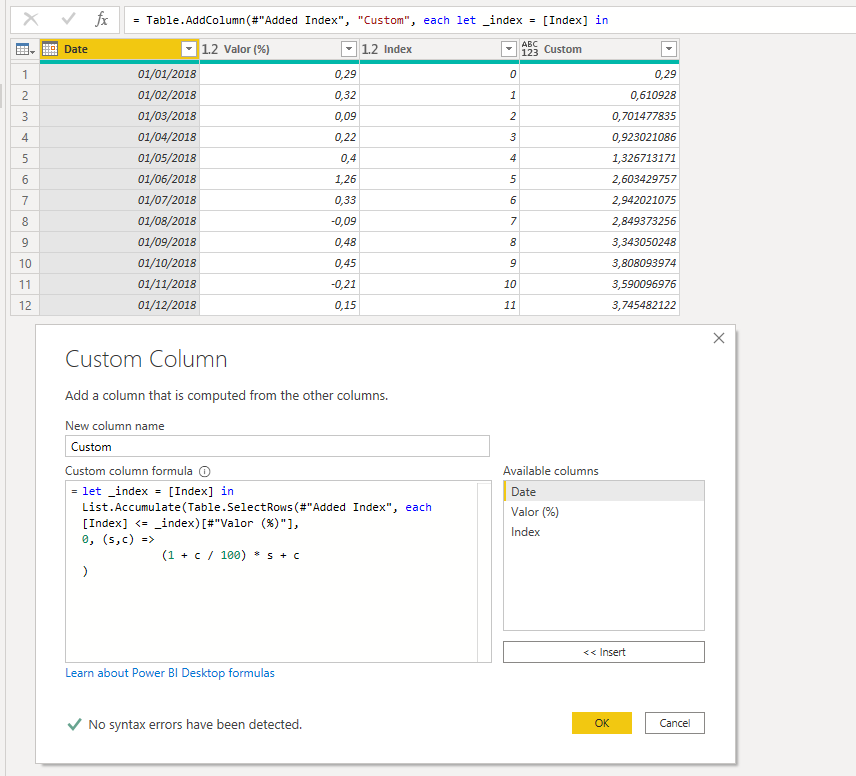
Fiz essa solução em Power Query:


let _index = [Index] in
List.Accumulate(Table.SelectRows(#"Added Index", each [Index] <= _index)[#"Valor (%)"],
0, (s,c) =>
(1 + c / 100) * s + c
)


Capture.PNG


esse é o mcode:

let
Source = Table.FromRows(Json.Document(Binary.Decompress(Binary.FromText("RczLDkAwEIXhd5l1hY5LeJbGoqKEoIlLF56eTM3YfjnnNwZmu6W6BgWZwgZaZWBwgSVHktXuLFnc2E4EeTOxFATz9YW1wuqTRcJ5zIw+SiLlw53SqUn89UtJsvkgN9REvbt5pN9R+wA=", BinaryEncoding.Base64), Compression.Deflate)), let _t = ((type nullable text) meta [Serialized.Text = true]) in type table [IPCA = _t, #"Valor (%)" = _t]),
#"Changed Type" = Table.TransformColumnTypes(Source,{{"IPCA", type date}, {"Valor (%)", type number}}),
#"Renamed Columns" = Table.RenameColumns(#"Changed Type",{{"IPCA", "Date"}}),
#"Added Index" = Table.AddIndexColumn(#"Renamed Columns", "Index", 0, 1),
#"Added Custom" = Table.AddColumn(#"Added Index", "Custom", each let _index = [Index] in
List.Accumulate(Table.SelectRows(#"Added Index", each [Index] <= _index)[#"Valor (%)"],
0, (s,c) =>
(1 + c / 100) * s + c
))
in
#"Added Custom"


Vou tentar fazer em DAX também.


Did I answer your question? Mark my post as a solution!

Proud to be a Super User!


camargos88
Community Champion
Community Champion

@leonardosoares ,


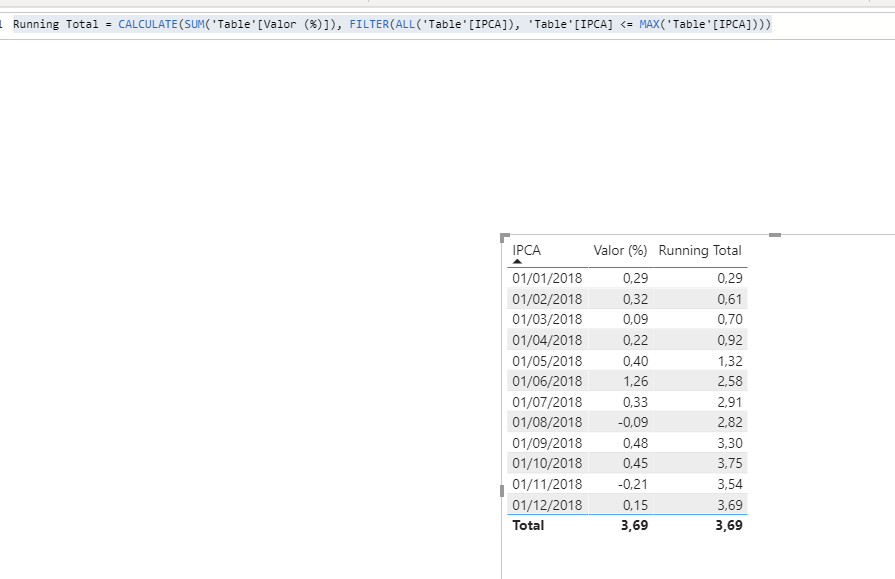
Tenta essa medida:


Running Total = CALCULATE(SUM('Table'[Valor (%)]), FILTER(ALL('Table'[IPCA]), 'Table'[IPCA] <= MAX('Table'[IPCA])))
 
O certo é ter uma tabela de datas sem interrupções, e faz todo o calculo usando essa tabela. Ai você pode usar também as funções de inteligencia de tempo: https://docs.microsoft.com/pt-br/dax/time-intelligence-functions-dax#:~:text=Data%20Analysis%20Expre...
 
Capture.PNG


Did I answer your question? Mark my post as a solution!

Proud to be a Super User!


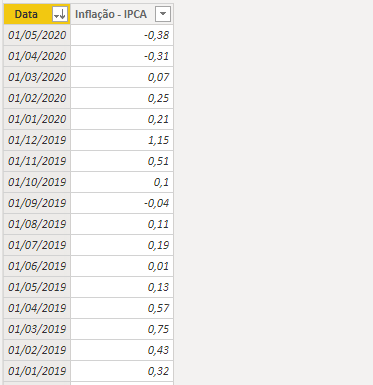
No powerbi existe a coluna data que está relacionada com minha dCalendario, a minha dificudade está em fazer o calculo dos juros compostos do IPCA porque não é um simples calculo acumulado até o mês.


leonardosoares_0-1594055120396.png


Formula de calculo no excel: (1+IPCA_NO_MÊS/100)*IPCA_NO_MÊS_ANTERIOR)+IPCA_NO_MÊS


leonardosoares_0-1594056024356.png


amitchandak
Super User
Super User

@leonardosoares , see if this can help

https://www.youtube.com/watch?v=xj_mmlszm-k

Share with Power BI Enthusiasts: Full Power BI Video (20 Hours) YouTube
Microsoft Fabric Series 60+ Videos YouTube
Microsoft Fabric Hindi End to End YouTube
jpa
Regular Visitor

No relatório é fácil, basta criar uma tabela, colocar o ANO, depois valor e pronto.

Agora por dax, também fico no aguardo.

Helpful resources

Announcements
April Power BI Update Carousel

Power BI Monthly Update - April 2026

Check out the April 2026 Power BI update to learn about new features.

Fabric SQL PBI Data Days

Data Days 2026 coming soon!

Sign up to receive a private message when registration opens and key events begin.

New to Fabric survey Carousel

New to Fabric Survey

If you have recently started exploring Fabric, we'd love to hear how it's going. Your feedback can help with product improvements.

Power BI DataViz World Championships carousel

Power BI DataViz World Championships - June 2026

A new Power BI DataViz World Championship is coming this June! Don't miss out on submitting your entry.