Join us at FabCon Atlanta from March 16 - 20, 2026, for the ultimate Fabric, Power BI, AI and SQL community-led event. Save $200 with code FABCOMM.
Register now!The Power BI Data Visualization World Championships is back! Get ahead of the game and start preparing now! Learn more
Hello friends,
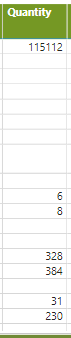
I'm having a trouble with building a DAX Measure to get some values and displays them as row values on matrix. Unfortunately when i use calculate doesn't work, my matrix turns into a huge amount of rows that i dont want. There's any way to only replace blanks without making the matrix "bigger". The quantity column below shows the quantity of a material, the blank values are materials that currently we dont have in storage, we have two tables, one with a list of all material numbers and another with all materials in storage, the first column of this matrix is the material number. Can you guys help me? Thanks so much.
Hi:
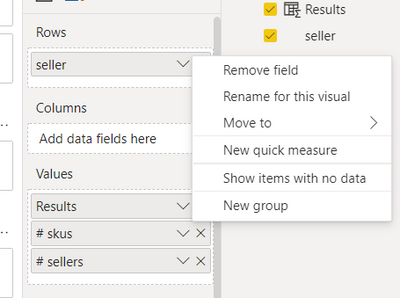
I wonder if you may have choosed "Show Items with No Data". When you rclick a field the message below appears?
In this case i'm using a matrix visual. The amount of rows is correct, i want to have those rows without quantity values, but i want to replace the blanks with some text, but the sollution i found on internet with if conditions associated with sum didnt work.
The Power BI Data Visualization World Championships is back! Get ahead of the game and start preparing now!
| User | Count |
|---|---|
| 14 | |
| 5 | |
| 5 | |
| 3 | |
| 3 |
| User | Count |
|---|---|
| 24 | |
| 10 | |
| 10 | |
| 6 | |
| 6 |