Join us at FabCon Atlanta from March 16 - 20, 2026, for the ultimate Fabric, Power BI, AI and SQL community-led event. Save $200 with code FABCOMM.
Register now!The Power BI Data Visualization World Championships is back! Get ahead of the game and start preparing now! Learn more
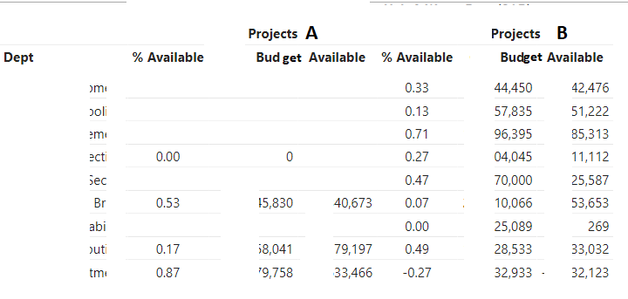
Trying to get my matrix blank values changed to zeros. Matrix looks like below screenshot.
I am doing IF ISBLANK calculation test on the calculation.
If there is no result then it is blank, right? What am I missing? It doesn't return zeros, just stays blank.
Solved! Go to Solution.
Hi @009co
The Project column and the Department column both must be independent dimension tables linked to the fact table through the respective columns. You can refer to my solution for this post just today Re: how to replace blank fields to zero in matrix ... - Microsoft Power BI Community
Moreover the measure can be written in more simple syntax as follows
% Available =
COALESCE (
DIVIDE ( SUM ( 'Table'[Available] ), SUM ( 'Table'[Budget] ), 0 ),
0
)
Project column and the Department columns are in same query as the values.
So yes it is obvious then that the blank values are because there are no rows in the query with those values for those dimensions.
Can't DAX replace these blanks with zeros without have a model with dimensions tables?
The Power BI Data Visualization World Championships is back! Get ahead of the game and start preparing now!
| User | Count |
|---|---|
| 19 | |
| 13 | |
| 8 | |
| 4 | |
| 4 |
| User | Count |
|---|---|
| 29 | |
| 19 | |
| 18 | |
| 11 | |
| 10 |