cancel
Showing results for 
Search instead for 
Did you mean: 

The Power BI Data Visualization World Championships is back! Get ahead of the game and start preparing now! Learn more

Reply
Anonymous
Not applicable

Average over entire column in DAX measure when filtered

Hi,


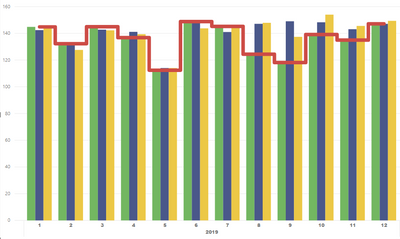
I am using a "Line and clustered column chart" and would like to add an additional line to dsiplay the average value of one of the columns. I have written a DAX measure that pefectly calculates me the value that I want to see and I can use it on cards etc. However as soon as I put the measure on the chart, it is being calculated for each category on the x-axis again. Here is the structure of the measure that I use - it sums up values in a table (Table1) based on a filter in another table (Table2) and then divides by the number of selected entries in Table2.:


avg_activity = 
VAR sumofactivity = 
CALCULATE(
	SUM('Table1'[Activity]);
	'Table2'[Type] IN { "mytype" }
)
RETURN
VAR countofactivity =
CALCULATE(COUNTROWS(Table2);'Table2'[Type] IN { "mytype" })
RETURN
sumofactivity/countofactivity


The month year hierachy on the x-axis is also from Table2, the values on the chart are from Table1. Now what I would like to get when putting this measure on a the chart wozuld be something like this: 

image.png

but what I get looks like this:

image.png

I've also tried using caluclated columns but with no success. I know that the problem is me using the Calculate-Function wrong but would be very thankful for any hint on how to get the desired behaviour!


2 REPLIES 2
Greg_Deckler
Community Champion
Community Champion

Perhaps:


avg_activity = 
VAR sumofactivity = 
CALCULATE(
	SUMX(ALL('Table1'),[Activity]);
	'Table2'[Type] IN { "mytype" }
)
RETURN
VAR countofactivity =
CALCULATE(COUNTROWS(ALL(Table2));'Table2'[Type] IN { "mytype" })
RETURN
sumofactivity/countofactivity


Follow on LinkedIn
@ me in replies or I'll lose your thread!!!
Instead of a Kudo, please vote for this idea
Become an expert!: Enterprise DNA
External Tools: MSHGQM
YouTube Channel!: Microsoft Hates Greg
Latest book!:
DAX For Humans

DAX is easy, CALCULATE makes DAX hard...
Anonymous
Not applicable

Hi Greg, thanks for your quick response! Unfortunately that creates a value which is way too high, however at least it displays now a constant line, so I think you showed me the right track.

Helpful resources

Announcements
November Power BI Update Carousel

Power BI Monthly Update - November 2025

Check out the November 2025 Power BI update to learn about new features.

Fabric Data Days Carousel

Fabric Data Days

Advance your Data & AI career with 50 days of live learning, contests, hands-on challenges, study groups & certifications and more!

FabCon Atlanta 2026 carousel

FabCon Atlanta 2026

Join us at FabCon Atlanta, March 16-20, for the ultimate Fabric, Power BI, AI and SQL community-led event. Save $200 with code FABCOMM.