Join us at FabCon Atlanta from March 16 - 20, 2026, for the ultimate Fabric, Power BI, AI and SQL community-led event. Save $200 with code FABCOMM.
Register now!The Power BI Data Visualization World Championships is back! Get ahead of the game and start preparing now! Learn more
Hello!
I'm trying to calculate an average of another measure. So i have "Mileage_value" column that shows how many kilometres a driver has driven and another column "Fuelconsumption_value" that shows how much fuel has been used.
First i calculated how many kilometres a driver has driven.
Solved! Go to Solution.
Hi @Anonymous ,
It cost my time to simulate your dataset.
The key to this problem is that you have to have a column to identify the start and end points, you can see that I have added a new field below - status.
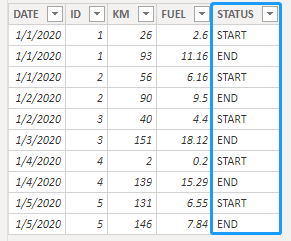
(Of course, this field can also be directly calculated using DAX, but if you can add this column to the data source, any way to consume memory is not recommended)
Then you can use the following DAX formula.
Consumption(L/100km) Avg =
VAR _S_KM =
CALCULATE (
SUM ( Sheet2[KM] ),
FILTER ( ALLSELECTED ( 'Sheet2' ), 'Sheet2'[STATUS] = "START" )
)
VAR _E_KM =
CALCULATE (
SUM ( Sheet2[KM] ),
FILTER ( ALLSELECTED ( 'Sheet2' ), 'Sheet2'[STATUS] = "END" )
)
VAR _S_FUEL =
CALCULATE (
SUM ( Sheet2[FUEL] ),
FILTER ( ALLSELECTED ( 'Sheet2' ), 'Sheet2'[STATUS] = "START" )
)
VAR _E_FUEL =
CALCULATE (
SUM ( Sheet2[FUEL] ),
FILTER ( ALLSELECTED ( 'Sheet2' ), 'Sheet2'[STATUS] = "END" )
)
RETURN
DIVIDE ( _E_FUEL - _S_FUEL, _E_KM - _S_KM ) * 100
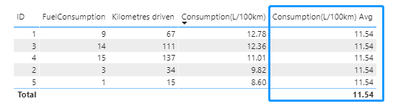
The results are shown in the below figure, it works perfectly:
Mark this post as solution if this helps,thanks!
( Davis.Z's blog at LinkedIn)
Hi @Anonymous ,
It cost my time to simulate your dataset.
The key to this problem is that you have to have a column to identify the start and end points, you can see that I have added a new field below - status.
(Of course, this field can also be directly calculated using DAX, but if you can add this column to the data source, any way to consume memory is not recommended)
Then you can use the following DAX formula.
Consumption(L/100km) Avg =
VAR _S_KM =
CALCULATE (
SUM ( Sheet2[KM] ),
FILTER ( ALLSELECTED ( 'Sheet2' ), 'Sheet2'[STATUS] = "START" )
)
VAR _E_KM =
CALCULATE (
SUM ( Sheet2[KM] ),
FILTER ( ALLSELECTED ( 'Sheet2' ), 'Sheet2'[STATUS] = "END" )
)
VAR _S_FUEL =
CALCULATE (
SUM ( Sheet2[FUEL] ),
FILTER ( ALLSELECTED ( 'Sheet2' ), 'Sheet2'[STATUS] = "START" )
)
VAR _E_FUEL =
CALCULATE (
SUM ( Sheet2[FUEL] ),
FILTER ( ALLSELECTED ( 'Sheet2' ), 'Sheet2'[STATUS] = "END" )
)
RETURN
DIVIDE ( _E_FUEL - _S_FUEL, _E_KM - _S_KM ) * 100
The results are shown in the below figure, it works perfectly:
Mark this post as solution if this helps,thanks!
( Davis.Z's blog at LinkedIn)
Thank you so much for your help!
Check out the November 2025 Power BI update to learn about new features.
Advance your Data & AI career with 50 days of live learning, contests, hands-on challenges, study groups & certifications and more!
| User | Count |
|---|---|
| 21 | |
| 10 | |
| 9 | |
| 4 | |
| 4 |
| User | Count |
|---|---|
| 32 | |
| 31 | |
| 20 | |
| 12 | |
| 12 |