Join us at FabCon Atlanta from March 16 - 20, 2026, for the ultimate Fabric, Power BI, AI and SQL community-led event. Save $200 with code FABCOMM.
Register now!Get Fabric Certified for FREE during Fabric Data Days. Don't miss your chance! Request now
Hi all,
I am new to PowerBI and need some help with DAX I have already created a formula to do this in excel but am having issues in PowerBI. All suggestions are appreciated.
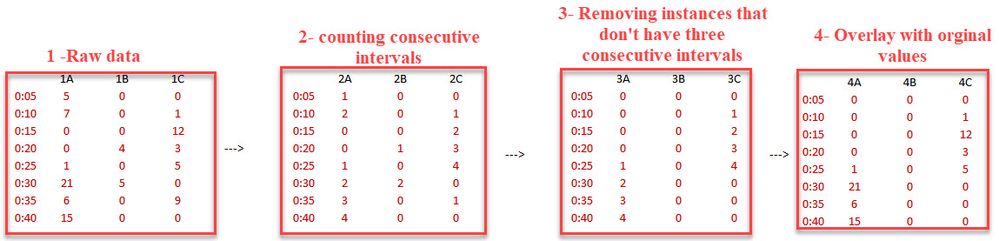
Here is an image of what I am trying to do:
I need to count all intervals that meet a condition and if they do, I want to count how many timestamps in a row this occurs for.
So I need to access the cell in the same calculated column but on cell up. Here is the formula in excel (it is from a large spreadsheet
From 1->2 (image above)
=IF(PJ4>0,TJ3+1,0) (PJ is from raw data, TJ is the data # 2 from the image above)
Again thank you for any help you may have!
Power BI does not support referring to a previous row directly like excel does.
You can work around this.
Add an "Index" column to your data.
In your DAX measure you can use a VAR to store the value
Then use a function like CALCULATE to access the value where the index equal your stored index - 1
VAR cur_index = SELECTEDVALUE(datatable[index])
VAR prev_index = cur_index -1
VAR myValue = CALCULATE(datatable[value],datatable[index] = prev_index)
Help when you know. Ask when you don't!
Check out the November 2025 Power BI update to learn about new features.
Advance your Data & AI career with 50 days of live learning, contests, hands-on challenges, study groups & certifications and more!
| User | Count |
|---|---|
| 11 | |
| 9 | |
| 9 | |
| 6 | |
| 5 |
| User | Count |
|---|---|
| 27 | |
| 22 | |
| 19 | |
| 17 | |
| 11 |