Join us at FabCon Atlanta from March 16 - 20, 2026, for the ultimate Fabric, Power BI, AI and SQL community-led event. Save $200 with code FABCOMM.
Register now!Get Fabric Certified for FREE during Fabric Data Days. Don't miss your chance! Request now
Hello I want to calculate the acumulated production per year, task and ID, like in the following table, can you help me?
| ID | TASK | YEAR | PRODUCTION | Accumulated production |
| 0 | 1 | 1 | -80 | -80 |
| 0 | 1 | 2 | 100 | 20 |
| 0 | 1 | 3 | 110 | 130 |
| 0 | 1 | 4 | 105 | 235 |
| 1 | 2 | 1 | -50 | -50 |
| 1 | 2 | 2 | -60 | -110 |
| 1 | 2 | 3 | -80 | -190 |
| 1 | 2 | 4 | 100 | -90 |
| 1 | 2 | 5 | 200 | 110 |
| 1 | 2 | 6 | 300 | 410 |
| 2 | 3 | 1 | -89 | -89 |
| 2 | 3 | 2 | -74 | -163 |
| 2 | 3 | 3 | -50 | -213 |
| 2 | 3 | 4 | -20 | -233 |
| 2 | 3 | 5 | 500 | 267 |
Hi @OscarSuarez10 ,
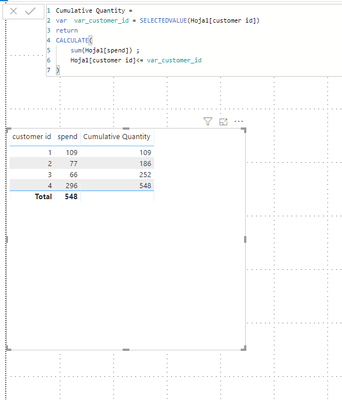
try the following expression:
Hello @Anonymous I applied the formula in this way:
ACUMULATED PRODUCTION =
var var_year = SELECTEDVALUE('pruebas'[YEAR])
return
CALCULATE(
sum('pruebas'[PRODUCTION]) ;
'pruebas'[YEAR]<= var_year
)
But i got nothin in the column:
Doy you know what am i doing wrong?
Hi @OscarSuarez10 ,
I don't know what could happen. Check out the screenshot I attached, it may helps you:
Hi,
modify below:
Hello @Anonymous , thanks for your help, when I use this formula I get the same values, is not adding the previus one:
| YEAR | PRODUCTION | Accumulated production |
| 1 | -80 | -80 |
| 2 | 100 | 100 |
| 3 | 110 | 110 |
| 4 | 105 | 105 |
| 1 | -50 | -50 |
| 2 | -60 | -60 |
| 3 | -80 | -80 |
| 4 | 100 | 100 |
| 5 | 200 | 200 |
| 6 | 300 | 300 |
| 1 | -89 | -89 |
| 2 | -74 | -74 |
| 3 | -50 | -50 |
| 4 | -20 | -20 |
| 5 | 500 | 500 |
Check out the November 2025 Power BI update to learn about new features.
Advance your Data & AI career with 50 days of live learning, contests, hands-on challenges, study groups & certifications and more!
| User | Count |
|---|---|
| 11 | |
| 9 | |
| 9 | |
| 6 | |
| 5 |
| User | Count |
|---|---|
| 27 | |
| 22 | |
| 19 | |
| 17 | |
| 11 |