Hi Everyone,
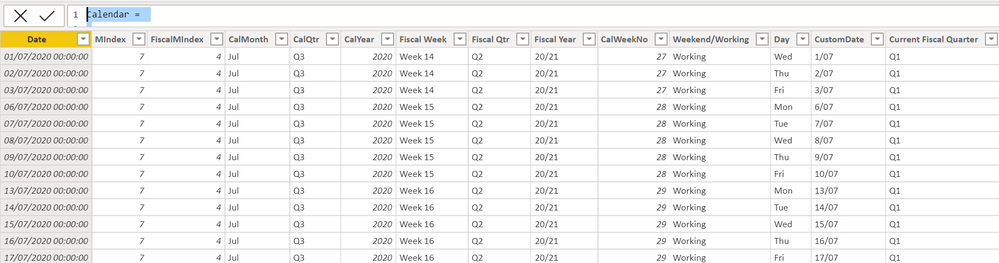
After much research I cannot seem to find a way to format my date for the UK fiscal year in my custom calendar table i.e YYYY-YY (2021-22). I have code that I use for my calendar table which is below. I have tried editing the code but im a newbie and the format comes out wrong. The best I could get it was YY-YY but this doesnt match my other data. Any one know how I could achieve this?
Calendar =

--Inputs--
VAR WeekStartsOn = "Mon"
VAR FiscalStartMonth = 4

--NOTE: Calendar week starts from Monday

--Calculation--
RETURN
    ADDCOLUMNS (
        CALENDARAUTO ( FiscalStartMonth - 1 ),
        "MIndex", MONTH ( [Date] ),
        "FiscalMIndex", MONTH ( EDATE ( [Date], - FiscalStartMonth + 1 ) ),
        "CalMonth", FORMAT ( [Date], "mmm" ),
        "CalQtr", "Q"
            & CEILING ( MONTH ( [Date] ), FiscalStartMonth - 1 ) / ( FiscalStartMonth - 1 ),
        "CalYear", YEAR ( [Date] ),
        "Fiscal Week",
        VAR FiscalFirstDay =
            IF (
                MONTH ( [Date] ) < FiscalStartMonth,
                DATE ( YEAR ( [Date] ) - 1, FiscalStartMonth, 1 ),
                DATE ( YEAR ( [Date] ), FiscalStartMonth, 1 )
            )
        VAR FilteredTableCount =
            COUNTROWS (
                FILTER (
                    SELECTCOLUMNS ( GENERATESERIES ( FiscalFirstDay, [Date] ), "Dates", [Value] ),
                    FORMAT ( [Dates], "ddd" ) = WeekStartsOn
                )
            )
        VAR WeekNos =
            IF (
                FORMAT ( FiscalFirstDay, "ddd" ) <> WeekStartsOn,
                FilteredTableCount + 1,
                FilteredTableCount
            )
        RETURN
            "Week " & WeekNos,
        "Fiscal Qtr", "Q"
            & CEILING ( MONTH ( EDATE ( [Date], - FiscalStartMonth + 1 ) ), 3 ) / 3,
        "Fiscal Year",
        VAR CY =
            RIGHT ( YEAR ( [Date] ), 2 )
        VAR NY =
            RIGHT ( YEAR ( [Date] ) + 1, 2 )
        VAR PY =
            RIGHT ( YEAR ( [Date] ) - 1, 2 )
        VAR FinYear =
            IF ( MONTH ( [Date] ) > ( FiscalStartMonth - 1 ), CY & "/" & NY , PY & "/" & CY )
        RETURN
            FinYear,
        "CalWeekNo", WEEKNUM ( [Date], 2 ),
        "Weekend/Working", IF ( WEEKDAY ( [Date], 2 ) > 5, "Weekend", "Working" ),
        "Day", FORMAT ( [Date], "ddd" ),
        "CustomDate", FORMAT ( [Date], "d/mm" )
    )
Regards,
Matthew


