Join us at FabCon Vienna from September 15-18, 2025
The ultimate Fabric, Power BI, SQL, and AI community-led learning event. Save €200 with code FABCOMM.
Get registered- Power BI forums
- Get Help with Power BI
- Desktop
- Service
- Report Server
- Power Query
- Mobile Apps
- Developer
- DAX Commands and Tips
- Custom Visuals Development Discussion
- Health and Life Sciences
- Power BI Spanish forums
- Translated Spanish Desktop
- Training and Consulting
- Instructor Led Training
- Dashboard in a Day for Women, by Women
- Galleries
- Data Stories Gallery
- Themes Gallery
- Contests Gallery
- Quick Measures Gallery
- Notebook Gallery
- Translytical Task Flow Gallery
- TMDL Gallery
- R Script Showcase
- Webinars and Video Gallery
- Ideas
- Custom Visuals Ideas (read-only)
- Issues
- Issues
- Events
- Upcoming Events
Enhance your career with this limited time 50% discount on Fabric and Power BI exams. Ends August 31st. Request your voucher.
- Power BI forums
- Forums
- Get Help with Power BI
- DAX Commands and Tips
- A measure that checks for 3 conditions
- Subscribe to RSS Feed
- Mark Topic as New
- Mark Topic as Read
- Float this Topic for Current User
- Bookmark
- Subscribe
- Printer Friendly Page

- Mark as New
- Bookmark
- Subscribe
- Mute
- Subscribe to RSS Feed
- Permalink
- Report Inappropriate Content
A measure that checks for 3 conditions
Hi Community,
I am trying to create a column in the 'DATA' table that selects an asccociated pricing value based on 3 conditions (Group, Fruit and Area). Each group has a different pricing for each area (A,B,C&D) though they transport the same fruit (Banana, Pineapples and Strawberries)
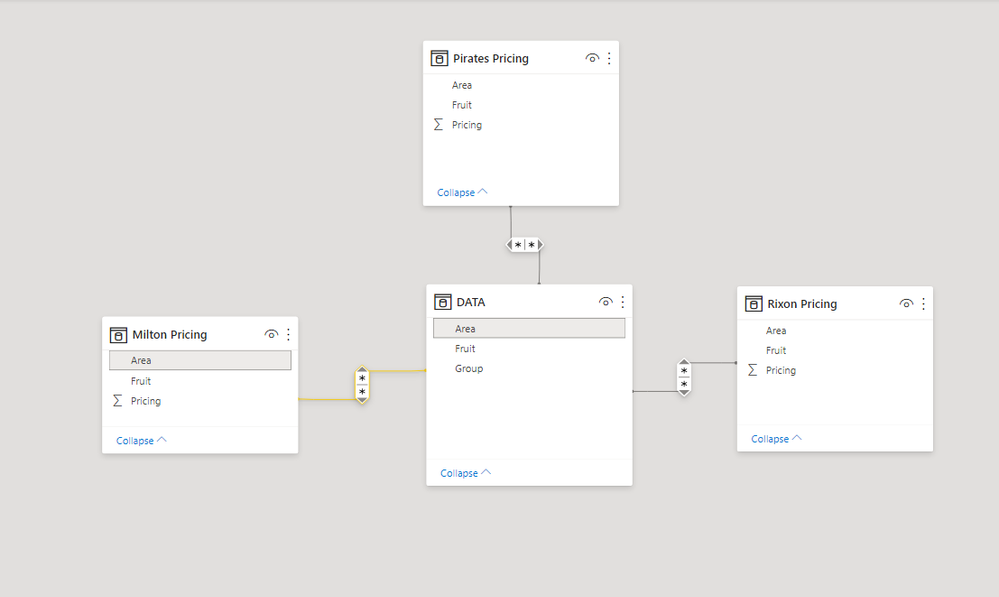
All 3 pricing tables have a many to many relationship with DATA table based on Area

Column with the pricing should be in this table
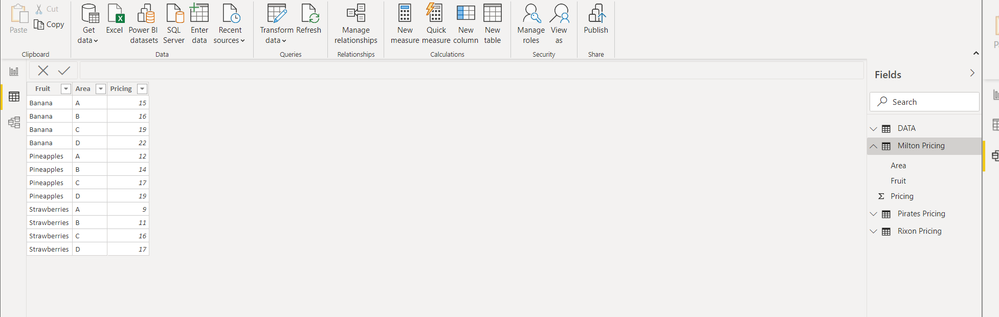
The pricing table for one group showing fruit and cost per area


- Mark as New
- Bookmark
- Subscribe
- Mute
- Subscribe to RSS Feed
- Permalink
- Report Inappropriate Content
Create composite key in each table = group,area,fruit. Then you will have one to many. Probably simplest to do in power query. Union all the price tables together then merge with data table. You will end up with one table to play with in dax, nice and simple.


- Mark as New
- Bookmark
- Subscribe
- Mute
- Subscribe to RSS Feed
- Permalink
- Report Inappropriate Content
Having one table in PBI maybe is "nice and simple" but is not the correct way to do modeling in PBI. The correct way to do it is to have a star-schema. Having just one big table with everything hides pitfalls that can bite an unseasoned DAX programmer in very nasty ways. Hence advice: Never structure data in a way different from the star-schema (conformed dimensions around fact tables) unless you want to create problems you will not even be aware of. Just stay away from one-table models.
Understand star schema and the importance for Power BI - Power BI | Microsoft Docs
- Mark as New
- Bookmark
- Subscribe
- Mute
- Subscribe to RSS Feed
- Permalink
- Report Inappropriate Content
depends on context. if you are building a simlple adhoc report for an impatient boss, then use the KISS approach as described, done in 30 minues. if you have plenty of time and are just trying to learn something then go study modeling to your hearts content, done in your own time.
- Mark as New
- Bookmark
- Subscribe
- Mute
- Subscribe to RSS Feed
- Permalink
- Report Inappropriate Content
Well, if you want to have big problems (meaning: insurmountable) later down the line... keep all your data in one big table. As you see above, the amount of data @TheGreatDyke has is ridiculously tiny and the model is ridiculously simple. Making it into a real star-schema will take no more than about 15-20 minutes in Power Query. Saying that you can't make it into a proper model because of your boss in this example would be... well, ridiculous as well. But even if you are creating someting ad-hoc, you'd better stick to the star-schema if you want to have an easy time creating DAX and trying to ascertain that your figures are right. Unless.... you don't care about the correctness of your results. Then you can do whatever you want.
- Mark as New
- Bookmark
- Subscribe
- Mute
- Subscribe to RSS Feed
- Permalink
- Report Inappropriate Content
Thank you Daxer for sharing the article. It seems I am still to fully understand cardinality and set up tables as Fact and Dims..
Given the current structure of the data, It does not allow 1 to many relationship.
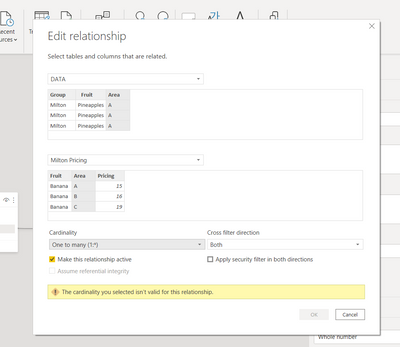
For the current data structure, what could be a possible approach that will achieve the goal of assigning a pricing cost in the 'Fact' table pulling it from the pricing tables
- Mark as New
- Bookmark
- Subscribe
- Mute
- Subscribe to RSS Feed
- Permalink
- Report Inappropriate Content
Please re-think your model and structure it as a star/snowflake-schema. If you don't do this, you'll feel the heat later and everything will be much harder (and error-prone). Trust me, you don't want to have a bad model like the one above. But it'll be you, of course, to deal with problems that do not exist in a well-formed model, so the choice is yours.
Turning a data set into a star-schema is not that difficult. You just have to answer some questions. What are the dimensions? A dimension is a table with a unique key and each row is a separate example of a business entity (e.g., customer, building, geographical information, transaction type, etc.). A fact table is a table with facts (surprise!). Fact tables contain only keys to dimensions (where the relationship is one-to-many from the dim to the fact) and figures that measure a process you want to model (transaction date, transaction amount, transaction type, product count, etc.). This is the very basics of dimensional data modeling. And you should religiously follow it without exceptions unless... you want to get into deep trouble later down the road.
Many-to-many in PBI is not something to be taken lightly. It comes with a set of its own quirks and problems and should be avoided as much as possible. It's very easy for an unexperienced person to get burnt when trying to use many-to-many without much thinking.
- Mark as New
- Bookmark
- Subscribe
- Mute
- Subscribe to RSS Feed
- Permalink
- Report Inappropriate Content
Thank you @Anonymous You are right. Star schema is the best approach

- Mark as New
- Bookmark
- Subscribe
- Mute
- Subscribe to RSS Feed
- Permalink
- Report Inappropriate Content
Many to many? I don't think this is the best model. Actually, I think it's the worst you could have selected. I wolud change it to a correct one immediately. Many to many relationships in PBI are there to solve one and only one problem: different table granularities. I don't think this is what applies in your case.
Before you do anything in PBI, please read THIS.
Helpful resources

Power BI Monthly Update - August 2025
Check out the August 2025 Power BI update to learn about new features.

Fabric Community Update - August 2025
Find out what's new and trending in the Fabric community.

| User | Count |
|---|---|
| 11 | |
| 9 | |
| 6 | |
| 6 | |
| 5 |


| User | Count |
|---|---|
| 23 | |
| 14 | |
| 14 | |
| 9 | |
| 7 |


