cancel
Showing results for 
Search instead for 
Did you mean: 

We've captured the moments from FabCon & SQLCon that everyone is talking about, and we are bringing them to the community, live and on-demand. Starts on April 14th. Register now

Reply
Anonymous
Not applicable

withTable selection selecting wrong row


I've encountered an issue when using the withTable selection with a map-based custom visual that I'm developing using Leaflet. The wrong row is selected when I create the selection in the custom visual. To demonstrate this, I put the same data passed to the custom visual in a native table visual.


When I click on the table visual, it shows a specific segment in the custom visual:
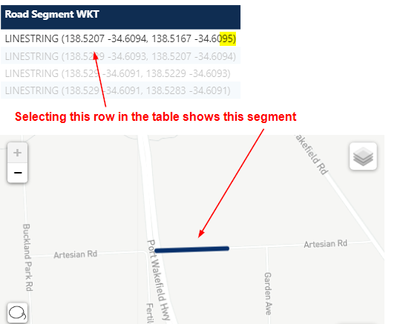
select_row.png


But when I click on the segment in the custom visual, it shows a different row in the table:
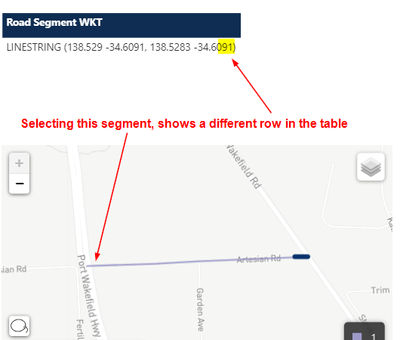
select_segment.png


I am using the v2.6.0 of the API. Simplified code is below. What am I doing wrong?


capabilities.json


{
  "dataRoles": [
    {
      "displayName": "Geometry (WKT)",
      "kind": "Grouping",
      "name": "geometry"
    },
    {
      "displayName": "Volume Count",
      "kind": "Measure",
      "name": "count"
    },
    {
      "displayName": "Tooltips",
      "kind": "Grouping",
      "name": "tooltips"
    }
  ],
  "dataViewMappings": [
    {
      "table": {
        "rows": {
          "select": [
            { "for": { "in": "geometry" } },
            { "for": { "in": "count" } },
            { "for": { "in": "tooltips" } }
          ]
        }
      }
    }
  ]
}


visual.ts


public update(options: VisualUpdateOptions) {
  const table = options.dataViews[0].table;
  table.rows.forEach((row, index) => {
    // Generate line geometry from data
    const line = ...

    // Selection
    const selectionId = this.host.createSelectionIdBuilder()
      .withTable(table, index)
      .createSelectionId();

    const polyline = L.polyline(line)
      .on("click", () => { this.selectionManager.select(selectionId); })
      .addTo(this.map);
  });
}


1 ACCEPTED SOLUTION
Anonymous
Not applicable

I ended up switching to using a Basic Filter from the Visual Filters API instead of Selection and everything worked.

View solution in original post

2 REPLIES 2
Anonymous
Not applicable

I ended up switching to using a Basic Filter from the Visual Filters API instead of Selection and everything worked.

Anonymous
Not applicable

I tried updating to the Visuals API 3.5.1, but I'm still encountering the same issue.


I also tried packaging the visual and trying it in Desktop, but still encountering the same issue.


An easier way to demonstrate is to duplicate the custom visual on the page. When I select the rows in one custom visual, the same number of rows is passed to the other custom visual, but not the same rows.


I tried investigating at the identityIndex from the selectionId.getKey(), but that seems like it's an index local to the visual itself.


Any ideas on what to investigate next?

Helpful resources

Announcements
New to Fabric survey Carousel

New to Fabric Survey

If you have recently started exploring Fabric, we'd love to hear how it's going. Your feedback can help with product improvements.

Power BI DataViz World Championships carousel

Power BI DataViz World Championships - June 2026

A new Power BI DataViz World Championship is coming this June! Don't miss out on submitting your entry.

Join our Fabric User Panel

Join our Fabric User Panel

Share feedback directly with Fabric product managers, participate in targeted research studies and influence the Fabric roadmap.

March Power BI Update Carousel

Power BI Community Update - March 2026

Check out the March 2026 Power BI update to learn about new features.

Top Solution Authors