cancel
Showing results for 
Search instead for 
Did you mean: 

We've captured the moments from FabCon & SQLCon that everyone is talking about, and we are bringing them to the community, live and on-demand. Starts on April 14th. Register now

Reply
coolsatya
Frequent Visitor

Personalized View - Save or Create Bookmark Option

Hello Everyone,


I want to understand how the end user can save or bookmark the personalized view for a particular dashboard after the pbix file is integrated in the UI (Like Angular and many more)


In PowerBi service user can create his own personalized view and then can save it as a bookmark so that he/she can review it whenever required. But the same thing when we integrate the enbedded URL to any of the UI Screens we are able to personalized the view but unable to save it or bookmark it. 


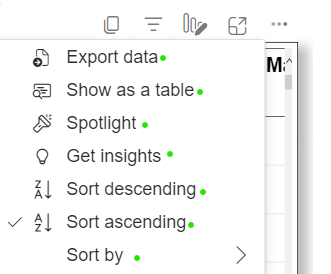
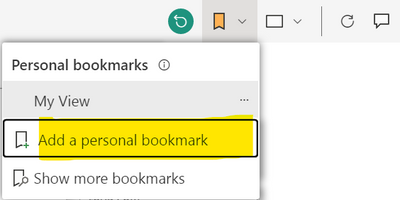
As per the below screenshot (1st Screenshot) you can see there is no option for the user to save or bookmark the visual which is already integrated in the UI Screen. But oin PowerBi service we have the bookmark function by default as shown in the below screenshot (2nd Screenshot).

coolsatya_0-1681738361496.png                     coolsatya_2-1681738645955.png


Can anyone help me with this solution.


Thanks.

1 REPLY 1
lbendlin
Super User
Super User

Do you see the "Chat in Teams"  link in your setup?

Helpful resources

Announcements
New to Fabric survey Carousel

New to Fabric Survey

If you have recently started exploring Fabric, we'd love to hear how it's going. Your feedback can help with product improvements.

Power BI DataViz World Championships carousel

Power BI DataViz World Championships - June 2026

A new Power BI DataViz World Championship is coming this June! Don't miss out on submitting your entry.

Join our Fabric User Panel

Join our Fabric User Panel

Share feedback directly with Fabric product managers, participate in targeted research studies and influence the Fabric roadmap.

March Power BI Update Carousel

Power BI Community Update - March 2026

Check out the March 2026 Power BI update to learn about new features.

Top Solution Authors