Hi Everyone,
I am working on a custom visual based on table data, and I want to add drill-through capabilities to it.
I know it should be possible since it is mentioned multiple times on this forum,
and explicitly stated here: Enable drill through on Custom Visuals - Microsoft Power BI Community
However, following all examples I can find, I still cannot get it to work.
The context menu is showing. I can include/exclude and all of that, but I never see the option to drill through.
If I convert the visual to a PowerBI exTable visual, then it is working. So it is not something wrong with my report.
I know the context menu is working since I can filter with it.
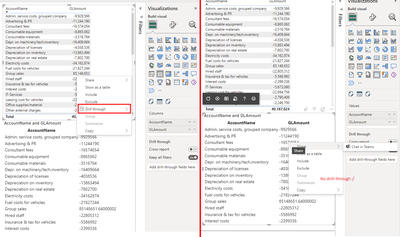
What am I still missing? Below is a minimal repro of my code in a project created by running "npx powerbi-visuals-tools new tableDrillThrough".
export class Visual implements IVisual {
    private readonly host: powerbi.extensibility.visual.IVisualHost;
    private readonly table: HTMLTableElement;
    private readonly selectionManager: powerbi.extensibility.ISelectionManager;

    constructor(options: VisualConstructorOptions) {
        this.host = options.host;
        this.selectionManager = this.host.createSelectionManager();

        if (document) {
            this.table = document.createElement("table");
            options.element.appendChild(this.table);
        }
    }

    public update(options: VisualUpdateOptions) {
        const dataview = options.dataViews.at(0);

        if (dataview == null || dataview.table == null) {
            return;
        }

        const rowNodes = [];

        const headerRow = document.createElement("tr");
        for (const column of dataview.table.columns) {
            const headerCell = document.createElement("th");
            headerCell.textContent = column.displayName;
            headerRow.appendChild(headerCell);
        }

        rowNodes.push(headerRow);

        for (let rowIndex = 0; rowIndex < dataview.table.rows.length; rowIndex++) {
            const row = dataview.table.rows[rowIndex];
            const rowElement = document.createElement("tr");

            for (const item of row) {
                const valueCell = document.createElement("td");
                valueCell.textContent = String(item);
                rowElement.appendChild(valueCell);
            }

            const selectionId = this.host.createSelectionIdBuilder()
                .withTable(dataview.table, rowIndex)
                .createSelectionId();

            rowElement.addEventListener("contextmenu", (event) => {
                this.selectionManager.showContextMenu(
                    selectionId,
                    { x: event.x, y: event.y },
                    "values" // Not sure what this should be, does not seem to make a difference
                );

                // Prevent the browser context-menu from showing
                event.preventDefault();
                return false;
            })

            rowNodes.push(rowElement);
        }

        this.table.replaceChildren(...rowNodes)
    }
}
Ofcourse I also edited the capabilities to have a table-like dataview mapping:
{
    "dataRoles": [
        {
            "displayName": "Values",
            "name": "values",
            "kind": "GroupingOrMeasure"
        }
    ],
    "dataViewMappings": [
        {
            "table": {
                "rows": {
                    "select": [
                        {
                            "for": {
                                "in": "values"
                            }
                        }
                    ],
                    "dataReductionAlgorithm": {
                        "window": {
                            "count": 30000
                        }
                    }
                }
            }
        }
    ],
    "privileges": []
}
Any help is greatly appreciated


