cancel
Showing results for 
Search instead for 
Did you mean: 

Data Days is here! Join us now for 60+ days of learning, challenges, and connection. Learn more

Reply
Rgant3
Regular Visitor

Flow Map Decimal Issue

I am using the Flow Map Custom visualization published by Weiwei Cui. I have attached the link to the visualization for reference: Flow Map Landing Page


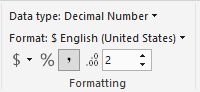
I have a data field that is formated to be a general currency decimal point with a fixed decimal limit of 2 places. I have provided a screen shot below. 


Decimal Format.PNG


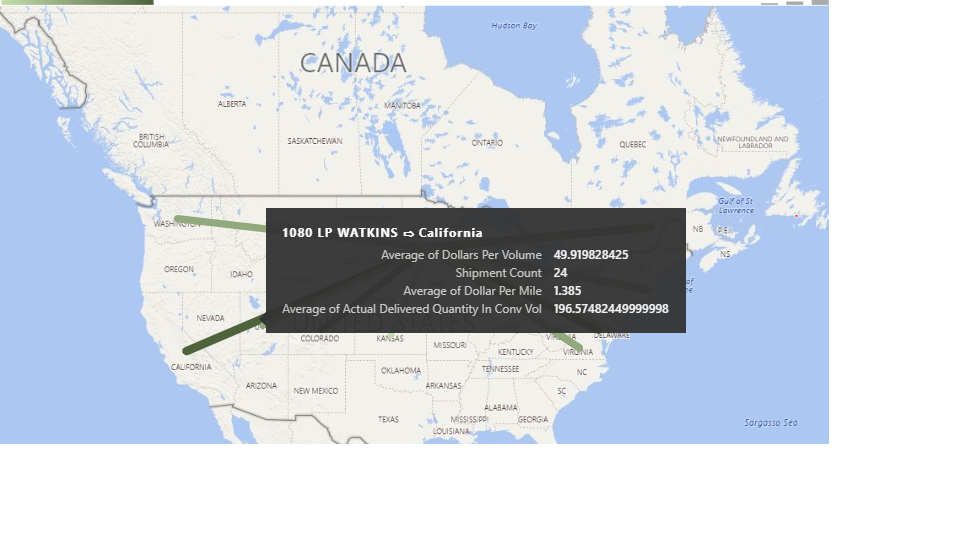
However, when I pull that data field into the Flow Map visual, the formatting is undone, and it is represented as an open ended decimal number, as shown below. Does anyone know how to fix this or how to contact the developer of this visualization?


Flow Map Incorrect.png

3 REPLIES 3
v-viig
Community Champion
Community Champion

Please contact Cui Weiwei <weiweicui@outlook.com> to get this issue resolved.


Ignat Vilesov,

Software Engineer


Microsoft Power BI Custom Visuals

pbicvsupport@microsoft.com

Anonymous
Not applicable

Hi all,

I am experiencing the same issue, has there been any solution to this problem?


Thanks!

v-viig
Community Champion
Community Champion

Please contact Please contact Cui Weiwei weiweicui@outlook.com because he is developer and owner of this custom visual.


Ignat Vilesov,

Software Engineer


Microsoft Power BI Custom Visuals

pbicvsupport@microsoft.com

Helpful resources

Announcements
Fabric Data Days is here Carousel

Fabric Data Days 2026

Don't miss out on Data Days, June 15 through August 7. Learn Fabric, Power BI, SQL, AI and more.

May Power BI Update Carousel

Power BI Monthly Update - May 2026

Check out the May 2026 Power BI update to learn about new features.

Power BI DataViz World Championships carousel

Power BI DataViz World Championships - June 2026

A new Power BI DataViz World Championship is coming this June! Don't miss out on submitting your entry.

Top Solution Authors