cancel
Showing results for 
Search instead for 
Did you mean: 

Vote for your favorite vizzies from the Power BI Dataviz World Championship submissions. Vote now!

Reply
Anonymous
Not applicable

Charticulator, text objects not working as expected for data labels

Hello,

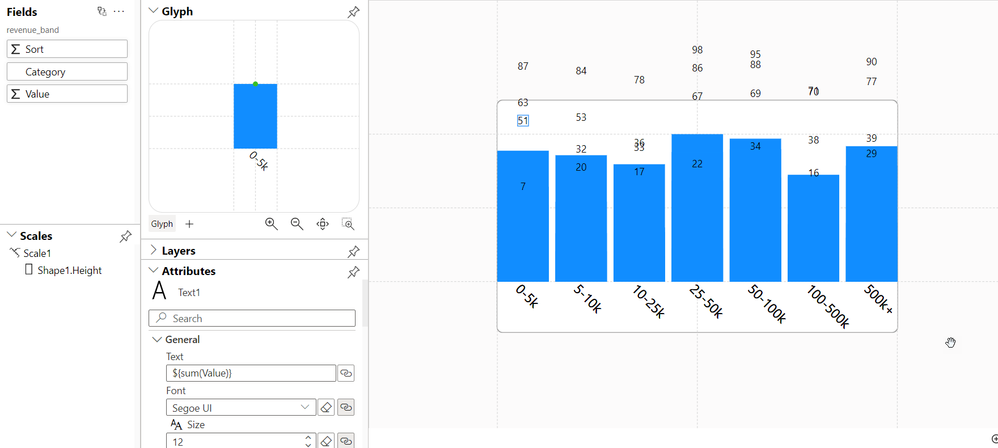
I am encountering a strange bug with charticulator when i try and place text objects. I am trying to create data labels for a simple bar chart.  When I place the text mark on the page, instead of getting one text object, I get an object for every data value for that category. 


I created sample data to build this chart, there are 4 values for every category. In the chart below, for category "0-5k", instead of seeing the sum of those 4 values, charticulator just lists every value. I am not sure if this is a bug or something I am doing wrong.


Any assistance will be appreciated.


Charticulator.png

0 REPLIES 0

Helpful resources

Announcements
Power BI DataViz World Championships

Power BI Dataviz World Championships

Vote for your favorite vizzies from the Power BI World Championship submissions!

Sticker Challenge 2026 Carousel

Join our Community Sticker Challenge 2026

If you love stickers, then you will definitely want to check out our Community Sticker Challenge!

January Power BI Update Carousel

Power BI Monthly Update - January 2026

Check out the January 2026 Power BI update to learn about new features.

FabCon Atlanta 2026 carousel

FabCon Atlanta 2026

Join us at FabCon Atlanta, March 16-20, for the ultimate Fabric, Power BI, AI and SQL community-led event. Save $200 with code FABCOMM.

Top Solution Authors
Top Kudoed Authors