cancel
Showing results for 
Search instead for 
Did you mean: 

We've captured the moments from FabCon & SQLCon that everyone is talking about, and we are bringing them to the community, live and on-demand. Starts on April 14th. Register now

Reply
Anonymous
Not applicable

DAX Divide in a Measure with Variables

Hello.

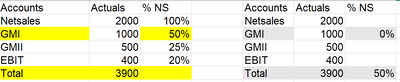
I would like some help with regards to the following %NS measure. %NS measure is a division of Accounts Value per Netsales. I want to create the first table and instead I am getting the second.  The %NS for GMI is calculated correctly but appears only under Total and in the GMI row I am getting 0%. Please find below the measure that I have created. Any advice will be really appreciated. Thanks in advance.

Result.PNG

%NS PER =

VAR Netsales=  CALCULATE (

                SUMX(Table;Table[Value]);

                FILTER(Table;Table[Account]="Net Sales");REMOVEFILTERS(Table[Account]))


Var GMI= CALCULATE (

                SUMX(Table;Table[Value]);

                FILTER(Table;Table[Account]="GMI");REMOVEFILTERS(Table[Account]))


RETURN

DIVIDE(GMI;Netsales;0)

4 REPLIES 4
Jihwan_Kim
Super User
Super User

Hi,

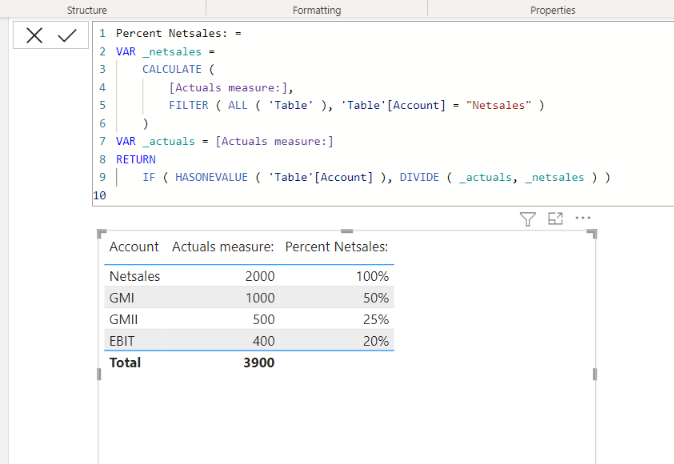
I am not sure if I understood your question correctly, but please check the below picture and the attached pbix file.


Jihwan_Kim_0-1674218352588.png


Actuals measure: = 
SUM( 'Table'[Actuals] )


Percent Netsales: =
VAR _netsales =
    CALCULATE (
        [Actuals measure:],
        FILTER ( ALL ( 'Table' ), 'Table'[Account] = "Netsales" )
    )
VAR _actuals = [Actuals measure:]
RETURN
    IF ( HASONEVALUE ( 'Table'[Account] ), DIVIDE ( _actuals, _netsales ) )


If this post helps, then please consider accepting it as the solution to help other members find it faster, and give a big thumbs up.


Click here to visit my LinkedIn page

Anonymous
Not applicable

Hi, Thanks for the answer but it is not working for my model. I have simplified it and provided only one table but I have a Date table and Account as well that are connected with my Table. I have tried to adapt your solution and instead of ALL, used ALLSELECTED as I want my table to get updated according to user selection-filters on Info (monthly values or not), Year and Month. As you can see below the problem is now that is working only for Netsales and not for the rest Accounts. Moreover, in contrast with your Netsales my Netsales are only being calculated for Account =Netsales but wanted to get the same Netsales value in all rows. I have attached my new variable along with the result that it brings back. Any help will be much appreciated.


Result2.PNG

%NS PER =
VAR Netsales=  CALCULATE (
                [Actuals PER];
               ALLSELECTED(Table[Info];Table[Month];Table[Year]);filter(Table;Table[Account]="Net Sales"))

VAR _actuals=[Actuals PER]
RETURN
    IF ( HASONEVALUE ( Table[Account] );DIVIDE(_actuals;Netsales))

Hi,

Please share your pbix file's link, and then I can try to look into it.

Thanks.


If this post helps, then please consider accepting it as the solution to help other members find it faster, and give a big thumbs up.


Click here to visit my LinkedIn page

amitchandak
Super User
Super User

@Anonymous , try like


%NS PER =

VAR Netsales= CALCULATE (

SUMX(Table;Table[Value]);

FILTER(all(Table[Account]) ;Table[Account]="Net Sales"))


Var GMI= CALCULATE (

SUMX(Table;Table[Value]);

FILTER(all(Table[Account]);Table[Account]="GMI"))
RETURN

DIVIDE(GMI;Netsales;0)


If this does not help
Can you share sample data and sample output in table format? Or a sample pbix after removing sensitive data.

Share with Power BI Enthusiasts: Full Power BI Video (20 Hours) YouTube
Microsoft Fabric Series 60+ Videos YouTube
Microsoft Fabric Hindi End to End YouTube

Helpful resources

Announcements
New to Fabric survey Carousel

New to Fabric Survey

If you have recently started exploring Fabric, we'd love to hear how it's going. Your feedback can help with product improvements.

Power BI DataViz World Championships carousel

Power BI DataViz World Championships - June 2026

A new Power BI DataViz World Championship is coming this June! Don't miss out on submitting your entry.

Join our Fabric User Panel

Join our Fabric User Panel

Share feedback directly with Fabric product managers, participate in targeted research studies and influence the Fabric roadmap.