Forum Discussion

Google sheet
Is there any way to create a powerbi report by accessing data from Google sheet?
4 Replies
- andreMemorable Member
Generally speaking, there is not good way today. However, there is a hack that works sometimes.
This is the only way that I was able to do it and it only works if you only have a single sheet in your spreadsheet.
- Go to your Google spreadsheet document
- Click on Blue button in the top right hand corner that says Share on in
- Generate a shareable link but make sure to select Can View option from a drop down
- User that link as a source for your Power Query using the "From Web Option"
- if you are lucky it should work, but with more complicated spreadsheets with graphics and multiple worksheets it may not work.
- konstantinosMemorable Member
Not tested in PowerBI if is refreshable but the solution andre descibes , working on excel in Desktop. I have more than 3 excel data models working & refreshing with Googlesheets. One thing to keep in mind is that the Google spreedsheets (new ) allows you to connect & view the data only from the first sheet.
- konstantinosMemorable Member
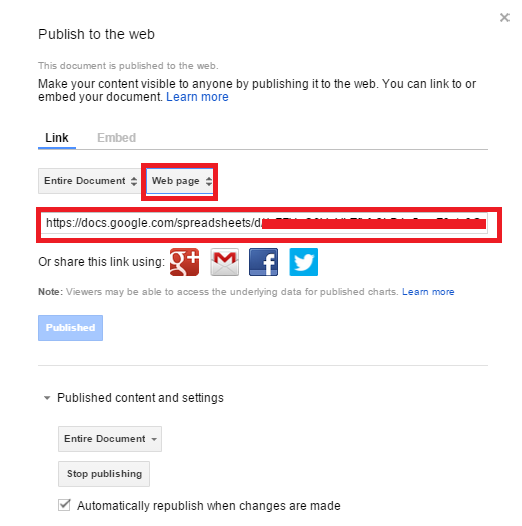
Actually, in googlesheets File-> Publish to Web and on the window open copy the link after you change the format from web page to excel .xlsx