Forum Discussion

rkbnair
11 years agoNew Member
Google sheet
Is there any way to create a powerbi report by accessing data from Google sheet?

andre
11 years agoMemorable Member
Generally speaking, there is not good way today. However, there is a hack that works sometimes.
This is the only way that I was able to do it and it only works if you only have a single sheet in your spreadsheet.
- Go to your Google spreadsheet document
- Click on Blue button in the top right hand corner that says Share on in
- Generate a shareable link but make sure to select Can View option from a drop down
- User that link as a source for your Power Query using the "From Web Option"
- if you are lucky it should work, but with more complicated spreadsheets with graphics and multiple worksheets it may not work.

konstantinos
11 years agoMemorable Member
Not tested in PowerBI if is refreshable but the solution andre descibes , working on excel in Desktop. I have more than 3 excel data models working & refreshing with Googlesheets. One thing to keep in mind is that the Google spreedsheets (new ) allows you to connect & view the data only from the first sheet.
- konstantinos11 years agoMemorable Member
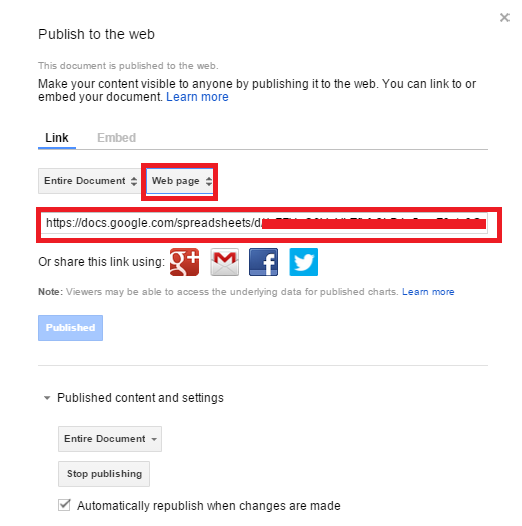
Actually, in googlesheets File-> Publish to Web and on the window open copy the link after you change the format from web page to excel .xlsx
 Anonymous9 years agoNot applicable
konstantinos Thanks your solution worked perfectly for me