cancel
Showing results for 
Search instead for 
Did you mean: 

Get Fabric Certified for FREE during Fabric Data Days. Don't miss your chance! Request now

Reply
Anonymous
Not applicable

Measure in table not filtering detail table

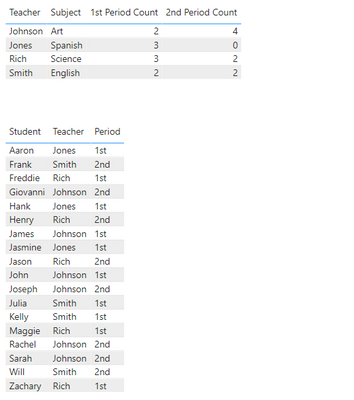
I have a page on my report containing two tables. The top table contains a list of all the teachers and various data about them, but also a few columns with measures counting the number students in each of their classes. For example a column for first period count, second period count, and so on. The bottom table contains a list of all of the students, with a column for period and teacher to show which teacher they have which period.


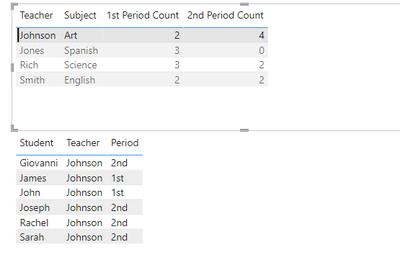
I would like for when I click on the top table cell for a class count, the bottom table filters to just the students in that class with that teacher. Right now when I click on the cell it filters to all of the students who have that teacher at any point, regardless of class. Does anyone know how to do this?


Currently this is how the page looks:

NVanderwest_0-1685563329483.png

And this is what it looks like when I click on Johnson's 1st Period Count:

NVanderwest_1-1685563455382.png


0 REPLIES 0

Helpful resources

Announcements
November Power BI Update Carousel

Power BI Monthly Update - November 2025

Check out the November 2025 Power BI update to learn about new features.

Fabric Data Days Carousel

Fabric Data Days

Advance your Data & AI career with 50 days of live learning, contests, hands-on challenges, study groups & certifications and more!

FabCon Atlanta 2026 carousel

FabCon Atlanta 2026

Join us at FabCon Atlanta, March 16-20, for the ultimate Fabric, Power BI, AI and SQL community-led event. Save $200 with code FABCOMM.