cancel
Showing results for 
Search instead for 
Did you mean: 

The Power BI Data Visualization World Championships is back! Get ahead of the game and start preparing now! Learn more

Reply
gonzna3
Frequent Visitor

unable to pin tiles to dashboard

When pinning a tile from any of my dashboards, I get the following error: 


Sorry, can't pin this visualization yet. Please try again later.

We're working on this feature. Please send us any other feedback about Power BI.


It has been a week that i am unable to pin any tiles to an existing dashboard or in the current workspace.

But if i create a new workspace it works fine.


Need help ASAP!

1 ACCEPTED SOLUTION
gonzna3
Frequent Visitor

I ended up "fixing it" by deleting the report & dataset from the web version, then going into the desktop version removing cache in the power bi report then publishing again. This seems to work now for me and the dashboard is working so far.


View solution in original post

4 REPLIES 4
gonzna3
Frequent Visitor

I ended up "fixing it" by deleting the report & dataset from the web version, then going into the desktop version removing cache in the power bi report then publishing again. This seems to work now for me and the dashboard is working so far.


Hi @gonzna3,


Sorry for the delay update.


Confirmed by PG, the issue has been fixed.


If you could pin tiles to dashboard now, please accept the replies making sense as solution to your question so that people who may have the same question can get the solution directly.


Best Regards,

Cherry

Community Support Team _ Cherry Gao
If this post helps, then please consider Accept it as the solution to help the other members find it more quickly.

Hi @gonzna3,


This could be a good workaround now for this issue. It's glad that you could fix it in this way.


Please always accept the replies making sense as solution to your question so that people who may have the same question can get the solution directly.


Best  Regards,

Cherry

Community Support Team _ Cherry Gao
If this post helps, then please consider Accept it as the solution to help the other members find it more quickly.
v-piga-msft
Resident Rockstar
Resident Rockstar

Hi @gonzna3,


Sorry for that. 


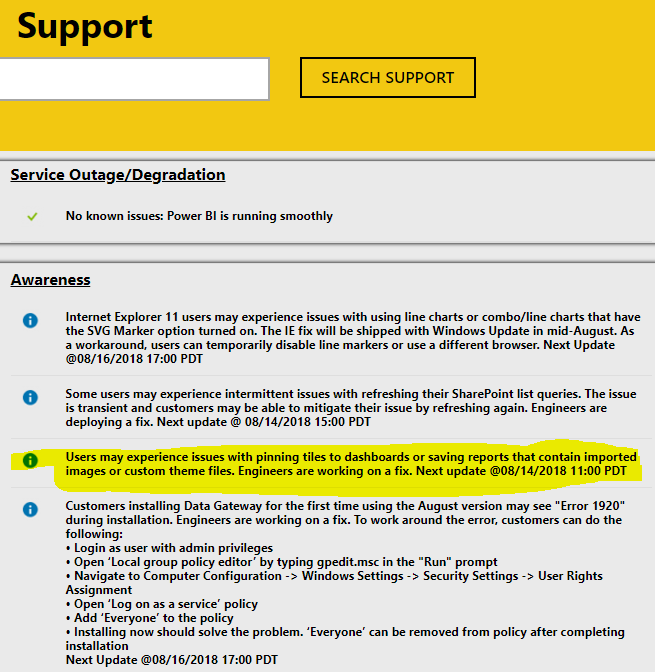
This is a known issue where you could find it in Power BI Support. Our engineers are working on a fix.


support.PNG


Best Regards,

Cherry

Community Support Team _ Cherry Gao
If this post helps, then please consider Accept it as the solution to help the other members find it more quickly.

Helpful resources

Announcements
Power BI DataViz World Championships

Power BI Dataviz World Championships

The Power BI Data Visualization World Championships is back! Get ahead of the game and start preparing now!

December 2025 Power BI Update Carousel

Power BI Monthly Update - December 2025

Check out the December 2025 Power BI Holiday Recap!

FabCon Atlanta 2026 carousel

FabCon Atlanta 2026

Join us at FabCon Atlanta, March 16-20, for the ultimate Fabric, Power BI, AI and SQL community-led event. Save $200 with code FABCOMM.