FabCon is coming to Atlanta
Join us at FabCon Atlanta from March 16 - 20, 2026, for the ultimate Fabric, Power BI, AI and SQL community-led event. Save $200 with code FABCOMM.
Register now!- Power BI forums
- Get Help with Power BI
- Desktop
- Service
- Report Server
- Power Query
- Mobile Apps
- Developer
- DAX Commands and Tips
- Custom Visuals Development Discussion
- Health and Life Sciences
- Power BI Spanish forums
- Translated Spanish Desktop
- Training and Consulting
- Instructor Led Training
- Dashboard in a Day for Women, by Women
- Galleries
- Data Stories Gallery
- Themes Gallery
- Contests Gallery
- QuickViz Gallery
- Quick Measures Gallery
- Visual Calculations Gallery
- Notebook Gallery
- Translytical Task Flow Gallery
- TMDL Gallery
- R Script Showcase
- Webinars and Video Gallery
- Ideas
- Custom Visuals Ideas (read-only)
- Issues
- Issues
- Events
- Upcoming Events
The Power BI Data Visualization World Championships is back! Get ahead of the game and start preparing now! Learn more
- Power BI forums
- Forums
- Get Help with Power BI
- Service
- refresh failed since June's update. with error: We...
- Subscribe to RSS Feed
- Mark Topic as New
- Mark Topic as Read
- Float this Topic for Current User
- Bookmark
- Subscribe
- Printer Friendly Page


- Mark as New
- Bookmark
- Subscribe
- Mute
- Subscribe to RSS Feed
- Permalink
- Report Inappropriate Content
refresh failed since June's update. with error: We cannot convert the value "[Table]" to type Table.
worry about monthly update: don't know what will be wrong again!
After June's update, a couple of scheduled refreshe failed, with error message: We cannot convert the value "[Table]" to type Table.. The exception was raised by the IDataReader interface
very simple just a merge caused issue. the merge is successful in Power BI desktop, only faied with refresh in service.
the merge table is from a dataflow.
code:
Source = _filepath_POV_13_2021,
#"Filtered Rows" = Table.SelectRows(Source, each ([Name] = "POV_PBI_Intl.TI")),
#"Removed Other Columns" = Table.SelectColumns(#"Filtered Rows",{"Data"}),
#"Expanded Data" = Table.ExpandTableColumn(#"Removed Other Columns", "Data", {"EntityCode", "Year", "AccountCode", "CountryCode", "AdjustmentType", "Basket", "Subbasket", "FCAmount", "TaxAmount", "Date"}, {"EntityCode", "Year", "AccountCode", "CountryCode", "AdjustmentType", "Basket", "Subbasket", "FCAmount", "TaxAmount", "Date"}),
#"Changed Type" = Table.TransformColumnTypes(#"Expanded Data",{{"EntityCode", type text}, {"Year", Int64.Type}, {"AccountCode", type text}, {"CountryCode", type text}, {"Basket", type text}, {"Subbasket", type text}, {"FCAmount", Int64.Type}, {"TaxAmount", Int64.Type}, {"AdjustmentType", type text}, {"Date", type date}}),
#"Filtered <>DOMFTI" = Table.SelectRows(#"Changed Type", each ([AccountCode] <> "DOMFTI")),
#"Merged Queries" = Table.NestedJoin(#"Filtered <>DOMFTI", {"EntityCode"}, CHEV21, {"Entity Code"}, "CHEV21", JoinKind.LeftOuter)
in
#"Merged Queries"
CHEV21 is from dataflow,
let
Source = PowerBI.Dataflows(null),
#"...-0f5e00a035f0" = Source{[workspaceId="...-0f5e00a035f0"]}[Data],
#"...-1a0ef9b18495" = #"...-0f5e00a035f0"{[dataflowId="...-1a0ef9b18495"]}[Data],
CHEV1 = #"...-1a0ef9b18495"{[entity="CHEV21"]}[Data]
in
CHEV1
thanks for help, those are critical business documentation, it worked for long time, now corrupted.
Celine ZHANG
Solved! Go to Solution.
- Mark as New
- Bookmark
- Subscribe
- Mute
- Subscribe to RSS Feed
- Permalink
- Report Inappropriate Content
Hi Selina,
it works again since yesterday afternoon (Pacific Time).
thanks,
Celine ZHANG
- Mark as New
- Bookmark
- Subscribe
- Mute
- Subscribe to RSS Feed
- Permalink
- Report Inappropriate Content
Hi Selina,
Thanks for following up my issue.
It happens only with Power BI service, with Power BI desktop it works perfectly.
I created a very simple testing/debug dataset, only to test this issue, it happens all the time just with this merge, delete the merge line, no issue.
Thanks for helping, it’s disturbing our business process/reports.
- Mark as New
- Bookmark
- Subscribe
- Mute
- Subscribe to RSS Feed
- Permalink
- Report Inappropriate Content
Hi @lotus99 ,
I find the reason why the issue happens with line merged.
For incremental refresh, it needs to meet some basic requirements, one of which is that the data source needs to be able to support query folder. But I checked the limits of the query folder and was surprised to find that merging would prevent it, as you did, if you performed the merge, the incremental refresh would fail, and canceling would work fine.

The following is the related docs, limitations about query folder are in the first doc, you can refer it for more information, the second doc is about incremental refresh, including its process and basic requirements.
Query folding - Power Query | Microsoft Docs
Incremental refresh for datasets and real-time data in Power BI - Power BI | Microsoft Docs
Best regards,
Community Support Team Selina zhu
If this post helps, then please consider Accept it as the solution to help the other members find it more quickly
- Mark as New
- Bookmark
- Subscribe
- Mute
- Subscribe to RSS Feed
- Permalink
- Report Inappropriate Content
Hi Selina ,
thanks for the investigation.
I don't perform incremental refresh, just regular simple refresh.
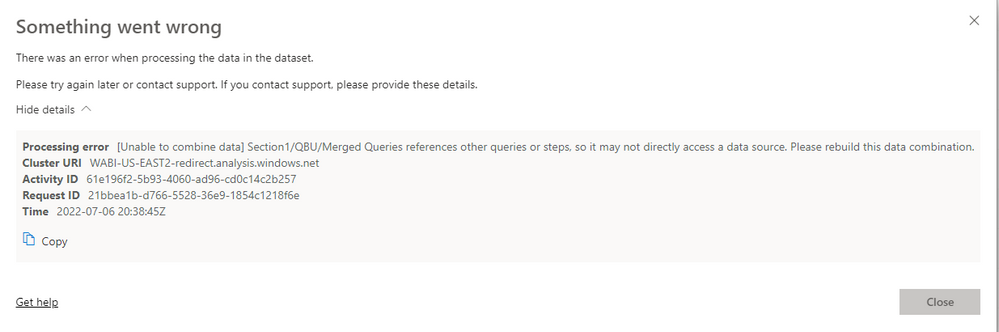
I'm puzzled from when to merge data, we need care about their source, need to be directly accessed?
the previousely sliced and diced data done in dataflow, cannot be merged with Excel data from SharePoint?
- Mark as New
- Bookmark
- Subscribe
- Mute
- Subscribe to RSS Feed
- Permalink
- Report Inappropriate Content
Hi @lotus99 ,
Did you succeed in refreshing in power bi desktop?
I find one blog and the reason leading to your error is as the following says, so do you combine an external data source?
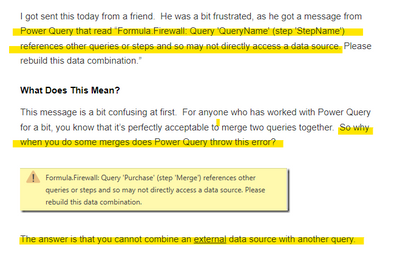
And from your error, it says that your merge queries have something wrong, so may be you need to check your query.
In the following docs , there has related solution to solve this error, you can refer to it and try.
Power Query Errors: Please Rebuild This Data CombinationThe Excelguru Blog
If it doesn't work , you can think about putting every stages used for the query in a single BIG query.
Solved: Refresh problem - Unable to combine data - Microsoft Power BI Community
Best regards,
Community Support Team Selina zhu
If this post helps, then please consider Accept it as the solution to help the other members find it more quickly
- Mark as New
- Bookmark
- Subscribe
- Mute
- Subscribe to RSS Feed
- Permalink
- Report Inappropriate Content
Hi Selina,
it works again since yesterday afternoon (Pacific Time).
thanks,
Celine ZHANG
- Mark as New
- Bookmark
- Subscribe
- Mute
- Subscribe to RSS Feed
- Permalink
- Report Inappropriate Content
Hi @lotus99 ,
Do you mean that your problem has been solved? If so, I am really very happy. Did it recover on its own or did you use some ways?
Would you be willing to tell me your method so that I can learn more?
Best regards,
Community Support Team Selina zhu
If this post helps, then please consider Accept it as the solution to help the other members find it more quickly
- Mark as New
- Bookmark
- Subscribe
- Mute
- Subscribe to RSS Feed
- Permalink
- Report Inappropriate Content
Hi @lotus99 ,
Do you mean that your problem has been solved? If so, I am really very happy. Did it recover on its own or did you use some ways?
Would you be willing to tell me your method so that I can learn more?
Best regards,
Community Support Team Selina zhu
If this post helps, then please consider Accept it as the solution to help the other members find it more quickly

- Mark as New
- Bookmark
- Subscribe
- Mute
- Subscribe to RSS Feed
- Permalink
- Report Inappropriate Content
Hi @lotus99 ,
Have you tried to refresh your data in power bi desktop, does it refresh normally? What data source are you using?
If the issue only occurs on Power BI service, but not on Power BI Desktop, have you tried removing the entire dataset from Power BI service first, then republishing it from Power BI Desktop to see if it works?
Best regards,
Community Support Team Selina zhu
If this post helps, then please consider Accept it as the solution to help the other members find it more quickly
Helpful resources

Power BI Monthly Update - November 2025
Check out the November 2025 Power BI update to learn about new features.

Fabric Data Days
Advance your Data & AI career with 50 days of live learning, contests, hands-on challenges, study groups & certifications and more!

FabCon Atlanta 2026
Join us at FabCon Atlanta, March 16-20, for the ultimate Fabric, Power BI, AI and SQL community-led event. Save $200 with code FABCOMM.


