cancel
Showing results for 
Search instead for 
Did you mean: 

Get Fabric Certified for FREE during Fabric Data Days. Don't miss your chance! Request now

Reply
LeoST
Frequent Visitor

"Featured Table" Lookup in Excel doesn't Find anything

Hello,


I've trubbels getting the "Featured Table" options to work at all.

I've set up a test table that looks like this:

LeoST_0-1644835680611.png

Then I configured the table as a "Featured Table" like this:

LeoST_1-1644835710754.png

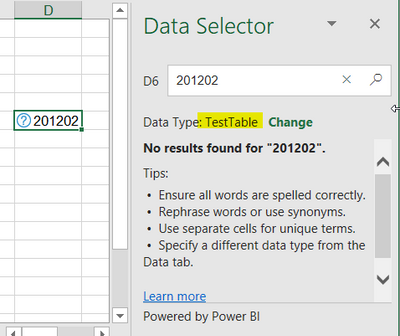
But when I use it, it doesn't find anything at all:

LeoST_2-1644835734744.png

The value is clearly in the table, but no matter what it will not find it. First I thought the table might be to big but then I created this test table with sill having this issue.

Am I missing something?


Thanks!

1 ACCEPTED SOLUTION
LeoST
Frequent Visitor

Update/Solution: I just waited an hour and now it works fine. Seems like PBI just needs a bit of processing time.

View solution in original post

2 REPLIES 2
LeoST
Frequent Visitor

Update/Solution: I just waited an hour and now it works fine. Seems like PBI just needs a bit of processing time.

Rudz
Kudo Collector
Kudo Collector

Thank you! I still have hair left thanks to you.


I have also learned to restart Excel after publishing. Certain changes are only picked up when you start Excel.

Helpful resources

Announcements
November Power BI Update Carousel

Power BI Monthly Update - November 2025

Check out the November 2025 Power BI update to learn about new features.

Fabric Data Days Carousel

Fabric Data Days

Advance your Data & AI career with 50 days of live learning, contests, hands-on challenges, study groups & certifications and more!

FabCon Atlanta 2026 carousel

FabCon Atlanta 2026

Join us at FabCon Atlanta, March 16-20, for the ultimate Fabric, Power BI, AI and SQL community-led event. Save $200 with code FABCOMM.

Top Solution Authors
Top Kudoed Authors