Forum Discussion

davebates's avatar
davebates
Regular Visitor
8 years ago
Solved

dates on dashboard

help please. I cannot download the desktop version so use the browser version. I am trying to create a dashboad with one of the charts a line chart from an excel spreadsheet of £s over certain periods. In the spreadsheet the periods are month end dates date/month/year eg 31 Jan 2017. When i select the periods for the x axis they appear as month/date/year and the October period appears after the January period. The dates also carry a time format 12.00.00 AM.


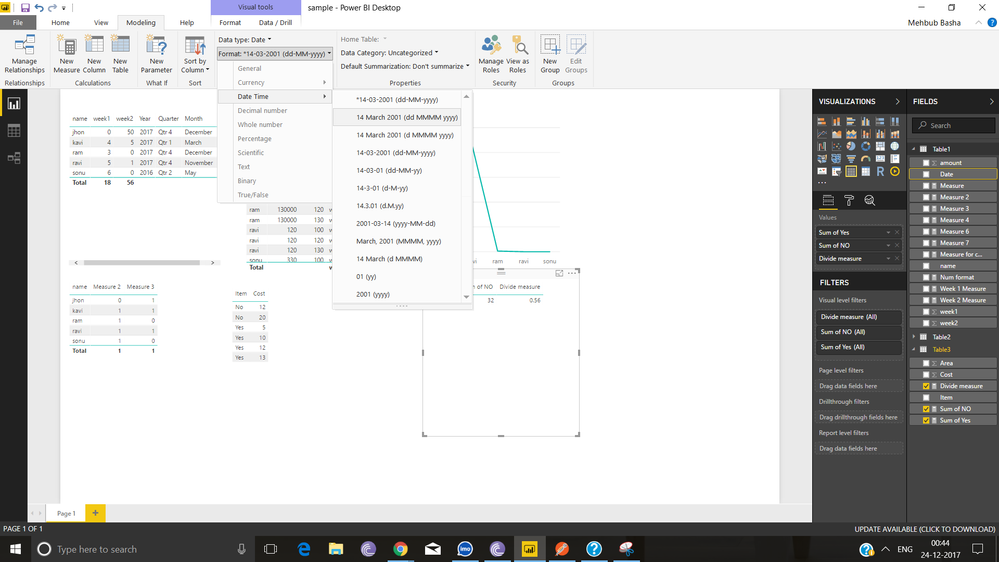
How do I reformat the dates to be date/moth/year and be recognised as dates.


any help would be appreciated

  • Hi davebates,


    I'm afraid you need the Power BI Desktop. If you want the feature editing in the Service, please create an idea here.


    Best Regards,

    Dale

5 Replies

  • Hi davebates,


    Please follow the below screen shot. You will understand and you can format the date as you have many options,


    If your issue reolved. Please give a like(kudo) to my answer and accept this anser as Solution accepted


    Regards,

    Mehbub

    • davebates's avatar
      davebates
      Regular Visitor

      thanks for the reply. I am not using the Desk top version. Do you know any other way

      • v-jiascu-msft's avatar
        v-jiascu-msft
        Icon for Microsoft Employee rankMicrosoft Employee

        Hi davebates,


        I'm afraid you need the Power BI Desktop. If you want the feature editing in the Service, please create an idea here.


        Best Regards,

        Dale