cancel
Showing results for 
Search instead for 
Did you mean: 

The Power BI Data Visualization World Championships is back! Get ahead of the game and start preparing now! Learn more

Reply
Nari1998
Helper II
Helper II

Viewing who has access to shared Power BI dashboard

Hi,


I have had a link shared of a power bi dashboard which is outside of my organization. The owner wants to see and know who have access to the dashboard and which roles and permissions. However i dont see anyone other than the owner having access to the file, but he said that other people are accessing it.

What is the fix to this issue to be able to determine who have access to the dashboard and with which roles/permission?


I hope to hear from you soon.

Thanks.

4 REPLIES 4
ibarrau
Super User
Super User

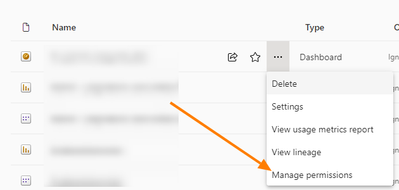
Hi. The users who have permission to a dashboard can be checked in two places. First, check people at the workspace those users will have view access to all the content. If you have PowerBi App you should check in there too. Then you can check for the specific dashboard if you click three dots and "manage permission"


ibarrau_0-1697545694229.png


You should see in there specific people that can view the dashboard. Pay attention to the "Permission" column because if they have "all permission" or "reshare", consider that the user can share the dashboard without asking additional permission and I can be reshared again.

I hope that helps,


If this post helps, then please consider Accept it as the solution to help the other members find it more quickly.

Happy to help!

LaDataWeb Blog

Hi @ibarrau thanks for the information. I'm aware of it, but the user claims it is shared with others but when i went into manage permission, i saw no one except for the user that shared it (who is the owner of it). What can it be?

Regarding dashboards those two are the only ways of sharing with Power Bi. An alternative would be if you have a web app embedding conent. Dashboards have more limitations for sharing.

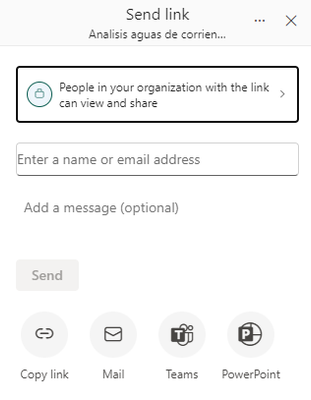
Unless you are talking about reports because reports can create links for the whole organization when sharing:

ibarrau_0-1697549117225.png

But you could check that at the manage permission anyway, so you should ask for evidence or screen of a user and what are they actually seen in order to understand what's going on.

I hope that helps,


If this post helps, then please consider Accept it as the solution to help the other members find it more quickly.

Happy to help!

LaDataWeb Blog

Thanks, will do that!

Helpful resources

Announcements
Power BI DataViz World Championships

Power BI Dataviz World Championships

The Power BI Data Visualization World Championships is back! Get ahead of the game and start preparing now!

December 2025 Power BI Update Carousel

Power BI Monthly Update - December 2025

Check out the December 2025 Power BI Holiday Recap!

FabCon Atlanta 2026 carousel

FabCon Atlanta 2026

Join us at FabCon Atlanta, March 16-20, for the ultimate Fabric, Power BI, AI and SQL community-led event. Save $200 with code FABCOMM.