Don't miss your chance to take the Fabric Data Engineer (DP-600) exam for FREE! Find out how by attending the DP-600 session on April 23rd (pacific time), live or on-demand.
Learn moreNext up in the FabCon + SQLCon recap series: The roadmap for Microsoft SQL and Maximizing Developer experiences in Fabric. All sessions are available on-demand after the live show. Register now
Hi,
I have created an usage metrics but it is not getting updated, please help how can I set it up.
Thanks !
Solved! Go to Solution.
Hi, @raassd
According to your description, the useage metrics you created did not refresh the data. Right?
You can check the following aspects:
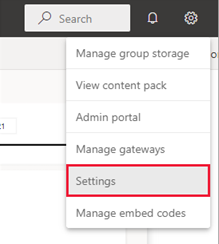
(1)When you first launch the usage metrics report, Power BI automatically creates a Usage Metrics Report dataset. The usage metrics report relies on that dataset. Power BI then refreshes this dataset daily. Although you can't change the refresh schedule, you can update the credentials that Power BI uses to refresh the usage metrics data.If you want to refresh this dataset yourself, you can try using the REST API.
(2)If dataset owners in your workspace leave, are no longer a part of your organization, or if the credentials expire, the datasets may become stale and refreshes may fail. In such cases, you can use the following procedure to take over a Usage Metrics Report dataset and update the credentials.
Open the workspace that contains the report for which you want to update the Usage Metrics Report dataset.
Switch to the Datasets tab.
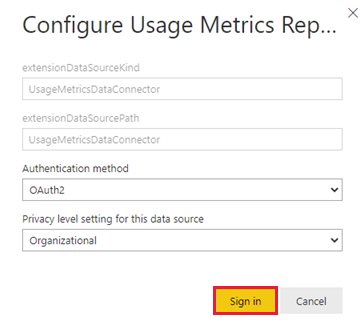
Select the Take over button, then in the Take over dataset settings dialog box, select Take over again.
8.Complete the sign-in sequence and note the notification that the data source was updated successfully.
You can refer to the following documentation:
Best Regards,
Aniya Zhang
If this post helps, then please consider Accept it as the solution to help the other members find it more quickly
Datasets - Refresh Dataset - REST API (Power BI Power BI REST APIs) | Microsoft Learn
Use this page to refresh via api. 202 code is async positive signal.
Hi, @raassd
According to your description, the useage metrics you created did not refresh the data. Right?
You can check the following aspects:
(1)When you first launch the usage metrics report, Power BI automatically creates a Usage Metrics Report dataset. The usage metrics report relies on that dataset. Power BI then refreshes this dataset daily. Although you can't change the refresh schedule, you can update the credentials that Power BI uses to refresh the usage metrics data.If you want to refresh this dataset yourself, you can try using the REST API.
(2)If dataset owners in your workspace leave, are no longer a part of your organization, or if the credentials expire, the datasets may become stale and refreshes may fail. In such cases, you can use the following procedure to take over a Usage Metrics Report dataset and update the credentials.
Open the workspace that contains the report for which you want to update the Usage Metrics Report dataset.
Switch to the Datasets tab.
Select the Take over button, then in the Take over dataset settings dialog box, select Take over again.
8.Complete the sign-in sequence and note the notification that the data source was updated successfully.
You can refer to the following documentation:
Best Regards,
Aniya Zhang
If this post helps, then please consider Accept it as the solution to help the other members find it more quickly
I have updated the credentials but it still won't automatically restart the refresh schedule.
And without access to the semantic model I cannot trigger it myself.
How am I meant to restart the schedule??
Thanks for your reply,
I dont have my solution for my problem in the above link.
I dont have permissions to raise the compliant ticket.
Thanks !
@raassd You could check the Issues forum here:
https://community.powerbi.com/t5/Issues/idb-p/Issues
And if it is not there, then you could post it.
If you have Pro account you could try to open a support ticket. If you have a Pro account it is free. Go to https://support.powerbi.com. Scroll down and click "CREATE SUPPORT TICKET".
If you have recently started exploring Fabric, we'd love to hear how it's going. Your feedback can help with product improvements.
A new Power BI DataViz World Championship is coming this June! Don't miss out on submitting your entry.
Share feedback directly with Fabric product managers, participate in targeted research studies and influence the Fabric roadmap.