Forum Discussion

 Helper V
True/False Filter is now 0/-1 ???
Something odd happened today to a solution that has been working fine.
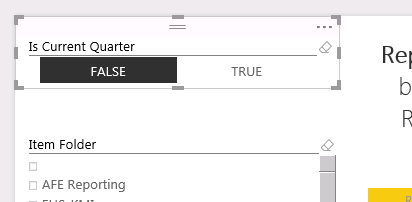
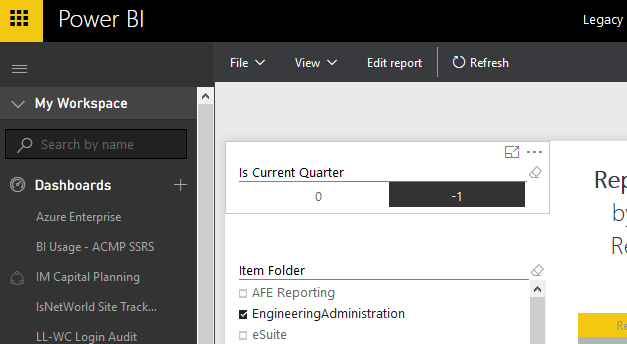
Note the horizontal slicer. It is "TRUE" and "FALSE" in PBID. When published to PowerBI.com, it becomes "0" and "-1"
Happening to others?
Evogelpohl is this still a problem? Powerbi service having gone through few updates can you pls check and see if issue still exists.
Looks fixed for me. I just created a conditional column that results in a Logical (TRUE or FALSE). It displays correctly in the service.

22 Replies
 BarbelRegular Visitor
It's 2018 and this still hasn't been fixed. How is it possible??
 AnonymousNot applicable
August 2019 and we're still getting that issue :smileysad:
 JargerBiirliFrequent Visitor
Probably related: I have a table visual showing a value that is originally boolean, but which I have set to show as an integer from Column Tools. Now, this works fine initially, with True becoming 1 and False 0. However, when I refresh the data, all the 1s suddenly become -1. If I switch the column back to True/False and then back to integer again, the values revert to 0 and 1. Seems like a bug to me.
- AnonymousNot applicable
2nd August 2022: Problem persist. Funny and strange
- NataschaFrequent Visitor
I have the same issue here.
 tonyb9000New Member
Still getting that issue! For context for others - the reason I want to use whole number instead of boolean is because it allows me to use Conditional Formatting in a table. Conditional formatting in the table does not work with Booleans unless I use the 'COUNT' option, which of course is 1 for every row, regardless of whether it's true or false.
- mnchicaFrequent Visitor
Still having this same issue, even after the January 2025 updates. This is so frustrating!
- Vance_TsaiNew Member
It's Aug 2020 STILL a problem!
If you wanna fix this, try to use boolen type in your True/False column not use txt type.
- NataschaFrequent Visitor
Tried the Boolean option but then the dataset shows TRUE/FALSE but my report only has filter option TRUE ...
 nmbalverenRegular Visitor
It's happening to my reports when i want to show a chart with only the results of days in the current or previous week. Power M function Date.IsInCurrentWeek or Date.IsInPreviousWeek shows 0 or -1 instead of true or false in powerBI Desktop. This is really annoying when charts are not visible for the end user. Microsoft, is it possible to fix this!
- ankitpatira
Community Champion
Evogelpohl is this still a problem? Powerbi service having gone through few updates can you pls check and see if issue still exists.
 reinhart97New Member
ankitpatiraThis is still a problem and it appears to be a bug as it looks fine in the Power BI Desktop software however, the online version shows -1 and 0 for TRUE or FALSE. I hope Microsoft plans to fix this as I have way too many connections to have to create a conditional column for each one.
- AbhiSSRS
Solution Sage
This is still an issue! Would really help if this is looked at my Microsoft!
- rockymtnrajahFrequent Visitor
The issue comes from when you have a column with TRUE/FALSE values and you leave its column type as text. During authoring in PBI-Desktop, everything works fine and PBI-desktop lets you use that field as a filter and it shows you the true/false values.
The same report continues to work fine after you publish it to PowerBi.com
The problem occurs right after a refresh is initiated in PBI.com. After that, what shows up as True/False suddenly shows up as 0/-1.
This difference in behavior between PBI-desktop and PBI.com has caused multiple teams at my company a lot of wasted hours trying to troubleshoot why its happening.
Seems like a bug to me.
Another observation: when you leave the column as text and PBI.com performs an automatic translation to 0/-1, the refresh takes a lot longer. In my case, locally the report refreshed in under 10 minutes. A refresh in PBI.com would take 30 minutes. Having fixed the issue, it now takes only 15 minutes. Very odd behavioral difference between PBI-DT and PBI.com
- AnonymousNot applicable
2nd August 2022: Problem persist. Funny and strange
 Evogelpohl
Looks fixed for me. I just created a conditional column that results in a Logical (TRUE or FALSE). It displays correctly in the service.
- MatWebb
Advocate I
This still exists as a problem.
I have poured 10's of hours into trying to resolve this one until i realised it was changing 'TRUE' to -1!!
Strange that some people see this ad resolved for them while others (myself included) still see the problem?
Any mods out there know more about this one?
Mat


