FabCon is coming to Atlanta
Join us at FabCon Atlanta from March 16 - 20, 2026, for the ultimate Fabric, Power BI, AI and SQL community-led event. Save $200 with code FABCOMM.
Register now!- Power BI forums
- Get Help with Power BI
- Desktop
- Service
- Report Server
- Power Query
- Mobile Apps
- Developer
- DAX Commands and Tips
- Custom Visuals Development Discussion
- Health and Life Sciences
- Power BI Spanish forums
- Translated Spanish Desktop
- Training and Consulting
- Instructor Led Training
- Dashboard in a Day for Women, by Women
- Galleries
- Data Stories Gallery
- Themes Gallery
- Contests Gallery
- QuickViz Gallery
- Quick Measures Gallery
- Visual Calculations Gallery
- Notebook Gallery
- Translytical Task Flow Gallery
- TMDL Gallery
- R Script Showcase
- Webinars and Video Gallery
- Ideas
- Custom Visuals Ideas (read-only)
- Issues
- Issues
- Events
- Upcoming Events
Get Fabric Certified for FREE during Fabric Data Days. Don't miss your chance! Request now
- Power BI forums
- Forums
- Get Help with Power BI
- Service
- Re: Time Out Incremental refresh importing data fr...
- Subscribe to RSS Feed
- Mark Topic as New
- Mark Topic as Read
- Float this Topic for Current User
- Bookmark
- Subscribe
- Printer Friendly Page


- Mark as New
- Bookmark
- Subscribe
- Mute
- Subscribe to RSS Feed
- Permalink
- Report Inappropriate Content
Time Out Incremental refresh importing data from AWS Athena using SIMBA Athena 64 bit ODBC
My company has moved all of data tables from a windows server to AWS Cloud.
I used to be able to use an incremental refresh for a table that has 130 million rows and 8 columns of data , using a ODBC SQL Server connection connected to a SQL Server on a Windows Server. The initial import if published from desktop , would take approx 30 to 45 minutes .
The same table now in AWS connected via the Simba Athena ODBC driver , using ADFS , will not work , it just keeps timing out after 3 to 4 hours.
The most rows of data I have successfully got this to work is just 30 million rows.
This is a major blocker for my comapny as we have invested in a premium licence , which we assumed would enable us to work with larger datasets.
Has anybody experienced this issue and found a workaround please.

- Mark as New
- Bookmark
- Subscribe
- Mute
- Subscribe to RSS Feed
- Permalink
- Report Inappropriate Content
Hi, I am facing the same issue, can you please let know if any solution or work arounds?
- Mark as New
- Bookmark
- Subscribe
- Mute
- Subscribe to RSS Feed
- Permalink
- Report Inappropriate Content
Thankyou , I am trying to get an EC2 environment set up , when this is actioned , I will resume with my testing


- Mark as New
- Bookmark
- Subscribe
- Mute
- Subscribe to RSS Feed
- Permalink
- Report Inappropriate Content
Hi. Let's see. It might be a good idea to handle millions of rows with the properly engine. I mean that it is recommended to use a data warehouse like Snowflake for analytics query in millions of rows. Before jumping an think that is a PowerBi issue, you need to run performance test on your new environment. For example, how much time it takes to select * from the big table in S3 with Athena? if this takes hours, then it's now a PowerBi issue. (I mean select all the rows and not just limit 200).
On the other hand you need a data gateway to take that much data. Where are you hosting your gateway to use ODBC? have you installed the standard one? this might also take a lot of time if it's not on the same environment (an EC2 in AWS)
Last, I'm not sure you can do incremental refresh with Athena. I don't think the source has query folding that is required for that.
I hope that helps
Happy to help!
- Mark as New
- Bookmark
- Subscribe
- Mute
- Subscribe to RSS Feed
- Permalink
- Report Inappropriate Content
When I run the query from AWS web portal in Athena , it takes 35 minutes to run.
When publishing it to PowerBI I could only get the Personal GateWay to work , as it need my windows creds to be able to connect via ADFS.
I used the same personal gateway when connecting to the Remote SQL server , which worked.
The incremental refersh does appear to work fine , when I pull in 60 days of data which is about 8 million rows , the full refresh took 30 mins , and now the incremental refresh of 3 days of data takes about 8 mins.
- Mark as New
- Bookmark
- Subscribe
- Mute
- Subscribe to RSS Feed
- Permalink
- Report Inappropriate Content
Ok. Where is that personal gateway hosted? we need to be sure the movement of data is the faster and closer we can. I would say that it needs to be in the AWS cloud.
Are you completely sure you can't use a standard gateway? I'm not familiarized with ADFS but I have connected AWS without ADFS many times using standard gateway.
Regards
Happy to help!
- Mark as New
- Bookmark
- Subscribe
- Mute
- Subscribe to RSS Feed
- Permalink
- Report Inappropriate Content
The personal gateway is hosted on my laptop , when I attempt to connect with standard gateway I get this error
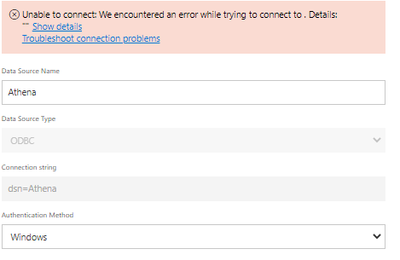
| Activity ID: | 57e58ea1-4961-42a0-aa27-d7ec23970ca9 |
| Request ID: | c1d0fca0-4344-620e-6969-0e305f0d1777 |
| Cluster URI: | https://wabi-us-east2-c-primary-redirect.analysis.windows.net/ |
| Status code: | 400 |
| Error Code: | DMTS_PublishDatasourceToClusterErrorCode |
| Time: | Thu Feb 17 2022 12:48:27 GMT+0000 (Greenwich Mean Time) |
| Service version: | 13.0.17665.52 |
| Client version: | 2202.1.09931-train |
| OPRA: | Invalid connection credentials. |
| Underlying error code: | -2147467259 |
| Underlying error message: | The credentials provided for the Odbc source are invalid. (Source at dsn=Athena.) |
| DM_ErrorDetailNameCode_UnderlyingHResult: | -2147467259 |
| Microsoft.Data.Mashup.CredentialError.DataSourceKind: | Odbc |
| Microsoft.Data.Mashup.CredentialError.DataSourcePath: | dsn=Athena |
| Microsoft.Data.Mashup.CredentialError.Reason: | AccessUnauthorized |
| Microsoft.Data.Mashup.MashupSecurityException.DataSources: | [{"kind":"Odbc","path":"dsn=Athena"}] |
| Microsoft.Data.Mashup.MashupSecurityException.Reason: | AccessUnauthorized |
- Mark as New
- Bookmark
- Subscribe
- Mute
- Subscribe to RSS Feed
- Permalink
- Report Inappropriate Content
We can talk about the connection later, but the problem here is that you have a gateway in your laptop. You are downloading millions of rows to your laptop and then uploading all over again. That's why you need an EC2 in AWS to install the gateway. Otherwise it will take a long time even if you have an amazing bandwith.
I would strongly suggest moving this to have 24hours a day support for refreshing and way more faster than a laptop.
Regards,
Happy to help!
- Mark as New
- Bookmark
- Subscribe
- Mute
- Subscribe to RSS Feed
- Permalink
- Report Inappropriate Content
Hi I have added PowerBI desktop and aGateway to a server in the AWS EC2 environment.
I am using incremental refresh to bring in 15 million rows of data .
When used on my personal computer it took upto 4 hours to run on a premium account.
So I have managed to get the EC2 environemnt setup with a server spec - EC2 server (t3a.xlarge is limited to 5gpbs bandwitch,
I have managed to create a report using desktop , with 3 days of data , and an incremental refresh to store 3 months of data. 15 million rows of data.
I can publish this and can get the gateway to connect in the cloud , but this is timing out after 2hrs.
When I tested the same code using databricks as a connector , it only took 20 minutes.
So I think there must be something I am doing wrong in my EC2 server.
Any assistance on this would be much appreciated
Some messages I see in my logs are
2023-08-17 15:49:45: tid(5408): connection_settings.cpp(46): LogConnectionAttributes: Set attribute: duration to value: 240 <=====
2023-08-17 15:49:45: tid(5408): connection_settings.cpp(46): LogConnectionAttributes: Set attribute: AwsProfile to value: powerbi
2023-08-17 15:49:45: tid(5408): connection_settings.cpp(46): LogConnectionAttributes: Set attribute: timeout to value: 120 <=====
2023-08-17 15:49:45: tid(5408): connection_settings.cpp(46): LogConnectionAttributes: Set attribute: UseProxyForIdP to value: 0
2023-08-17 15:49:45: tid(5408): connection_settings.cpp(46): LogConnectionAttributes: Set attribute: LakeformationEnabled to value: 0
2023-08-17 15:49:45: tid(5408): connection_settings.cpp(46): LogConnectionAttributes: Set attribute: EnableResultReuse to value: 0
2023-08-17 15:49:45: tid(5408): connection_settings.cpp(46): LogConnectionAttributes: Set attribute: ReusedResultMaxAgeInMinutes to value: 60
2023-08-17 15:49:45: tid(5408): connection_settings.cpp(46): LogConnectionAttributes: Set attribute: VerifySSL to value: 1
2023-08-17 15:49:45: tid(5408): connection_settings.cpp(46): LogConnectionAttributes: Set attribute: SSL_Insecure to value: 0
2023-08-17 15:49:45: tid(5408): connection_settings.cpp(46): LogConnectionAttributes: Set attribute: S3ResultBlockSize to value: 67108864 <=====
2023-08-17 15:49:45: tid(5408): connection_settings.h(264): InitializeAuthenticationAndEncOptions: Log enter.
2023-08-17 15:49:45: tid(5408): connection_settings.h(278): Merge: Override parameter AuthenticationType
2023-08-17 15:49:45: tid(5408): connection_settings.h(278): Merge: Override parameter AwsProfile

Helpful resources

Power BI Monthly Update - November 2025
Check out the November 2025 Power BI update to learn about new features.

Fabric Data Days
Advance your Data & AI career with 50 days of live learning, contests, hands-on challenges, study groups & certifications and more!

FabCon Atlanta 2026
Join us at FabCon Atlanta, March 16-20, for the ultimate Fabric, Power BI, AI and SQL community-led event. Save $200 with code FABCOMM.


