
Join us at FabCon Atlanta from March 16 - 20, 2026, for the ultimate Fabric, Power BI, AI and SQL community-led event. Save $200 with code FABCOMM.
Register now!The Power BI Data Visualization World Championships is back! Get ahead of the game and start preparing now! Learn more
Hi,
I created a measure using below DAX and I used USERPRINCUPAL function to make sure that the non-managers in the organization are not able to see the value of this measure in the report.
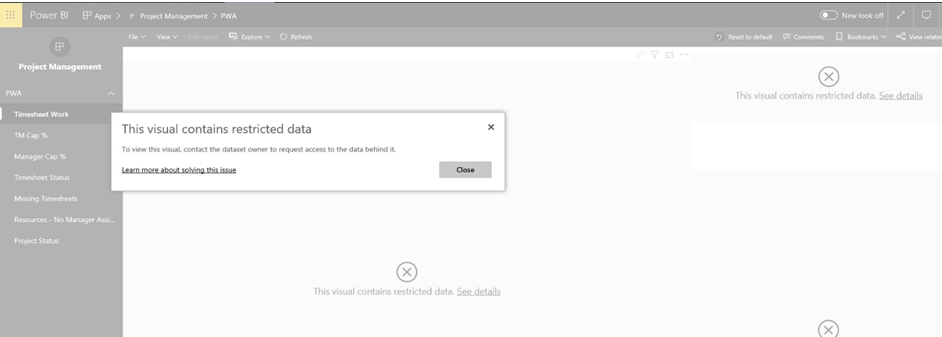
I published the report to the group of users and one of the user reported that he is getting below error while accessing the report on power BI service.
Can somebody please help?
Solved! Go to Solution.
Hi shivam04,
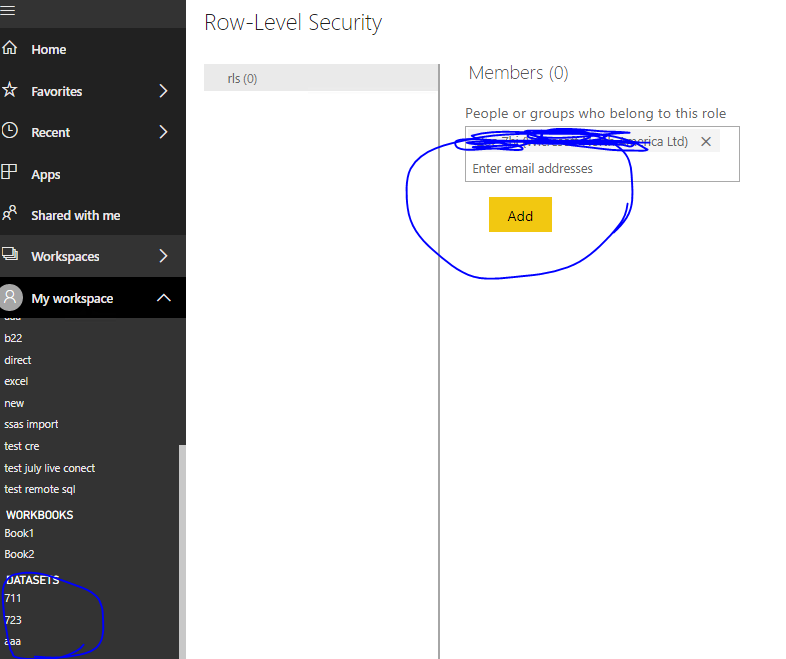
When you publish the report in powerbi service, did you set security for the role
You could try to add this user seperately in role to see whether it work or not
Best Regards,
Zoe Zhi
If this post helps, then please consider Accept it as the solution to help the other members find it more quickly.
Hi shivam04,
When you publish the report in powerbi service, did you set security for the role
You could try to add this user seperately in role to see whether it work or not
Best Regards,
Zoe Zhi
If this post helps, then please consider Accept it as the solution to help the other members find it more quickly.
Thanks Zoe. It worked.
The only confusion I have on my mind is that why do I have to create a new role for this specific user as there is no RLS in my model. It is just the measure which is using the login information of the user and deciding whether it shows the measure value in the report or not and I am not hiding any row but column.
The Power BI Data Visualization World Championships is back! Get ahead of the game and start preparing now!
Check out the November 2025 Power BI update to learn about new features.