cancel
Showing results for 
Search instead for 
Did you mean: 

The Power BI Data Visualization World Championships is back! Get ahead of the game and start preparing now! Learn more

Reply
Anonymous
Not applicable

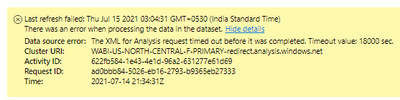
The XML for Analysis request timed out before it was completed. Timeout value: 18000 sec

Hi,


I am getting error while refreshing the dashboard on power bi service.

Data source is SQL and it is around 1.2 GB. 

How can I resolve this issue. Please help

shankarshiva70_0-1626329292428.png


Thanks.

1 ACCEPTED SOLUTION
Anonymous
Not applicable

Hi @Anonymous ,


As stated in this blog, refreshing the dataset will give an error message indicating you that your dataset is too large when data model size grows beyond 1 GB.(yours is around 1.2GB)


I would recommend you

1. Make sure your on-premise gateway is the lateset version.

2.Use Power BI Desktop to check the refresh duration.If it takes more than 2 hours, consider moving your dataset to Power BI Premium. Your dataset might not be refreshable on shared capacity. Also consider using Incremental refresh for datasets that are larger than 1GB or take several hours to refresh.

3. Set the Time out parameter on the connection. Try setting this to something larger than 3600, like 7200 for 2 hours or even 36000 for 10 hours. Default number if you put nothing = 10min

4. Break up your dataset into smaller datasets and refresh them in Power BI Service .


Refer to:

https://docs.microsoft.com/en-us/power-bi/connect-data/refresh-data#best-practices

https://docs.microsoft.com/en-us/power-bi/connect-data/refresh-troubleshooting-refresh-scenarios

https://community.powerbi.com/t5/Service/Timeout-value-in-powerbi-service/m-p/1570341

https://community.powerbi.com/t5/Service/data-refresh-timeout-works-sometimes-fails-others/m-p/1020774


Best Regards,
Eyelyn Qin
If this post helps, then please consider Accept it as the solution to help the other members find it more quickly.

View solution in original post

3 REPLIES 3
OlapOffice
Helper II
Helper II

The Premium limit I believe is 5 hours only. https://blog.crossjoin.co.uk/category/premium/


Anonymous
Not applicable

Hi @Anonymous ,


As stated in this blog, refreshing the dataset will give an error message indicating you that your dataset is too large when data model size grows beyond 1 GB.(yours is around 1.2GB)


I would recommend you

1. Make sure your on-premise gateway is the lateset version.

2.Use Power BI Desktop to check the refresh duration.If it takes more than 2 hours, consider moving your dataset to Power BI Premium. Your dataset might not be refreshable on shared capacity. Also consider using Incremental refresh for datasets that are larger than 1GB or take several hours to refresh.

3. Set the Time out parameter on the connection. Try setting this to something larger than 3600, like 7200 for 2 hours or even 36000 for 10 hours. Default number if you put nothing = 10min

4. Break up your dataset into smaller datasets and refresh them in Power BI Service .


Refer to:

https://docs.microsoft.com/en-us/power-bi/connect-data/refresh-data#best-practices

https://docs.microsoft.com/en-us/power-bi/connect-data/refresh-troubleshooting-refresh-scenarios

https://community.powerbi.com/t5/Service/Timeout-value-in-powerbi-service/m-p/1570341

https://community.powerbi.com/t5/Service/data-refresh-timeout-works-sometimes-fails-others/m-p/1020774


Best Regards,
Eyelyn Qin
If this post helps, then please consider Accept it as the solution to help the other members find it more quickly.

Ciao, il mio data set non si aggiorna, come devo fare per seguire questo suggerimento: 

 3. Impostare  il parametro Timeout sulla connessione. Prova a impostarlo su qualcosa di più grande di 3600, come 7200 per 2 ore o anche 36000 per 10 ore. 

Grazie in anticipo a chi mi può aiutare 

Denis

Helpful resources

Announcements
Power BI DataViz World Championships

Power BI Dataviz World Championships

The Power BI Data Visualization World Championships is back! Get ahead of the game and start preparing now!

December 2025 Power BI Update Carousel

Power BI Monthly Update - December 2025

Check out the December 2025 Power BI Holiday Recap!

FabCon Atlanta 2026 carousel

FabCon Atlanta 2026

Join us at FabCon Atlanta, March 16-20, for the ultimate Fabric, Power BI, AI and SQL community-led event. Save $200 with code FABCOMM.