Hello everyone!
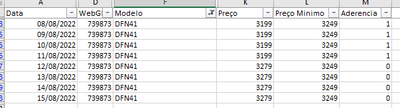
I tried a lot of different methods to get this sum done but could not succeed so far. I've tried summarize table, earlier function, calculate and so on.
The conditional format for the cell backgroud is defined by: if the price is lower than a minimum price, let it be orange. Simple as that.
Therefore, what I basically need is to have a calculated column that sums the number of orange cells every row. As the pictures says, I'd like to have the "OrangeDays" column counting how many cells are orange in each row.
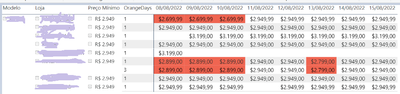
So, for example, the result for the first row should be OrangeDays = 3 and for the last two rows, OrangeDays should be 4.
Any ideas on how to solve this? I've tried a lot of different things but not being able to put a measure on the columns of a matrix is bugging me for real.
Thanks a lot in advance!
All the best,
Murilo