Fabric Data Days starts November 4th!
Advance your Data & AI career with 50 days of live learning, dataviz contests, hands-on challenges, study groups & certifications and more!
Get registered- Power BI forums
- Get Help with Power BI
- Desktop
- Service
- Report Server
- Power Query
- Mobile Apps
- Developer
- DAX Commands and Tips
- Custom Visuals Development Discussion
- Health and Life Sciences
- Power BI Spanish forums
- Translated Spanish Desktop
- Training and Consulting
- Instructor Led Training
- Dashboard in a Day for Women, by Women
- Galleries
- Data Stories Gallery
- Themes Gallery
- Contests Gallery
- Quick Measures Gallery
- Visual Calculations Gallery
- Notebook Gallery
- Translytical Task Flow Gallery
- TMDL Gallery
- R Script Showcase
- Webinars and Video Gallery
- Ideas
- Custom Visuals Ideas (read-only)
- Issues
- Issues
- Events
- Upcoming Events
Join us at FabCon Atlanta from March 16 - 20, 2026, for the ultimate Fabric, Power BI, AI and SQL community-led event. Save $200 with code FABCOMM. Register now.
- Power BI forums
- Forums
- Get Help with Power BI
- Service
- Re: Stagger scheduled updates on WEB csv data refr...
- Subscribe to RSS Feed
- Mark Topic as New
- Mark Topic as Read
- Float this Topic for Current User
- Bookmark
- Subscribe
- Printer Friendly Page


- Mark as New
- Bookmark
- Subscribe
- Mute
- Subscribe to RSS Feed
- Permalink
- Report Inappropriate Content
Stagger scheduled updates on WEB csv data refresh
I have a server that struggles with the way Power BI pulls data from it via a URL.
Let's say I have 5 separate data sources with 5 different URLs. All these data sources are in one dataset.
When I refresh all the data, Power BI starts to request an update from all 5 URLs simultaneously which freaks out the server.
If I manually refresh each data source individually, I don't get this issue.
Is there a way to set a staggered schedule update on this report in Power BI service so that it at least waits 10 seconds between each URL refresh? Perhaps some query parameter?
Thank you!


- Mark as New
- Bookmark
- Subscribe
- Mute
- Subscribe to RSS Feed
- Permalink
- Report Inappropriate Content
Hi there
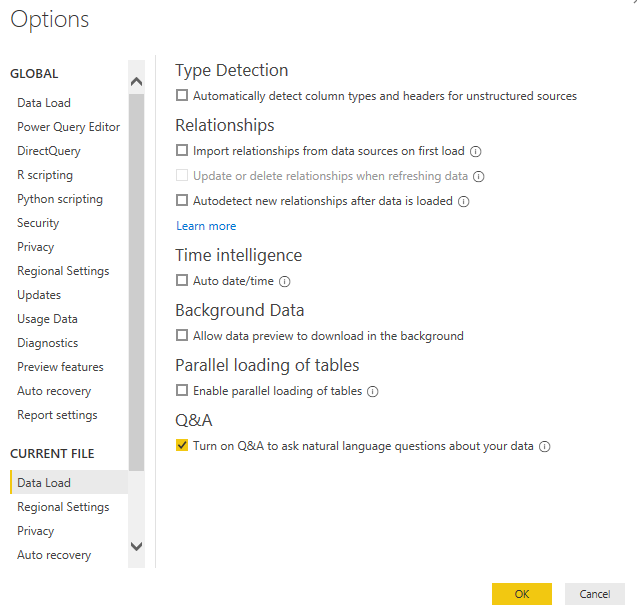
The easiest way to do this, is you could disable the parallel loading of tables in your PBIX.
If you go into Options and Settings, then click on Options.
Then under CURRENT FILE, then click on Data Load you can remove the tick from "Enable parallel loading of tables" as shown below.
- Mark as New
- Bookmark
- Subscribe
- Mute
- Subscribe to RSS Feed
- Permalink
- Report Inappropriate Content
Thanks!
This looks like it would be a great solution if it had a way to set a short delay.
From my observation, it looks like it doesn't download them all at once but it still "requests" them all at once.
So it's hitting the server with 2 requests for each data set. Once to check if the server is alive (all at once) and the link is valid, and the second time is to load the data (one by one).
Any other suggestions?
- Mark as New
- Bookmark
- Subscribe
- Mute
- Subscribe to RSS Feed
- Permalink
- Report Inappropriate Content
I do have a blog post, where you can change how long you want to wait between each call to a Web API
You could stagger each one if you know roughly how long they would take.
Here are the details below: https://www.fourmoo.com/2018/07/17/using-the-power-function-invokeafter-to-determine-how-long-to-wai...
- Mark as New
- Bookmark
- Subscribe
- Mute
- Subscribe to RSS Feed
- Permalink
- Report Inappropriate Content
Thanks but I feel like we are talking about two separate things here:
In the blog post you have, you are using a custom function to stagger the number of requests to the same API, in the same function, on the same table.
My situation is different. I have 5 queries that create 5 separate tables. Each query/table has a URL source, 5 total. How would you join all 5 queries in one and then enumerate through each with a delay? I don't even know where to start here. Not to mention that each of these URLs has authentication, different amounts of columns, and I would somehow have to connect them all in one function and then split them into 5 tables.
My issues isn't that I'm being limited by the API, the server hands over the entire csv file in one request. And completes the request in ~2 seconds.
During these 2 seconds, Power BI "spams" the server with 4 more requests (the other 4 URLs) which freaks out the server because it didn't even finish hading over the first but Power BI asks for another 4.
If there's a way to enumerate through my existing queries, without rewriting the query from scratch and just set a delay between each query, that would be ideal.
- Mark as New
- Bookmark
- Subscribe
- Mute
- Subscribe to RSS Feed
- Permalink
- Report Inappropriate Content
As far as I know you would need to re-write the queries for your use case.
- Mark as New
- Bookmark
- Subscribe
- Mute
- Subscribe to RSS Feed
- Permalink
- Report Inappropriate Content
GilbertQ,
Do you think I could go into each Query and just add a "Function.InvokeAfter" instead?
say:
Query 1: Function.InvokeAfter 10 seconds
Query 2: Function.InvokeAfter 20 seconds
Query 3: Function.InvokeAfter 30 seconds
Query 4: Function.InvokeAfter 40 seconds
Query 5: Function.InvokeAfter 50 seconds
If that would work, would this be the correct syntax?
Query 1 current:
let
    Source = Csv.Document(Web.Contents("httpsURL"),[Delimiter=",", Columns=5, Encoding=1252, QuoteStyle=QuoteStyle.None]),
    #"Promoted Headers" = Table.PromoteHeaders(Source, [PromoteAllScalars=true]),
in
    #"Promoted Headers"
Query 1 modified with Function.InvokeAfter
let
    Source = Function.InvokeAfter(Csv.Document(Web.Contents("httpsURL"),[Delimiter=",", Columns=5, Encoding=1252, QuoteStyle=QuoteStyle.None]),#duration(0,0,0,10)),
    #"Promoted Headers" = Table.PromoteHeaders(Source, [PromoteAllScalars=true]),
in
    #"Promoted Headers"
- Mark as New
- Bookmark
- Subscribe
- Mute
- Subscribe to RSS Feed
- Permalink
- Report Inappropriate Content

Helpful resources

FabCon Global Hackathon
Join the Fabric FabCon Global Hackathon—running virtually through Nov 3. Open to all skill levels. $10,000 in prizes!

Power BI Monthly Update - October 2025
Check out the October 2025 Power BI update to learn about new features.

FabCon Atlanta 2026
Join us at FabCon Atlanta, March 16-20, for the ultimate Fabric, Power BI, AI and SQL community-led event. Save $200 with code FABCOMM.


