
cancel
Showing results for 
Search instead for 
Did you mean: 

View all the Fabric Data Days sessions on demand. View schedule

Reply
PowerWhy
Helper IV
Helper IV

Sharing report from workspace versus sharing report via app

Hi All,


Please can you tell me the advantages/disadvantages for sharing a report from a workspace (using the highlighted share button below), versus publishing the report to an app and then sharing the app?


Thank you!


PW


screenshot share report from workspace.PNG

1 ACCEPTED SOLUTION

Hey @PowerWhy ,


If permissions are the main thing then I would strongly suggest doing the App method.  Actually, the users don't have anything more to deal with - the APPS link is on the left side already.


Did I answer your question? Mark my post as a solution!

Proud to be a Datanaut!
Private message me for consulting or training needs.


View solution in original post

3 REPLIES 3
PowerWhy
Helper IV
Helper IV

Thanks @collinq . We just want users to have read only access to the report. I recommended sharing via apps, but the organisation has historically shared the report from the workspace - so I need to be able to justify sharing by apps.


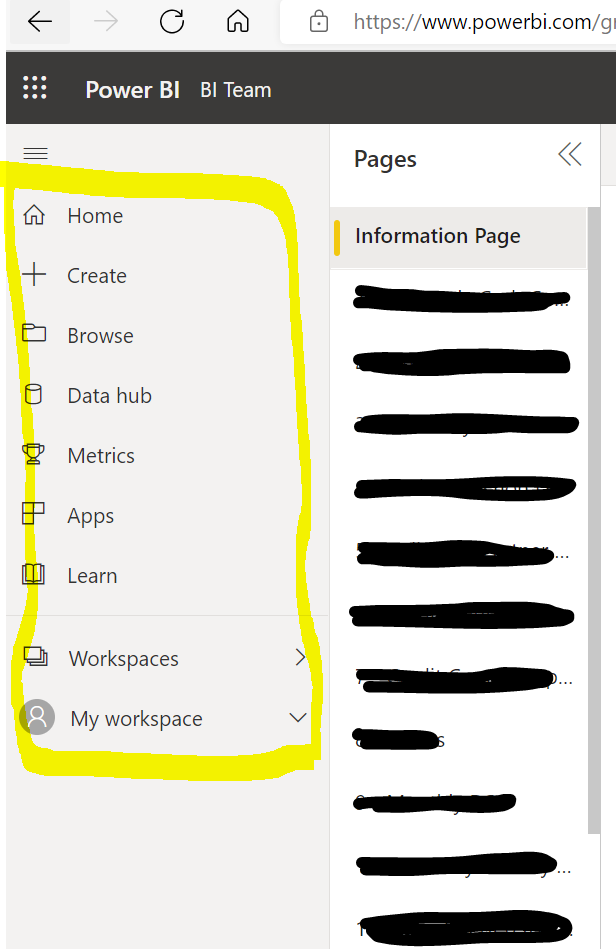
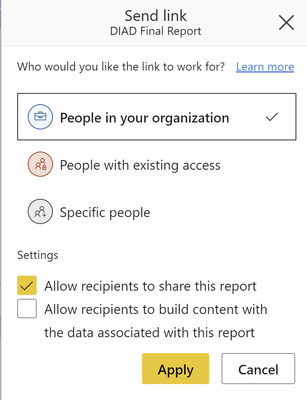
If the below settings are chosen from the report share button I think the only difference from the user's perspective is that they have to tolerate an additional toolbar on the left hand side (highlighted in yellow in the second screenshot)?


1105am.PNG


workspace report left toolbar.PNG


collinq
Super User
Super User

Hi @PowerWhy ,


The question really is:  What do you want user to do or, how much interaction do you want the user to have?  If you are giving the users full rights and want them to hit every single report within a workspace, then you share the workspace.  AND, you select the rights that you give them.  And, if you are trying to just share a report, then you can decide what permissions in the report itself:

collinq_0-1656448958805.png


In my mind, if you don't want users to do anything but review what you gave them, share the app, and don't select any check boxes:

collinq_1-1656449020788.png

By not selecting anything you are not giving them the ability to do anything other than view what you want them to.


So, basically, the "where" matters but the "what you give them" matters more.


Did I answer your question? Mark my post as a solution!

Proud to be a Datanaut!
Private message me for consulting or training needs.


Hey @PowerWhy ,


If permissions are the main thing then I would strongly suggest doing the App method.  Actually, the users don't have anything more to deal with - the APPS link is on the left side already.


Did I answer your question? Mark my post as a solution!

Proud to be a Datanaut!
Private message me for consulting or training needs.


Helpful resources

Announcements
November Power BI Update Carousel

Power BI Monthly Update - November 2025

Check out the November 2025 Power BI update to learn about new features.

Fabric Data Days Carousel

Fabric Data Days

Advance your Data & AI career with 50 days of live learning, contests, hands-on challenges, study groups & certifications and more!

FabCon Atlanta 2026 carousel

FabCon Atlanta 2026

Join us at FabCon Atlanta, March 16-20, for the ultimate Fabric, Power BI, AI and SQL community-led event. Save $200 with code FABCOMM.

Top Solution Authors