Join us at FabCon Atlanta from March 16 - 20, 2026, for the ultimate Fabric, Power BI, AI and SQL community-led event. Save $200 with code FABCOMM.
Register now!View all the Fabric Data Days sessions on demand. View schedule
Previously, i.e. January/February 2023, the external users when logged into their PBI account through app.powerbi.com saw a tab "from external organisations" next to "Recent", "Favorites" and "My Apps".
Now this is not the case.
I have got 3 external users who are registered as "guest" users in my tenant. They have PBI Pro licences.
How can I make the Direct Access work? What is the secret setting somewhere in the MS universe that allows for it?
They can see the report when I share the link, but I would like them to be able to use the workspaces and apps I created. There are several report within each workspace, so it's more practical then have links.
Thank you.
Jiri
P.S. I assigned them as Members to each of the workspaces for example. The other attempt was to give the direct access each report. But with no success.
Solved! Go to Solution.
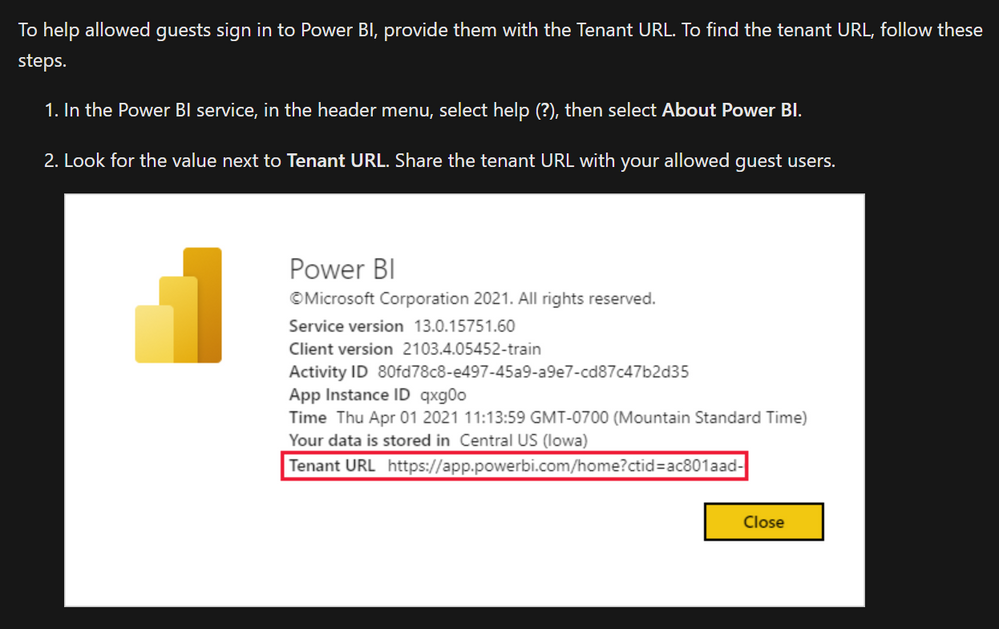
After going on on through the documentation online, I discovered this:
When providing the external users this link, they could get to the shared workspaces, apps etc.
Hours of my life I will never get back!
After going on on through the documentation online, I discovered this:
When providing the external users this link, they could get to the shared workspaces, apps etc.
Hours of my life I will never get back!
Check out the November 2025 Power BI update to learn about new features.
Advance your Data & AI career with 50 days of live learning, contests, hands-on challenges, study groups & certifications and more!