cancel
Showing results for 
Search instead for 
Did you mean: 

The Power BI Data Visualization World Championships is back! Get ahead of the game and start preparing now! Learn more

Reply
Anonymous
Not applicable

Selected User Account Does Not Exist in Tenant

Hi, 


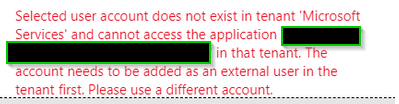
I tried to share an rapport with an external user. The email/user is registered as a guest user in the tenant but still get the message:

-What could be the reason for this???
-Does the external user account be a work account or should it work for personal account as well??

Coan7_1-1668151714809.png


1 ACCEPTED SOLUTION
v-easonf-msft
Community Support
Community Support

Hi, @Anonymous 

How did you invite guest users to your BI portal in Power BI? Planned Invites or Ad hoc Invites?

The guest user must sign in with their organization email address.

Please refer to below tutorials.

Distribute Power BI content to external guest users using Azure Active Directory B2B 

Distribute Power BI content to external guest users with Azure AD B2B 

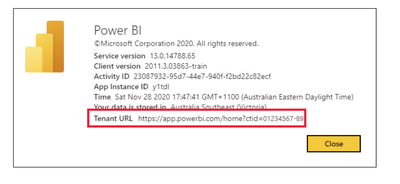
You can also provide them with your Tenant URL to help external users to log in to Power BI. To find the tenant URL, follow these steps.

  1. In the Power BI service, in the top menu, select help ( ? ) then About Power BI.

  2. Look for the value next to Tenant URL. This is the tenant URL you can share with your guest users.

veasonfmsft_1-1668391379972.png

Enabling external users to edit and manage content within Power BI 

Best Regards,
Community Support Team _ Eason

View solution in original post

1 REPLY 1
v-easonf-msft
Community Support
Community Support

Hi, @Anonymous 

How did you invite guest users to your BI portal in Power BI? Planned Invites or Ad hoc Invites?

The guest user must sign in with their organization email address.

Please refer to below tutorials.

Distribute Power BI content to external guest users using Azure Active Directory B2B 

Distribute Power BI content to external guest users with Azure AD B2B 

You can also provide them with your Tenant URL to help external users to log in to Power BI. To find the tenant URL, follow these steps.

  1. In the Power BI service, in the top menu, select help ( ? ) then About Power BI.

  2. Look for the value next to Tenant URL. This is the tenant URL you can share with your guest users.

veasonfmsft_1-1668391379972.png

Enabling external users to edit and manage content within Power BI 

Best Regards,
Community Support Team _ Eason

Helpful resources

Announcements
Power BI DataViz World Championships

Power BI Dataviz World Championships

The Power BI Data Visualization World Championships is back! Get ahead of the game and start preparing now!

December 2025 Power BI Update Carousel

Power BI Monthly Update - December 2025

Check out the December 2025 Power BI Holiday Recap!

FabCon Atlanta 2026 carousel

FabCon Atlanta 2026

Join us at FabCon Atlanta, March 16-20, for the ultimate Fabric, Power BI, AI and SQL community-led event. Save $200 with code FABCOMM.