Join us at FabCon Atlanta from March 16 - 20, 2026, for the ultimate Fabric, Power BI, AI and SQL community-led event. Save $200 with code FABCOMM.
Register now!Get Fabric Certified for FREE during Fabric Data Days. Don't miss your chance! Request now
Hello,
I have a report shared to external users who are log in as guests under our tenant. I want to share with them a report in which I dont want them to have access on the dataset as there are data I don't want them to see.
I carrently have them as viewers but when they upgrade their accounts to Pro or any other upgrade they can click on the See related option in the report and they can still see the dataset and access it which is entirely what I dont want them to do.
One way is to stop them upgrading their account via trial or purchase and get access to the dataset. Do you know any way I can do this? Assume in admin portal options? If not, can you please suggest any other way to restrict their access to the dataset?
Many thanks!
Solved! Go to Solution.
Hi, @Anonymous
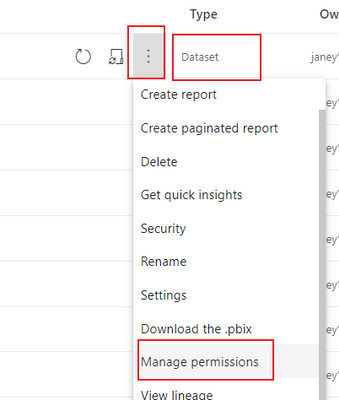
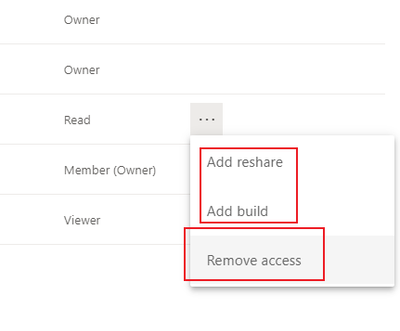
Yes, you can manually change the user's permissions to the dateset. For the situation you describe, it is recommended that you only retain the read permission for the guest user. You can check the following article for other permissions. Note: Please don't grant them member,contributor access in the workspace.
Reference:Build permission for shared datasets - Power BI | Microsoft Docs
Did I answer your question ? Please mark my reply as solution. Thank you very much.
If not, please feel free to ask me.
Best Regards
Janey Guo
Hi, @Anonymous
Yes, you can manually change the user's permissions to the dateset. For the situation you describe, it is recommended that you only retain the read permission for the guest user. You can check the following article for other permissions. Note: Please don't grant them member,contributor access in the workspace.
Reference:Build permission for shared datasets - Power BI | Microsoft Docs
Did I answer your question ? Please mark my reply as solution. Thank you very much.
If not, please feel free to ask me.
Best Regards
Janey Guo
Thanks Janey, This works fine!
Check out the November 2025 Power BI update to learn about new features.
Advance your Data & AI career with 50 days of live learning, contests, hands-on challenges, study groups & certifications and more!