
Forum Discussion
Renamed fields in Query Editor causes error in Reports
Hi there,
I've a a large number of reports running off a dataset connecting to directly to SQL Server. I've had to rename several fields to more useful names in the Query ediitor.
When I refresh these reports I get the following error below.
Is there a way of renaming fields so my reports will pick up these newly named fields dynamically?
- Anonymous7 years ago
Few ways to go about this. Since it's coming from sql I think it would be safe to assume that the order of the columns would be the same. Going with that idea:
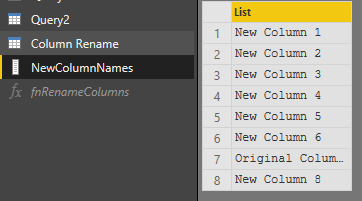
- Create a List of desired column names in the order of the current output from sql
- to translate that table into a list you can use:
= Table.ToList(Source)
- Then can add this function into a blank query:
(Source as table, Index as list, NewNames as list) => let #"Index of Old Columns" = List.Transform(Index, each Table.ColumnNames( Source ){_} ), ZippedList = List.Zip( {#"Index of Old Columns",NewNames}), #"Rename Columns" = Table.RenameColumns(Source, ZippedList) in #"Rename Columns"Then you can use that function in your table:
= fnRenameColumns(Source, {0..(List.Count(NewColumnNames)-1)},NewColumnNames)Could use a few more steps to get rid of that List.Count, but this works just fine.
Credit to Gil Raviv and his amazing book on Power Query!
2 Replies
- AnonymousNot applicable
Few ways to go about this. Since it's coming from sql I think it would be safe to assume that the order of the columns would be the same. Going with that idea:
- Create a List of desired column names in the order of the current output from sql
- to translate that table into a list you can use:
= Table.ToList(Source)
- Then can add this function into a blank query:
(Source as table, Index as list, NewNames as list) => let #"Index of Old Columns" = List.Transform(Index, each Table.ColumnNames( Source ){_} ), ZippedList = List.Zip( {#"Index of Old Columns",NewNames}), #"Rename Columns" = Table.RenameColumns(Source, ZippedList) in #"Rename Columns"Then you can use that function in your table:
= fnRenameColumns(Source, {0..(List.Count(NewColumnNames)-1)},NewColumnNames)Could use a few more steps to get rid of that List.Count, but this works just fine.
Credit to Gil Raviv and his amazing book on Power Query!
- v-piga-msft
Resident Rockstar
Hi Pateen ,
Have you solved your problem?
If you have solved, please always accept the replies making sense as solution to your question so that people who may have the same question can get the solution directly.
If you still need help, please feel free to ask.
Best Regards,
Cherry