cancel
Showing results for 
Search instead for 
Did you mean: 

Learn from the best! Meet the four finalists headed to the FINALS of the Power BI Dataviz World Championships! Register now

Reply
connork
Frequent Visitor

RLS Access All Dynamic List

New to RLS so bear with me:


I have a dashboard that includes RLS restricted by customer, and the reporting is working well; business owners can only see reporting on customers they are assigned..  However, there are also execs that should have access to the entire dataset.


As new customers are added, I want the execs' dataset to remain complete (with the new customer data) without having to go into the security table and adding another line customer to the relevant user ID.  


Is there a way to give users "all access" in a report with RLS enabled without manaully adding new customers to each user ID? 

1 ACCEPTED SOLUTION
v-caliao-msft
Microsoft Employee
Microsoft Employee

Hi @connork,


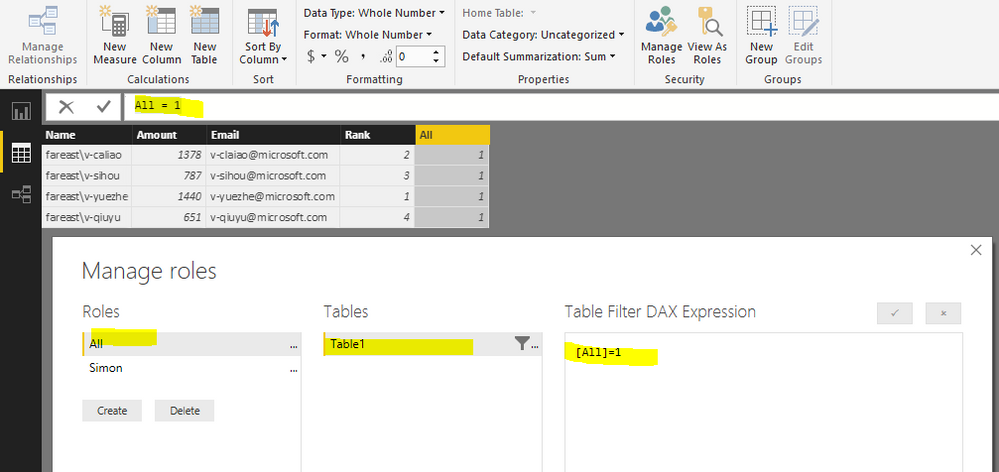
First, please create a calculated column to your table with the DAX below.
All = 1

Then create a new role: [All]=1
Capture.PNG


Then you can add users who can access all data to this role in Power BI Services.


Regards,

Charlie Liao

View solution in original post

1 REPLY 1
v-caliao-msft
Microsoft Employee
Microsoft Employee

Hi @connork,


First, please create a calculated column to your table with the DAX below.
All = 1

Then create a new role: [All]=1
Capture.PNG


Then you can add users who can access all data to this role in Power BI Services.


Regards,

Charlie Liao

Helpful resources

Announcements
Power BI DataViz World Championships carousel

Power BI DataViz World Championships - June 2026

A new Power BI DataViz World Championship is coming this June! Don't miss out on submitting your entry.

Join our Fabric User Panel

Join our Fabric User Panel

Share feedback directly with Fabric product managers, participate in targeted research studies and influence the Fabric roadmap.

March Power BI Update Carousel

Power BI Community Update - March 2026

Check out the March 2026 Power BI update to learn about new features.

Top Kudoed Authors