cancel
Showing results for 
Search instead for 
Did you mean: 

The Power BI Data Visualization World Championships is back! Get ahead of the game and start preparing now! Learn more

Reply
BigKev
Helper III
Helper III

Power BI does not update Sharepoint list Online after column name change in Sharepoint List Online

Hi All,


I have encountered a weird issue today. 


So I have a source connection from Power BI to Sharepoint List Online. Everything works perfectly, and data is being refreshed on scheduled as well.


Today, the SharePoint owner decides to change some column name. After the changes been saved, my power BI seems like stop pulling data from that SharePoint List. The new column name also does not flow to Power BI (no error), regardless of how many time I hit the refresh button.


It looks like a similar issue has been posted in 2018 in here: https://community.powerbi.com/t5/Service/Sharepoint-list-columns-do-not-update/m-p/353533 


However, no solution is given yet. Has anyone found the solution to this?


Pleaes help.


Cheers,

Kev

1 ACCEPTED SOLUTION
v-deddai1-msft
Community Support
Community Support

Hi @BigKev ,


Would you please try to download the pbix file and refresh it in power bi desktop. Republish it to the power bi service.


Did on demand refresh for the dataset work well? As far as I know, if you rename the column in the data source that is used in the report, it will result in   The xxx column does not exist in the rowset error. The workaround is  refresh the dataset in power bi desktop and republish it to the power bi service.


If this post helps, then please consider Accept it as the solution to help the other members find it more quickly.


Best Regards,

Dedmon Dai

View solution in original post

4 REPLIES 4
v-deddai1-msft
Community Support
Community Support

Hi @BigKev ,


Would you please try to download the pbix file and refresh it in power bi desktop. Republish it to the power bi service.


Did on demand refresh for the dataset work well? As far as I know, if you rename the column in the data source that is used in the report, it will result in   The xxx column does not exist in the rowset error. The workaround is  refresh the dataset in power bi desktop and republish it to the power bi service.


If this post helps, then please consider Accept it as the solution to help the other members find it more quickly.


Best Regards,

Dedmon Dai

I also tried it but still does not work at all.

This is a M$ bug. They need to fix it. Has it been reported?

nandukrishnavs
Community Champion
Community Champion

@BigKev 


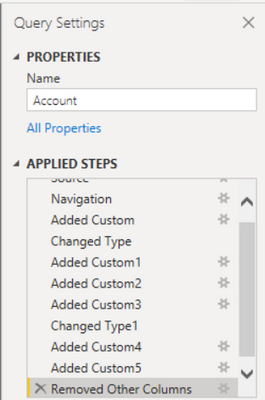
Open Power BI Edit Query window. Select the steps one by one and refresh the query. 

nandukrishnavs_0-1624944618004.png

Also, make sure, you are not removing the required columns.


If this is not working then try to connect the data using OData feed.

input will be <site URL>/vti_bin/listdata.svc


Regards,
Nandu Krishna

Did I answer your question? Mark my post as a solution!
Appreciate with a kudos 👍

Proud to be a Super User!


Regards,
Nandu Krishna

Helpful resources

Announcements
Power BI DataViz World Championships

Power BI Dataviz World Championships

The Power BI Data Visualization World Championships is back! Get ahead of the game and start preparing now!

December 2025 Power BI Update Carousel

Power BI Monthly Update - December 2025

Check out the December 2025 Power BI Holiday Recap!

FabCon Atlanta 2026 carousel

FabCon Atlanta 2026

Join us at FabCon Atlanta, March 16-20, for the ultimate Fabric, Power BI, AI and SQL community-led event. Save $200 with code FABCOMM.