cancel
Showing results for 
Search instead for 
Did you mean: 

Get Fabric Certified for FREE during Fabric Data Days. Don't miss your chance! Request now

Reply
VijayP
Super User
Super User

Power BI Embedded

Hi Friends


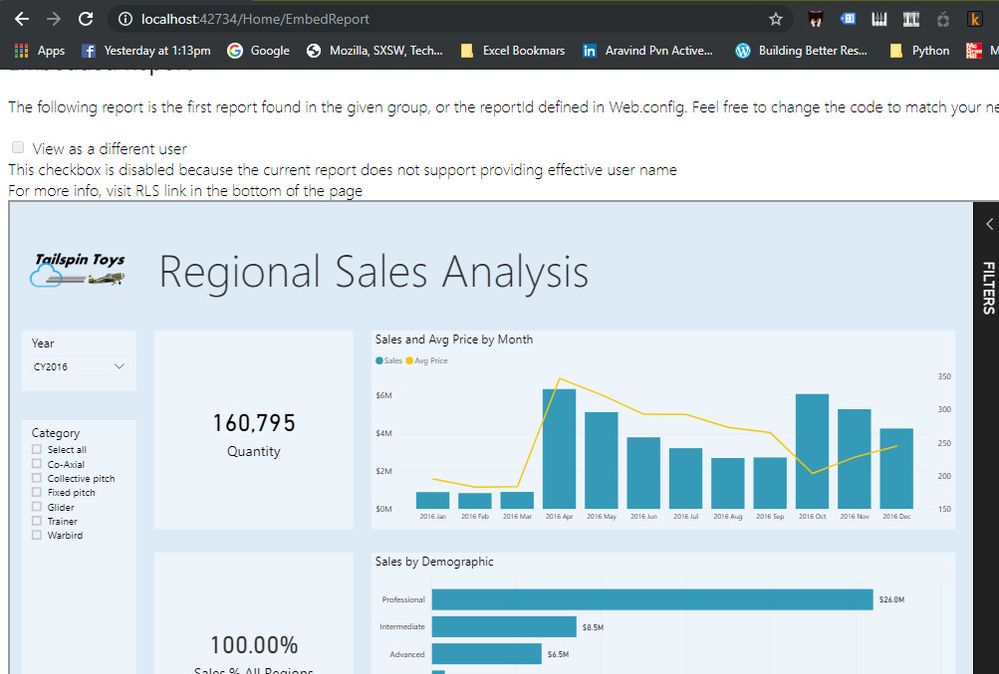
Once We have created Embedded Report after making changes to web.config, how to add to the client application the same.

Do we require a premium license and what is the workflow.

IN other words what are the next steps from below Window. Read fe

snap.jpg


Did I answer your question? Mark my post as a solution! Appreciate your Kudos!!
MY Blog || My YouTube Channel || Connect with me on Linkedin || My Latest Data Story - Ageing Analysis

Proud to be a Super User!


1 ACCEPTED SOLUTION
Jayendran
Solution Sage
Solution Sage

Hi @VijayP .


The Sample Code is just for the demo to understand how to embed the PBI Report, once you understand the concpet, you can either enhance your current code as per the client requirements and push it to the client Production website or you can implement the same using PBI JS and embeed token concept to your already existing client website.


You don't need to purchase a Pro license to embed your pbi report, you can use the Service Principal method to embed report which don't need a Pro license, 


For the Production workload you should consider for the Premium capacities . 


As per the microsoft docs


Spoiler
Embed tokens with PRO license are intended for development testing, so a Power BI master account or service principal can only generate a limited number of tokens. Purchase a capacity for embedding in a production environment. There's no limit to how many embed tokens you can generate when you purchase a capacity. Go to Available Features to check the usage value that indicates the current embedded usage in percentage

Refer the PBI Embedded FAQ which will give you all the insights in detail 

View solution in original post

1 REPLY 1
Jayendran
Solution Sage
Solution Sage

Hi @VijayP .


The Sample Code is just for the demo to understand how to embed the PBI Report, once you understand the concpet, you can either enhance your current code as per the client requirements and push it to the client Production website or you can implement the same using PBI JS and embeed token concept to your already existing client website.


You don't need to purchase a Pro license to embed your pbi report, you can use the Service Principal method to embed report which don't need a Pro license, 


For the Production workload you should consider for the Premium capacities . 


As per the microsoft docs


Spoiler
Embed tokens with PRO license are intended for development testing, so a Power BI master account or service principal can only generate a limited number of tokens. Purchase a capacity for embedding in a production environment. There's no limit to how many embed tokens you can generate when you purchase a capacity. Go to Available Features to check the usage value that indicates the current embedded usage in percentage

Refer the PBI Embedded FAQ which will give you all the insights in detail 

Helpful resources

Announcements
Fabric Data Days Carousel

Fabric Data Days

Advance your Data & AI career with 50 days of live learning, contests, hands-on challenges, study groups & certifications and more!

October Power BI Update Carousel

Power BI Monthly Update - October 2025

Check out the October 2025 Power BI update to learn about new features.

FabCon Atlanta 2026 carousel

FabCon Atlanta 2026

Join us at FabCon Atlanta, March 16-20, for the ultimate Fabric, Power BI, AI and SQL community-led event. Save $200 with code FABCOMM.

Top Kudoed Authors