FabCon is coming to Atlanta
Join us at FabCon Atlanta from March 16 - 20, 2026, for the ultimate Fabric, Power BI, AI and SQL community-led event. Save $200 with code FABCOMM.
Register now!- Power BI forums
- Get Help with Power BI
- Desktop
- Service
- Report Server
- Power Query
- Mobile Apps
- Developer
- DAX Commands and Tips
- Custom Visuals Development Discussion
- Health and Life Sciences
- Power BI Spanish forums
- Translated Spanish Desktop
- Training and Consulting
- Instructor Led Training
- Dashboard in a Day for Women, by Women
- Galleries
- Data Stories Gallery
- Themes Gallery
- Contests Gallery
- QuickViz Gallery
- Quick Measures Gallery
- Visual Calculations Gallery
- Notebook Gallery
- Translytical Task Flow Gallery
- TMDL Gallery
- R Script Showcase
- Webinars and Video Gallery
- Ideas
- Custom Visuals Ideas (read-only)
- Issues
- Issues
- Events
- Upcoming Events
The Power BI Data Visualization World Championships is back! Get ahead of the game and start preparing now! Learn more
- Power BI forums
- Forums
- Get Help with Power BI
- Service
- Re: On-Premise Gateway Issues
- Subscribe to RSS Feed
- Mark Topic as New
- Mark Topic as Read
- Float this Topic for Current User
- Bookmark
- Subscribe
- Printer Friendly Page


- Mark as New
- Bookmark
- Subscribe
- Mute
- Subscribe to RSS Feed
- Permalink
- Report Inappropriate Content
On-Premise Gateway Issues
Hi,
Have decided to deploy Power BI and On-Premise Gateway. Have researched them both.
Downloaded the gateway and installed. Created a free account online. The gateway and data source are configured, but nothing ever uploads. I have a few questions:
- I'm pulling data from SQL Express. Can I use SQL Express as the source of my data?
- I'm using a free online Power BI account. I understand I can use this with the On-Premise Gateway?
- The gateway's diagnostic Network Ports Test clearly states: "Note: If one or more tests failed, contact your network administrator to open the ports for the required servers.". With the exception of two servers the test works fine, but my interpretation of the above statement from Microsoft means that a failure is a failure. The two tests that fail are in a different subnet to the ones that work. They are the last two shown here:
g30-prod-am3-007-sb.servicebus.windows.net 52.174.145.97 Success
g31-prod-am3-007-sb.servicebus.windows.net 52.174.144.205 Success
g34-prod-am3-007-sb.servicebus.windows.net 40.91.213.8 FAILED
g38-prod-am3-007-sb.servicebus.windows.net 40.91.212.84 FAILED
Breaking this some more:
Server Name: g30-prod-am3-007-sb.servicebus.windows.net IP Address: 52.174.145.97
Port 443 : Open
Port 5671 : Open
Port 5672 : Open
Port 9350 : Open
Port 9351 : Open
Port 9352 : Open
Port 9353 : Open
Port 9354 : Open
Server Name: g31-prod-am3-007-sb.servicebus.windows.net IP Address: 52.174.144.205
Port 443 : Open
Port 5671 : Open
Port 5672 : Open
Port 9350 : Open
Port 9351 : Open
Port 9352 : Open
Port 9353 : Open
Port 9354 : Open
Server Name: g34-prod-am3-007-sb.servicebus.windows.net IP Address: 40.91.213.8
Port 443 : Open
Port 5671 : Closed
Port 5672 : Closed
Port 9350 : Closed
Port 9351 : Closed
Port 9352 : Closed
Port 9353 : Closed
Port 9354 : Closed
Server Name: g38-prod-am3-007-sb.servicebus.windows.net IP Address: 40.91.212.84
Port 443 : Open
Port 5671 : Closed
Port 5672 : Closed
Port 9350 : Closed
Port 9351 : Closed
Port 9352 : Closed
Port 9353 : Closed
Port 9354 : Closed
I have checked firewalls and anti-virus. What's interesting is that if I test the ports above from a source external to where I am working, the ports are listed as being blocked.
Can anybody help me? Power BI and the On-Premise Gateway offered great prospects. As of yet, I have not managed to the solution working.
David
Solved! Go to Solution.
- Mark as New
- Bookmark
- Subscribe
- Mute
- Subscribe to RSS Feed
- Permalink
- Report Inappropriate Content
Looks like we got this sorted. We'd followed some instructional videos on YouTube but they don't make the process clear.
We had created the Gateway and Data Source. What was not apparent is that this would not create the dataset. We expected from what had been demonstrated in the videos that it would.
Instead the report creator needs to open Power BI Desktop and connect (on-site or remotely using VPN) to the SQL server. They then create the report. When done they publish it to the Power BI service online. When this is done the report is available via the Power BI service online. The dataset is also created. It is important to alter the dataset at this point to select the gateway that is used to refresh it. Once we had done this we not only had the dataset but we were able to refresh the data.
Thanks all for your input.


- Mark as New
- Bookmark
- Subscribe
- Mute
- Subscribe to RSS Feed
- Permalink
- Report Inappropriate Content
If that does then you know it has to do with additional ports that will be required to be opened.
- Mark as New
- Bookmark
- Subscribe
- Mute
- Subscribe to RSS Feed
- Permalink
- Report Inappropriate Content
Hi GilbertQ,
Thanks for your message. We had tried this too, but still no luck.
Regards!
- Mark as New
- Bookmark
- Subscribe
- Mute
- Subscribe to RSS Feed
- Permalink
- Report Inappropriate Content
If HTTPS does not work then it is possible that the server is locked down to specific websites.
- Mark as New
- Bookmark
- Subscribe
- Mute
- Subscribe to RSS Feed
- Permalink
- Report Inappropriate Content
Hi GilbertQ
The server configuration is very basic. There is no high-level security implemented that would restrict the server in this way. It is a real mystery.
Regards
- Mark as New
- Bookmark
- Subscribe
- Mute
- Subscribe to RSS Feed
- Permalink
- Report Inappropriate Content
I think that possibly the server is fine but there is a firewall preventing it from working.
You could test it by installing it on your own PC and see if that works?
If that does then ask your IT Admin to have a look at it for you?
- Mark as New
- Bookmark
- Subscribe
- Mute
- Subscribe to RSS Feed
- Permalink
- Report Inappropriate Content
Hi GilbertQ
Thanks for your persistence with the issue. We thought the same thing. Even even tried testing the gateway from a different site and we still couldn't get it to work.
David


- Mark as New
- Bookmark
- Subscribe
- Mute
- Subscribe to RSS Feed
- Permalink
- Report Inappropriate Content
Hi @OLoughanD,
Creating a support ticket could help you with a further analysis.
Regards,
Yuliana Gu
If this post helps, then please consider Accept it as the solution to help the other members find it more quickly.
- Mark as New
- Bookmark
- Subscribe
- Mute
- Subscribe to RSS Feed
- Permalink
- Report Inappropriate Content
Hi Yuliana,
I'll do that. Thank you.
David
- Mark as New
- Bookmark
- Subscribe
- Mute
- Subscribe to RSS Feed
- Permalink
- Report Inappropriate Content
Looks like we got this sorted. We'd followed some instructional videos on YouTube but they don't make the process clear.
We had created the Gateway and Data Source. What was not apparent is that this would not create the dataset. We expected from what had been demonstrated in the videos that it would.
Instead the report creator needs to open Power BI Desktop and connect (on-site or remotely using VPN) to the SQL server. They then create the report. When done they publish it to the Power BI service online. When this is done the report is available via the Power BI service online. The dataset is also created. It is important to alter the dataset at this point to select the gateway that is used to refresh it. Once we had done this we not only had the dataset but we were able to refresh the data.
Thanks all for your input.
- Mark as New
- Bookmark
- Subscribe
- Mute
- Subscribe to RSS Feed
- Permalink
- Report Inappropriate Content
Iam having the similar network port failed issue
g34-prod-by3-007-sb.servicebus.windows.net 40.78.58.134 FAILED
g40-prod-by3-007-sb.servicebus.windows.net 23.99.83.111 FAILED
g43-prod-by3-007-sb.servicebus.windows.net 138.91.250.253 FAILED
May I know what is the solution.
- Mark as New
- Bookmark
- Subscribe
- Mute
- Subscribe to RSS Feed
- Permalink
- Report Inappropriate Content
Hi,
I don't think we ever solved the issue. Turned out to be a bit of red herring.
We had been working on the basis of a video we had watched. During the course of trying to diagnose why we couldn't get the service working we encountered the network ports issue. We figured this had something to do with the problem. I don't believe it did have any bearing. In fact we managed to get the diagnostic to success and fail, depending on when we ran it and without any network configuation changes.
We had expected to see some DataSet item in the PowerBI online console and we had expected that we would have to connect our reports to it. The service doesn't work that way.
What we did:
1. Create the PowerBI account online
2. Install the PowerBI gateway (we put it on a server where we also installed Power BI desktop)
3. Create a report.
4. Save it and click Publish.
5. The report now appears on the online PowerBI account where it can be shared.
Hope this helps. Don't put much faith in the network ports being the source of your problems.
- Mark as New
- Bookmark
- Subscribe
- Mute
- Subscribe to RSS Feed
- Permalink
- Report Inappropriate Content
Thanks @GilbertQ and @OLoughanD
Microsoft is coming up with the new version with the fix for this timeout issue. Hopefully this should work.
- Mark as New
- Bookmark
- Subscribe
- Mute
- Subscribe to RSS Feed
- Permalink
- Report Inappropriate Content
- Mark as New
- Bookmark
- Subscribe
- Mute
- Subscribe to RSS Feed
- Permalink
- Report Inappropriate Content
Could try and change the setting to use HTTPS and see if that works?
If that does work it would indicate to me that your firewall is blocking the access.
- Mark as New
- Bookmark
- Subscribe
- Mute
- Subscribe to RSS Feed
- Permalink
- Report Inappropriate Content
Thanks for the reply.
I have already tried this HTTPS mode and also had double checked with my Infra team and there is no blockage from our network firewall. Iam surprised to see this happening even in my personal laptop, which does not connect to any network except internet.
- Mark as New
- Bookmark
- Subscribe
- Mute
- Subscribe to RSS Feed
- Permalink
- Report Inappropriate Content
Possibly anti virus or something similar that is stopping the ports from being accessed?
- Mark as New
- Bookmark
- Subscribe
- Mute
- Subscribe to RSS Feed
- Permalink
- Report Inappropriate Content
- Mark as New
- Bookmark
- Subscribe
- Mute
- Subscribe to RSS Feed
- Permalink
- Report Inappropriate Content
Hi @OLoughanD,
It looks like the connection is blocked by firewall. You can confirm this problem by by running Test-NetConnection from a PowerShell prompt. If that is the case, you may need to whitelist (unblock) the IP addresses, for your data region, in your firewall.
Best regards,
Yuliana Gu
If this post helps, then please consider Accept it as the solution to help the other members find it more quickly.
- Mark as New
- Bookmark
- Subscribe
- Mute
- Subscribe to RSS Feed
- Permalink
- Report Inappropriate Content
Hi Yuliana,
Thanks for your message. We don't think it is anything to do with firewalling. We disabled various functionality to check and the result stayed the same. We also re-ran the Network Ports test and we have had it work perfectly during some tests. Yet at other times it does not work. It is always the same last two servers that fail. This kind of behaviour does not indicate the firewall is the issue.
Regards!
- Mark as New
- Bookmark
- Subscribe
- Mute
- Subscribe to RSS Feed
- Permalink
- Report Inappropriate Content
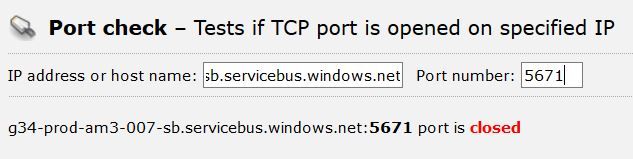
Some of the issues I have been experiencing appear not to be local. I did some additional testing lastnight and the Network Ports Test succeeded whereas it had failed persistently before. I tested this again this morning and the same test now fails again.
If I check the listed server port from an off-site source, I find the port on the Microsoft server is listed as closed:

Helpful resources

Power BI Dataviz World Championships
The Power BI Data Visualization World Championships is back! Get ahead of the game and start preparing now!

Power BI Monthly Update - December 2025
Check out the December 2025 Power BI Holiday Recap!

FabCon Atlanta 2026
Join us at FabCon Atlanta, March 16-20, for the ultimate Fabric, Power BI, AI and SQL community-led event. Save $200 with code FABCOMM.


| User | Count |
|---|---|
| 58 | |
| 56 | |
| 35 | |
| 18 | |
| 14 |


