Don't miss your chance to take exam DP-600 or DP-700 on us!
Request nowLearn from the best! Meet the four finalists headed to the FINALS of the Power BI Dataviz World Championships! Register now
So, I restored a dataflow from backup json file, all reference was adjusted properly. Once the dataflow is refreshed, I get the following error:
Error: On-Prem execution not supported for entity '08f9414f-cd72-40ce-97ac-941e33aa3b6c/aa0ae873-debb-4d09-8e5e-947b5df059d4/SORel-not-closed-Skem' since it refers to another entity.. RootActivityId = c556921e-e79a-416b-9a08-2335222041d3.Param1 = 08f9414f-cd72-40ce-97ac-941e33aa3b6c/aa0ae873-debb-4d09-8e5e-947b5df059d4/SORel-not-closed-Skem Request ID: 0b668ca6-5916-2036-1bb2-9c94999d63cd.
I went into setting to turn off On-prime gateway for specific dataflow (which is not supposed to be turning on when restoring the dataflow because the dataflow was directly refer to the source via Power BI dataflow mode.) Howver, there is not possible an option to turn off the On-prime gateway as the slider button is turned on and disabled.
Solved! Go to Solution.
I found the work around solution for this issue.
1- Check the gateway of that dataflow in setting. If it is set to be using gateway and the option was lock, then
2- Edit the dataflow; add any entity from other dataflow using Power BI dataflow connector.
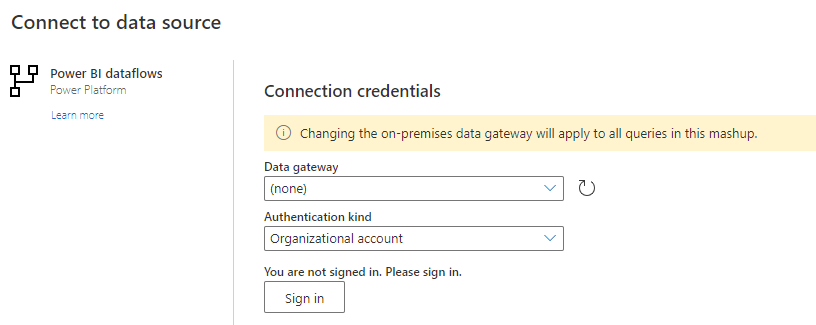
3- When asked to change to Power BI dataflow... mode, accept and go on
4- When done adding, you can delete the entity. Save then refresh. This should work and permanent change back to non-gateway mode.
Hi, there is any possibility that you attach images of the process, because is not asking for change mode...!
Many thanks
I found the work around solution for this issue.
1- Check the gateway of that dataflow in setting. If it is set to be using gateway and the option was lock, then
2- Edit the dataflow; add any entity from other dataflow using Power BI dataflow connector.
3- When asked to change to Power BI dataflow... mode, accept and go on
4- When done adding, you can delete the entity. Save then refresh. This should work and permanent change back to non-gateway mode.
Can you please share some Screenshot to follow u the steps?
Hi @rdnguyen ,
i'm trying to edit the dataflow but when i edit it, is not appearing the message to change the mode.
What should i see (if would be nice if you can attach a image) ?
Thanks a lot
Hi @rdnguyen
As far as I know it is not supported to restore and change the dataflow files?
This would appear to be the case that there is some other dependancy in the Power BI Service which is causing it to fail?
Share feedback directly with Fabric product managers, participate in targeted research studies and influence the Fabric roadmap.
Check out the February 2026 Power BI update to learn about new features.