cancel
Showing results for 
Search instead for 
Did you mean: 

The Power BI Data Visualization World Championships is back! Get ahead of the game and start preparing now! Learn more

Reply
iversa
Helper I
Helper I

Not being able to print reports

The absolute most frustrating part about PowerBI is that we can't print reports. When searching I see that I'm not alone!! Please, Microsoft PowerBI team are you listing to users or simply ignoring us? If you have no intentions to add the print functionality please state so. Then we at least I can move on 

5 REPLIES 5
v-yuta-msft
Community Support
Community Support

Hi iversa,


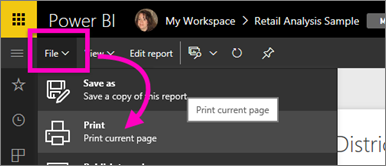
Power bi service support printing reports now though the reports can be printed one page at a time. Please follow steps below:

  • Open the report in either Reading View or Editing View.
  • Select File > Print to print the current report page.

         power-bi-print.png 

  • The Print window for your browser opens.

If you want to just print a visual in your report, follow two steps:

  • Open the visual in Focus mode by hovering over the tile and selecting the Focus icon Focus icon from the top-right corner.
  • Follow steps 2-3 under Print a report page above.


Regards,

Jimmy Tao

Thank you for your response Jimmy but that is not what I call printing a report. That is like taking a screenshot plus I have to then manually scroll to where I think the next page starts. My report would be 10 pages if I had a way to print it


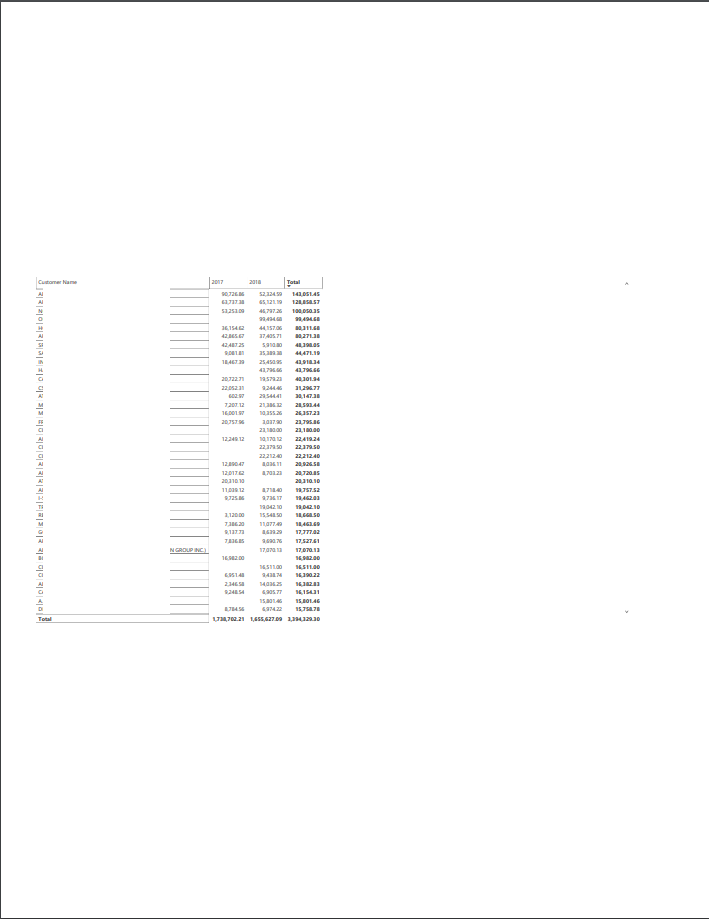
Plus this is what it looks like when I print a page on an 8.5 x 11. Please don't tell me that this is printing a report. I can do much better by using taking a screenshot


Please Jimmy don't tell me that this is is how I would print a 10-page report. Your response makes it even more frustrating


print report in powerbi.png


It would help too if the data could be exported to Excel and print from there. It has the option to Analyze the data in Excel but that does not return the data they way I see it in the report that I created in PowerBI

Hi iversa,


Yes, you can export underly data to exel file from a visual in power bi service, please refer to: https://docs.microsoft.com/en-us/power-bi/consumer/end-user-export-data.


Regards,

Jimmy Tao

It does not export the data in the way as I have in my report

Helpful resources

Announcements
Power BI DataViz World Championships

Power BI Dataviz World Championships

The Power BI Data Visualization World Championships is back! Get ahead of the game and start preparing now!

December 2025 Power BI Update Carousel

Power BI Monthly Update - December 2025

Check out the December 2025 Power BI Holiday Recap!

FabCon Atlanta 2026 carousel

FabCon Atlanta 2026

Join us at FabCon Atlanta, March 16-20, for the ultimate Fabric, Power BI, AI and SQL community-led event. Save $200 with code FABCOMM.