cancel
Showing results for 
Search instead for 
Did you mean: 

Get Fabric Certified for FREE during Fabric Data Days. Don't miss your chance! Request now

Reply
Anonymous
Not applicable

No data in Power BI Premium capacity metrics app

Hi,


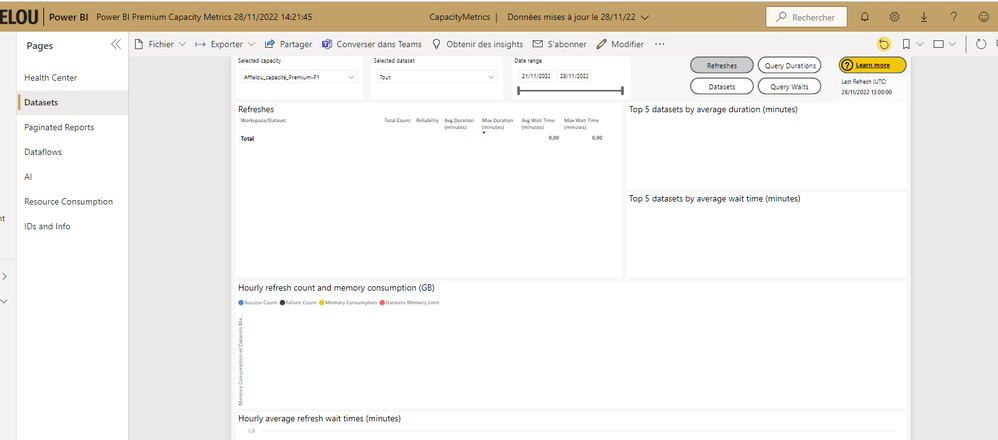
I just installed the Power BI Premium capacity metrics application, after connected with my account (power bi administrator) and the refresh of dataset. No data shows in the application. 

I tried reinstallation, got the same problem. The server power bi is always running so there is no reason that I got no data in the report..


Does anyone have any information about my problem?


Appreciate your helps,


Yours, Power BI prem no data.png

Chen


1 ACCEPTED SOLUTION
Anonymous
Not applicable

The data has been updated and now appears in the report. Nothing has been done on my side.

View solution in original post

3 REPLIES 3
Anonymous
Not applicable

The data has been updated and now appears in the report. Nothing has been done on my side.

djurecicK2
Super User
Super User

Hi @Anonymous ,

 This might be a dumb question, but has the selected dataset been refreshed during the time period selected?

Anonymous
Not applicable

Hi @djurecicK2 , thanks for your reply, but... I'm sure it was the right period selected.

Helpful resources

Announcements
November Power BI Update Carousel

Power BI Monthly Update - November 2025

Check out the November 2025 Power BI update to learn about new features.

Fabric Data Days Carousel

Fabric Data Days

Advance your Data & AI career with 50 days of live learning, contests, hands-on challenges, study groups & certifications and more!

FabCon Atlanta 2026 carousel

FabCon Atlanta 2026

Join us at FabCon Atlanta, March 16-20, for the ultimate Fabric, Power BI, AI and SQL community-led event. Save $200 with code FABCOMM.

Top Solution Authors